Powered By

Powered by Blogger

Tampilkan postingan dengan label banshee. Tampilkan semua postingan

Kamis, 13 Januari 2011

Banshee Is Not Replacing Rhythmbox In Linux Mint 11

Banshee

Clement Lefebvre, the Linux Mint founder, recently talked to Muktware about Banshee - which has replaced Rhythmbox in the recent Ubuntu 11.04 development builds -, and Mono. Banshee is an amazing application but it uses Mono which many consider risky because Microsoft could one day assert its patents against all the free applications that use Mono.

While Clement says he doesn't consider Mono a thread, it looks like Rhythmbox will stay as default in Linux Mint:

Rhythmbox is our default player and we're quite happy with it. If Ubuntu switches to Banshee, we'll of course give it a close look and assess whether the migration is a good move for us too, but as it is now there isn't any plan to change anything.

As you probably already know by now, Linux Mint will not switch to Unity either, keeping the old "classic" GNOME as default.

Jumat, 07 Januari 2011

Ubuntu 11.04 Updates: Banshee Default, New Grub Background, AppMenu Changes [Screenshots & Video]


An update today finally sets Banshee as the default music player in Ubuntu 11.04 Natty Narwhal. Since Banshee is now default, it has replaced Rhythmbox in the Ubuntu Sound Menu:

Banshee sound menu Ubuntu 11.04


Another change that came today is a new background color for the Ubuntu 11.04 Natty Narwhal GRUB menu - and it's aubergine to match the new Ubuntu branding:

Ubuntu 11.04 grub menu aubergine


There have also been a lot of changes to the AppMenu (global menu) recently (I'm not really sure when this update occured):


Appmenu Ubuntu 11.04
(unmaximized, focused window)

Natty appmenu
(unmaximized, focused window - hovering the application name on the top panel displays the menu)

  • the menu is hidden in the application window even for unmaximized windows
  • only the application title is displayed on the top panel and the menu shows up when hovering it
  • when an application is not maximized but has the focus, when hovering its title on the top panel, only part of its title is displayed so you know to which application that menu belongs to (yet its title doesn't get in the way)


Since this is pretty hard to explain, I've recorded a video with the latest Ubuntu 11.04 Natty Narwhal daily build as of today (and all updates installed):


While these Appmenu changes seem a bit weird at first, they make sense from the usability point of view. What do you think?

Jumat, 29 Oktober 2010

News On The Default Applications In Ubuntu 11.04 Natty Narwhal [Updated]

Today is the last UDS-N day and a session about the default application selection in the upcoming Ubuntu 11.04 Natty Narwhal is ongoing. Here's what has been discussed:

- LibreOffice will likely be included in next version of Ubuntu if it's ready

- Firefox 4 is still favored over Chrome as the default browser in Ubuntu. Chrome still poses too many challenges for Ubuntu (the release cycle doesn't fit well with Ubuntu Update model and also there are issues with the Global Menu integrations and so on).

- The decision to replace Evolution with Thunderbird in Ubuntu has been deferred. Hopefully Thunderbird will be ready in a cycle or two (it misses a calendar, exchange support, integration with appmenu and messaging menu).

- Banshee might be included by default in Ubuntu 11.04 (and thus replace Rhythmbox) if it can be slimmed down to fit on the CD

- Oneconf will be included by default in Ubuntu 11.04. OneConf is a mechanism for recording software information in Ubuntu One, and synchronizing with other computers as needed.

- Gnome-dictionary will be removed from the CD

- Nautilus Elementary was also brought up for discussion, but was rejected "because the patches are considered hacks".


So, what do you think?


quotes via #uds and Gobby notes thanks to @moremormota

Jumat, 01 Oktober 2010

Install Banshee 1.8.0 (Stable) In Ubuntu [PPA]

Banshee 1.8.0

Banshee 1.8.0 (stable) has been released yesterday. There are many new features and improvements since the last stable version: Amazon MP3 Store and Download plugins, MPRIS v2 support (it should now be integrated into the Ubuntu 10.10 Sound Menu), Miro Podcast Directory which allows you to stream and subscribe to podcasts, Bulk Metadata Fixup Extension, improved iPhone, iTouch, iPad, and iPod support, improved audiobook support and a lot of other improvements. A complete list can be found @ Banshee release announcement.

To install Banshee 1.8.0 in Ubuntu (Karmic, Lucid or Maverick), use the following commands:
sudo add-apt-repository ppa:banshee-team/ppa
sudo apt-get update
sudo apt-get install banshee

How to install and get the Banshee MeeGo (netbook) interface

Banshee Meego netbook interface

If you want to install the netbook optimized interface for Banshee (Meego), use the following command (in addition to the regular interface Banshee - so make sure you've installed that first):
sudo apt-get install banshee-meego

If you then want to use the MeeGo interface for Banshee, run it and you'll notice a Banshee logo button on the top right corner - click it and Banshee will switch to the Meego interface. To switch back to the regular looking Banshee, click the Banshee logo button again.

To always run Banshee with the Meego interface (by default), create a new shortcut (or edit the existing one under Applications > Sound & Video) and under the command, enter: "banshee --client=MeeGo".

Selasa, 18 Mei 2010

Banshee Is Under Evaluation For Becoming A Default Application In Ubuntu Netbook Edition 10.10

banshee 1.6.0 screenshot


When we told you about some discussions on changing some default application in Ubuntu Netbook Edition 10.10, Banshee was only being discussed. But today the blueprint for UNE default app selection changed and it now confirms Banshee as being evaluated for becoming default in Ubuntu Netbook Edition 10.10. Of course, this doesn't confirm Banshee as default yet, but it does mean that there are some chances to see it in UNE 10.10 as the "unified media player" we were talking about.

To be able to get included in Ubuntu Netbook Edition 10.10, Banshee still needs some tweaks. It is even considered to use Meego Banshee interface instead of the default Banshee.


The most important reason for considering Banshee as a default app in UNE 10.10 is the "unified media player" idea - as Banshee can play both video and audio files. And of course, Banshee supports the new UbuntuOne Music Store (there's already a plugin for that) so it has an advantage over similar applications.


Another application is also under evaluation for UNE 10.10 inclusion: Evolution Express - a netbook interface for Evolution. Here are some screenshots with a pre-release version of Evolution Express:

evolution express netbook screenshot

evolution express calendar screenshot linux


And finally, even though UNE 10.10 won't be getting Zoho webservice as the default office application, Zoho will be pushed as a featured application in the Ubuntu Software Center for UNE.

Selasa, 11 Mei 2010

Fix Banshee iPod Sync (Podsleuth) In Ubuntu 10.04 Lucid Lynx

bansheeThis post is thanks to Ricardo Ferreira who sent us the tip (actually most of the post is written by him).


iPod sync with Banshee is broken in Ubuntu 10.04 Lucid Lynx since HAL is now D-Bus activated and does not have an init script. This bug was fixed by Banshee developers last night but isn't yet available anywhere - except GIT.

So here is a short guide to compile the latest podsleuth from Git in Ubuntu 10.04 Lucid Lynx.


1. Install the dependencies required to compile Podsleuth

sudo apt-get install git-core automake libmono-dev libndesk-dbus-glib1.0-cil-dev libndesk-dbus1.0-cil-dev libhal-dev libdbus-1-dev libsgutils2-dev mono-mcs mono-gmcs


2. Get podsleuth from GIT:
git clone git://git.gnome.org/podsleuth 


3. Compile podsleuth

cd podsleuth
./autogen.sh && ./configure --prefix=/usr && make


And finally, install it with:
sudo make install


Credits and many thanks for this how-to: Ricardo Ferreira.

Sabtu, 10 April 2010

Banshee Gets Ubuntu One Music Store Plugin

banshee ubuntu one music store

Every Linux music player can get an Ubuntu One Music Store Plugin, but officially there is one developed for Rhythmbox only.

The first application to get a plugin (besides Rhythmbox, of course) is Banshee. To use it, you must be running Ubuntu Lucid with all packages up to date. Then, run the following command in a terminal to install the plugin:
sudo apt-get install banshee-extension-ubuntuonemusicstore


[via ubuntuone blog]

Rabu, 31 Maret 2010

Banshee 1.6.0 Stable, Released!

banshee 1.6.0 screenshot

After almost a year, a new Banshee stable version has been released: 1.6.0.

Compared to Banshee 1.5.6 (1.6.0 RC2), there aren't many new things. However, Banshee has made an amazing progress since the last stable version and it now has a lot of very interesting features. If you're a constant WebUpd8 reader, you already know most of them since we've covered almost every release of Banshee until 1.6.0.

A quick recap of new features since the latest stable Banshee version: Auto DJ, sync device from playlist option, grid view, 15 great community extensions (which includes Lyrics, Telepathy and Mirage), new shuffle modes, library-folder watcher, a YouTube extension and well... many other features. You can read in detail about all of these, HERE.


Download Banshee 1.6.0


Download Banshee 1.6.0.

If you're using Ubuntu, you probably want to install Banshee 1.6.0 from the PPA. Well, Banshee 1.6.0 is not yet available in either its stable or daily PPA. However, since the daily PPA has a build from today, it should be 99.99% Banshee 1.6.0, so install it using the following commands (Ubuntu 9.10 Karmic and Ubuntu 10.04 Lucid):
sudo add-apt-repository ppa:banshee-team/banshee-daily
sudo apt-get update && sudo apt-get install banshee


You can find the stable PPA here (in case you want to see when Banshee 1.6.0 will be released in this PPA - but usually it takes quite some time).

Minggu, 21 Maret 2010

Banshee 1.5.6 (1.6 RC2) Released

banshee 1.5.5

Banshee 1.5.6 is now available for download, this being just a bug-fix release. A list of fixed bugs can be found HERE.

Banshee 1.5.6 (1.6 RC2) is the last release before 1.6.0 stable which is due March 31, 2010.

Ubuntu installation instructions can be found HERE. For other Linux distributions, see the Banshee download page.

Kamis, 11 Maret 2010

Banshee 1.5.5 Released With Grid View, YouTube Plugin And Gapless Playback

banshee 1.5.5

Banshee 1.5.5 was released just a few hours ago. Like we told you a few days ago, Banshee 1.5.5 (aka 1.6 RC1) got a very nice new YouTube extension but the new version also brings some other new features like Grid View and Gapeless Playback:

Banshee 1.5.5 was just released, including gapless playback, a grid album browser, and a YouTube extension! It contains lots of good bug fixes as well - those of you burned by the 1.5.4 SQL crash will be pleased with the additional QA given to this release.


The Banshee Community Extensions 1.5.5 package got five new extensions: CoverWallpaper, LiveRadio, Magnatune, Telepathy, and Ubuntu One Music Store (not ready for users yet).

Other changes in Banshee 1.5.5:

  • The Mirage shuffle/fill by-similar mode has been greatly improved. It's smarter, now looking for tracks similar to the last several you've played, and dissimilar from ones you've skipped.
  • Improve search responsiveness on large libraries
  • Add icons for Nexus One and Audiobooks
  • Play Queue item count, size, duration now ignores old tracks
  • Muinshee fixes: disable Auto-DJ, allow reordering, hide previous song
  • Fix a very common, SQL-related crash in 1.5.4
  • Fix saving equalizer settings in culture-invariant way
  • Jumping to a source's prefs via its context menu works again
  • Usage data not submitted more than every 48 hours
  • Fix repeatedly resyncing some files to a device b/c transcoded
  • Clear the redo stack on shuffle mode change
  • Accept feeds with empty title
  • Uri encode file location queries, making them work properly
  • Fixes to the OS X build


The new Grid View:

banshee 1.5.5 grid view
(You can also see the new YouTube Related videos at the bottom)

The Grid View will will be used for Videos, Audiobooks, and more in future releases.


Watching a YouTube Video:

banshee youtube video


Ubuntu installation: Banshee 1.5.5 is not yet available in the Banshee stable PPA but if you want to try out the new features already, you can get it from the daily Banshee PPA, using the following commands:
sudo add-apt-repository ppa:banshee-team/banshee-daily
sudo apt-get update && sudo apt-get install banshee


If you're not using Ubuntu, see the Banshee download page.


The next release, Banshee 1.6.0 (stable) should be out on March 31.

Selasa, 09 Maret 2010

Banshee Telepathy Extension Allows You To Stream And Share Music With Your Jabber (Including Gtalk) Empathy Contacts

banshee telepathy extension

Speaking of Banshee extensions and Jabber, I've recently came across a very interesting Banshee extension which I'm sure many of you will find to be useful.

The extension is called Banshee Telepathy Extension and you can use it to share or stream music through Empathy instant messaging client with your contacts (Jabber (including GTalk) only) through a p2p protocol.


Banshee Telepathy Extension features:
  • Download your friends' Banshee library metadata and check out what they listen to, their ratings, BPM values, etc.
  • View your friends' playlists and export them to disk
  • Share what you're listening to with all your instant messaging friends by advertising the track, artist, and album of the currently playing track in Empathy's status message. This can be toggled on / off
  • Download your friends' music; one track at a time or a selection. You can cancel ones in progress, queued, individually or all at once. The sender has the option to cancel all in progress / queued only. Both sender and receiver get a progress bar. File sharing can be toggled on / off
  • Stream your friends' music. Streaming can be toggled on / off.


If you use both Banshee and Empathy IM client, you should give this extension a try.

A note before you try it out: it seems you need to restart the plugin after both you and your friend(s) have logged in for Banshee to see you. This can easily be done by going to Banshee: Edit > Preferences > Extensions and disable and then re-enable the Telepathy plugin.

I tried testing this plugin but I then realized the computer I use at work uses an firewalled internet connection with most of the ports blocked so it seems it's up to you to try out this great Banshee / Empathy extension. See the installation instructions below.


Install Banshee Telepathy Extension in Ubuntu


Installing Banshee Telepathy Extension in Ubuntu is pretty easy as there is a .deb package available (if you want, you can also add the PPA) but unfortunately for Ubuntu Karmic only. However the package might work in Lucid too (please let us know in the comments if you try this in Lucid).

Download Banshee Telepathy Extension .deb:


Ubuntu Karmic users will also need a newer version of Telepathy-gabble:

Install Banshee Telepathy Extension in openSUSE


There are also packages available for openSUSE (including dependencies). Grab them from HERE.


If you don't use Ubuntu or openSUSE or just want to install the latest version of the Banshee Telepathy Extension, see it's github page.

For more info and how to use, see this README.

Banshee To Add A New YouTube Related Videos Plugin

Gnomeuser @ubuntuforums reports that Banshee just added a new Youtube plugin to GIT that allows showing related Youtube videos in the context pane.

I for one didn't get a chance to play with this new plugin as GIT is blocked where I work, but it should be available soon in the Banshee daily PPA.

This makes the future development of Banshee (1.5.5) - a music player written in MONO - which is supposed to be released tomorrow even more interesting.

Banshee 1.6.0, the stable release should be out on March 31.

Kamis, 25 Februari 2010

Banshee Media Player 1.5.4 Has Been Released

Image and video hosting by TinyPic
(image credits: Gabriel Burt, as Banshee 1.5.4 is not yet available in the PPA)


Banshee 1.5.4 has just been released and the new version features the release of Banshee Community Extensions as well as support for Nokia N900 phones and more.


The Banshee Community Extensions include Alarm Clock, Lyrics, Mirage (which calculates the acoustical similarity between songs) and several other extension. The most interesting is the Mirage extension which doesn't use the Automatic Playlist Generator anymore, and instead it is now integrated into the playback controller either by adding shuffle-by-similar or fill-by-similar:


banshee shuffle by similar

Other improvements in Banshee 1.5.4 include:
  • Wikipedia context pane extension enabled by default
  • Anonymous opt-in usage data
  • Equalizer presets
  • Add support for Nokia N900 phones
  • Coverart for unicode artist/albums now supported
  • Dropped glade-sharp dep; GNOME 3.0 ready
  • Add columns showing track sample rate and bits per sample
  • Option to sort an artist's albums by year, not title
  • Fixes to GIO backend
  • Many crash/startup fixes for OS X build
  • Fix several memory leaks

The next version of Banshee (1.5.5) is expected on March 10, followed by the release of Banshee 1.6.0 on March 31.

Install Banshee 1.5.4 in Ubuntu


Banshee 1.5.4 is not yet available in the Banshee PPA but should be uploaded very soon (hopefully). When it will be available, you can install it in Ubuntu by running the following commands:
sudo add-apt-repository ppa:banshee-team/ppa
sudo apt-get update && sudo apt-get install banshee banshee-extension-alarm banshee-extension-lirc banshee-extension-mirage banshee-extension-lyrics

If you feel adventurous, you can add the Banshee Daily Builds PPA (also add the Banshee Stable PPA for dependencies) but the latest build is from 2 days ago.


For other Linux distributions and source code, see the Banshee download page.

Minggu, 07 Februari 2010

Reviews Of iPhone/iPod Synchronizing Applications For Linux

All of these require a working setup with ifuse, gvfs, libimobiledevice (aka libiphone) etc as per our previous article. In today's article, StoneCut reviews GTKpod, Rhythmbox, Banshee and Songbird and their current status regarding iPhone/iPod syncing.


1. GTKpod


This is the app that the developers who code the iPhone support use for debugging so it's most likely also the most stable. However, it's also extremely sluggish and can be a real pain to use. On the good side, though, it handles anything music and video related like a champ. Compilations work, Album covers work, Videos work and so on. If any other method fails then you can always fall back on GTKpod. Unfortunately, though, you would usually have to mount the iPhone an extra time under /mnt/iPod via "ifuse /mnt/iPod" or a similar directory for GTKpod to recognize it but GVFS mounts the iPhone elsewhere, so it doesn't work.

On my system I fixed that problem a symbolic link (your Phone needs to be plugged in to create the link):
sudo mkdir /mnt/iPhone && sudo chmod 777 /mnt/iPhone && ln -s /home/stonecut/.gvfs/StoneCut's iPhone/ /mnt/iPod

Next, you can set the /mnt/iPod folder to be used within GTKpod under Edit -> Repository/iPod Options. Set the iPhone mount point to "/mnt/iPhone". Make sure your iPhone is connected during the setup. From here on you can always just launch GTKpod and you won't have to issue another "ifuse /mnt/iPhone" command ever again. You just have to hit that "Read iPod" button (or whatever it's called in English, my GTKpod is localized).


2. Rhythmbox


Rhythmbox works really well for me the past few weeks. You need to import music to your library and then drag'n'drop it from the library to the device, if you drag'n'drop files straight from your file system onto the iPhone in Rhythmbox they won't be added. Next, you'll see a little progress bar stating "copying" in the status bar of Rhythmbox. Do not disconnect the iPhone when it's done. You'll need to wait for up to two minutes afterwards and make sure you actually see the "synchronising" screen on your iPhone. Once that's done wait another minute and make sure it doesn't start synchronising again (may happen if you copy multiple files). Multiple files will be copied with alternate bursts of "Copying" in Rhythmbox and "Synchronising" on your iPhone.

Once it's done synchronising you need to make absolutely sure you properly unmount it everywhere before disconnecting. Do a right-click on your iPhone in Rhythmbox and choose unmount/eject. Next, close Rhythmbox and make sure you umount/eject the iPhone's photo device that may still be connected. Once that's done fire up the iPod app and check if everything worked right.

Using Rhythmbox is much faster than GTKpod, but it's not always as stable. For some people the "Synchronising" screen simply never pops up on the screen. Sadly there's no way to force it in Rhythmbox as there is in GTKpod.

One drawback of Rhythmbox when compared to GTKpod is that it doesn't allow syncing of videos.


3. Banshee


Initially, Banshee worked for me but something must have gotten broken in the meantime. For now, Banshee (even from PPA) doesn't "see" the iPhone/iPod Touch at all. It would be great if they could fully implement iPhone/iPod Touch support since it would probably allow us to transfer Videos like we can with GTKpod. It may be related to a recent namechange of libiphone to libimobiledevice but I tried fixing it with some symlinks and it didn't work. Maybe it will work again in the future. I do remember some issues with songs from compilations showing up as individual albums, though, from my previous test and that drove me crazy since I create compilations with hundreds of songs and don't want to see thousands of albums but just the compilation albums themselves.

This problem doesn't exist with GTKpod and I haven't had any issues with Rhythmbox either regarding this detail yet.


4. Songbird


Songbird does not work for iPhone/iPod Touch sync at all. They apparently use their own libraries which are broken for now. It's a bit of a shame, it most closely resembles iTunes, which (I guess) people would be most familiar with.


So what does this all mean ?!

You should try to use Rhythmbox if it works properly for you. If you run into any issues then try GTKpod. GTKpod is currently also the only solution for copying to your device. Just drag'n'drop the files like you would with your music files.


Once again, a big thanks to StoneCut (and of course, credits for this article). Also, expect a lot more articles from StoneCut on iPhone/iPod and Ubuntu syncing (tips, tricks, etc.)!

Kamis, 17 Desember 2009

Banshee Grid View Almost Ready

banshee grid view

Aaron Bockover, the creator and maintainer of the Banshee project has announced a new grid layout mode for the album browser in Banshee. The Grid View is not finished yet, as there are still a few quirks to work out and some more polish, but this is a big step towards a friendlier way of displaying your media collection.


Aaron says that:

I’m making the widget more clever and abstracted about layout and rendering so it can be more inviting to users. In fact, you can even live-toggle between layout modes (e.g list and grid) without losing any state.

This effort provides a more visually immersing and space-conscious view for your collection of albums. This big step forward is the groundwork for presenting other media collections in a friendlier way — video thumbnails, movie box covers, audio books, photos…


More info & image credits: Aaron Bockover blog | via anotherubuntu

Kamis, 15 Oktober 2009

Banshee 1.5.1 aka 1.6 Beta 2 Released

Banshee 1.5.1 (aka 1.6 Beta 2) has been released, bringing important changes, such as an Auto DJ mode, three new shuffle modes, support for WebOS devices (like Palm) and support for the Samsung Galaxy Android phones.

banshee 1.5.1 shuffle

Other changes:

  • The ellipsized ListView text received tooltips;
  • The "Library" suffix was removed from the Video and Music sources;
  • The ListView selection received a thin highlight for a 3D effect;
  • The search box can be cleared with the ESC key;
  • Added the --gconf-base-key command-line option;
  • Added support for playlists on Android G1 mobile devices;
  • Improved support for Rockbox-powered devices;
  • Ability to sync the video folder on WebOS and Android mobile devices;
  • The error message label is now selectable;
  • Gtk.AccelMap can be saved and loaded;
  • The "preset" option of the LAME encoder is now configurable;
  • The song properties are now selectable;
  • The track editor received tooltips;
  • Copyright, conductor, composer and grouping fields received auto-completion function;
  • Added oga/taglib mime-type to the OGG Vorbis audio profile;
  • Multiple folders can now be selected when importing music;
  • The "comment" filter was added to the Banshee's search function.

Installing Banshee 1.5.1 in Ubuntu


You can add this PPA or manually download .deb files:

32bit:


64bit:


Unfortunately, the .deb files are only available for Ubuntu Jaunty so far.

For other Linux distributions, head over to Banshee download page.

[image credits: http://versia.com]

Jumat, 18 September 2009

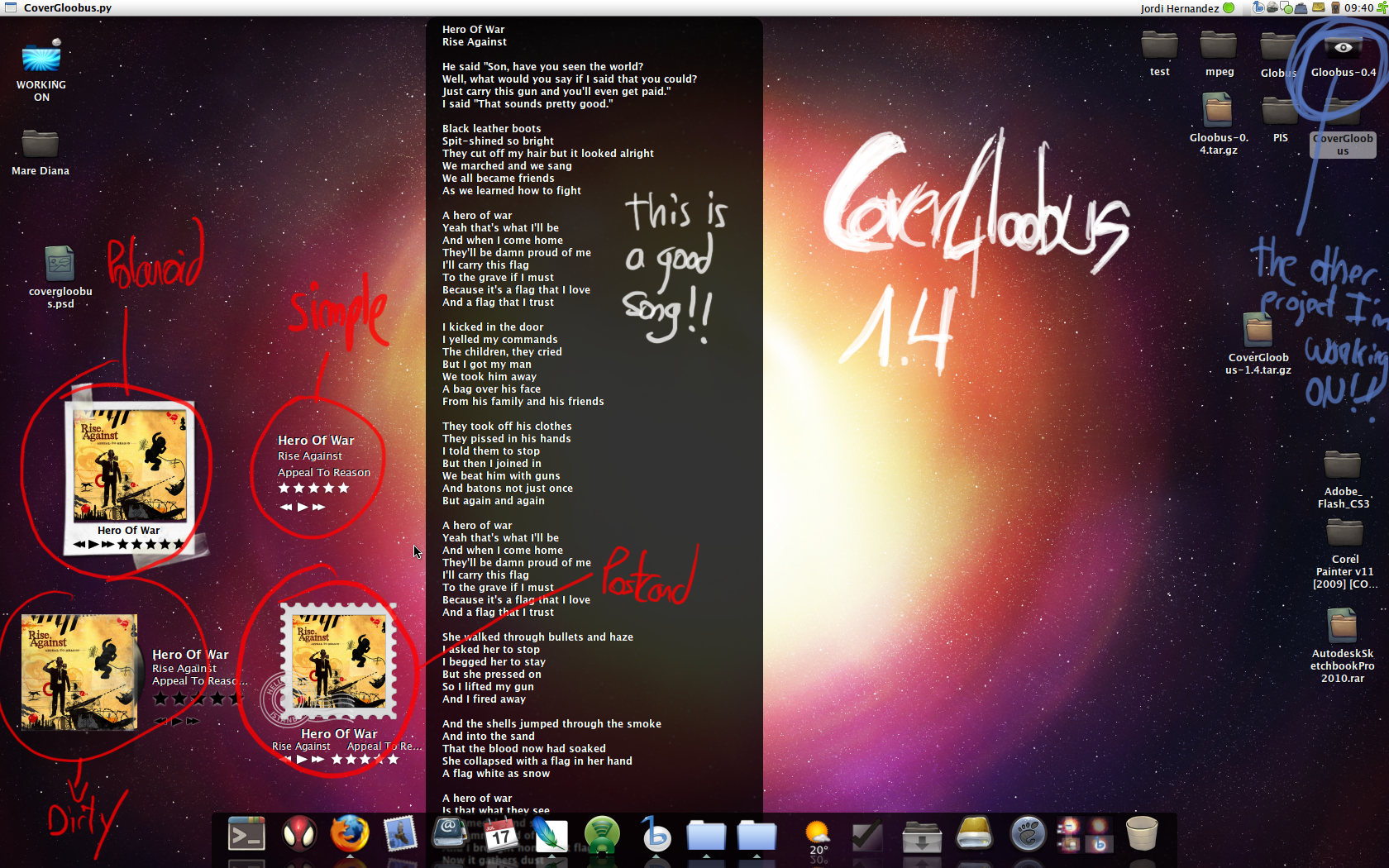
CoverGloobus Displays Cover Art, Lyrics And More On Your Desktop [Linux]

covergloobus

[Linux] From the same author as Gloobus, the amazing files preview applications which we recently covered, comes yet another great application: CoverGloobus, which is an audio player controller that sits on your desktop and can display the album cover, lyrics, etc. (similar to Rhythmbox Cover Art Plug-in).

CoverGloobus supports the following audio players: Banshee, Rhythmbox, Listen and Songbird.

You can also use it with Exaile, by downloading this file, extract it to the Players folder in the CoverGloobus directory and then add:
from Exaile import *
to CoverGloobus.py, on line 49 (just use gedit and you will easly see which that line is, because the lines are numbered).

CoverGloobus features:

-audio player controls
-album covers are automatically downloaded and displayed
-middle click CoverGloobus to display the lyrics for current playing song
-ratings system
-multiple skins

covergloobus desktop pantera

How to use CoverGloobus

1. Download CoverGloobus from HERE and extract the archive contents to any folder.

2. Open a terminal and navigate to the folder where you extracted CoverGloobus. Then, type this:
./CoverGloobus-config.py
This will open the CoverGloobus configuration dialog. You can now choose which theme CoverGloobus should use, the position it should star in, and what audio player you are using.

3. Now you can start CoverGloobus. Again, use the terminal to navigate to the folder where you extracted it, and run it using the following command:
./CoverGloobus.py

4. Optional: you can create a script which will automatically open CoverGloobus when you power-up your audio player, and kill it when you close your audio player. Here's how (the following example is for using CoverGloobus with Banshee; you can replace Banshee with Rhythmbox, etc):

-create a new, blank file, let's call it banshee_cg.sh and paste this:

#!/bin/bash
/path/to/CoverGloobus/CoverGloobus.py &
CoverGloobusPID=$!
banshee-1 --redirect-log --play-enqueued %U
kill $CoverGloobusPID
where you need to replace /path/to with the path to the CoverGloobus folder; the whole banshee-1 --redirect-log --play-enqueued %U line with the command to start another audio player such as Rhythmbox, if you don't plan on using Banshee.

-save the file, open a terminal, navigate to it's folder and make the script executable with this command: chmod +x banshee_cg.sh

-now you can open the script either by double-clicking it, or thtough a terminal: sh banshee_cg.sh