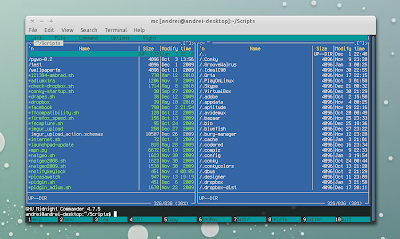
(in the screenshot above, you can see Lfm on top, Mc on the bottom left and Vifm on the bottom right corner, all running in
Terminator)
GNU Midnight Commander (MC), Vifm and Last File Manager (Lfm) are 3 visual file manager applications for the Linux console. All of these 3 applications will remind you of Norton Commander - with the main interface consisting of two panels which display the file system -, but each has something special. Read about these 3 great console file managers for Linux and let us know your favourite in the comments!
1. Midnight Commander

Midnight Commander is probably the most well-known application of this kind and probably the most easy to use due to being the closest to Norton Commander and having the most common operations displayed at the bottom.
In Midnight Commander (MC), arrow keys control file selection, the insert key is used to select files and the Function Keys perform operations such as renaming, editing and copying files. It also supports mouse operations.
Midnight Commander's features include multiple file renaming (using wildcard characters), the ability to view the contents of RPM and DEB package files, to work with common archive formats as if they were simply another directory, an editor called mcedit and to function as an FTP or FISH client.
Mcedit seems really useful and it can be executed as standalone program or from Midnight Commander using F4 key. mcedit's features include syntax highlighting for many languages, macros, code snippets, simple integration with external tools, automatic indentation, mouse support, clipboard and more.
If you want to try Midnight Commander (and learn more about it), download it from
HERE. Ubuntu users can install it by simply running the following command in a terminal:
sudo apt-get install mc
2. Last File Manager
Last File Manager (Lfm - based on curses and written in Python) is yet another easy to use console file manager which comes with 1-pane or 2-pane views. It's strongest assets are vfs for compressed files (so you can view archives just as if they were folders - just like MC, except Lfm doesn't seem to handle .deb and .rpm files), dialogs with entry competition, bookmarks, history, files colored by extension (although using the mime-type would sound more fair but that's nice anyway) and tabs.
Of course, those are just a few of Lfm features and you must try it out to see how great it is. I can tell you two other features which I love the most: direct find/grep integrations (and other tools) and a fast file viewer - pyview - with text and binary mode.
To download Lfm and learn how to use it, see it's
HomePage. Ubuntu users can install Last File Manager using this command:
sudo apt-get install lfm
3. Vifm

We couldn't forget Vim lovers. Vifm is a ncurses based file manager with vi like key-bindings. Vifm is not for the average user and if you're not comfortable with Vim, it will take a while before you get used to it. However
Vifm documentation page provides a few keyboard shortcuts to get you started.
You can set Vifm to either a 1 pane or 2 pane view, with the 2-pane view being able to serve either as two different classic panels, or one of the panels being used as quick file properties viewer (you can set quick file views in the pane with the
:view command or view full screen file info with Ctrl + g).
For those who never used Vim, Vifm lets you cut with
dd, paste with
p, and rename a file with
cw. Movement keys are the standard hjkl, with
h and
l ascending and descending the directory tree.
In the vifmrc configuration file you can set up your own commands and define simple rules regarding file types and the program to open them.
For more info on using Vifm, after installing it, type ":help" (you will also need vim installed).
Download Vifm from
HERE. Ubuntu users can install Vifm using the following command:
sudo apt-get install vifm vim
So, do you use any of these console-based Linux file managers? If so, which is you favourite? Or maybe you use another one?
This post was suggested by rkv, so many thanks to him!