Powered By

Powered by Blogger

Tampilkan postingan dengan label twitter. Tampilkan semua postingan

Jumat, 01 April 2011

Unity Gwibber Lens (Place) For Ubuntu 11.04

Unity Gwibber Lens

Firstly, a short introduction of "Lenses" via the Ubuntu wiki: "Lenses used to be known as Places. When referring to code and APIs we still use the term Places, but the user-visible name is Lenses. The Places name will be retired in 11.10".

I've recently came upon a very interesting Unity Lens for Gwibber developed by Ken VanDine and couldn't wait to try it but it didn't really work until the latest Unity update released a few hours ago. You can use the Unity Gwibber Lens to quickly access your Gwibber posts, replies, private messages and so on. And it also comes with a search.

To use it you can click the Gwibber icon on the Unity dock (it also has a keyboard shortcut so you can use Super + G) or directly from Dash but in that case only people will show up and not tweets / posts (I think this is a bug though).

In case that sounds a bit confusing, check out the video below to see exactly how the Unity Gwibber Lens works:


Download Unity Gwibber Lens


Unity Gwibber Lens is still experimental and not everything works. You'll also find some bugs like you can see in the above video (slowness, etc.).

But if you want to use it, you can use the following .deb I've created using the official packaging and the latest BZR code.

Update: you can now install Unity Gwibber Lens from the Gwibber PPA. Add the PPA and install it using the commands below:

sudo add-apt-repository ppa:gwibber-team/ppa
sudo apt-get update
sudo apt-get install unity-lens-gwibber


Then log out and log back in (makes sure you've already added some accounts in Gwibber before logging out).

You can also get the latest BZR code from HERE.

Jumat, 11 Maret 2011

Hotot Twitter Client Gets A "Wide" Interface

The best Linux Twitter client - Hotot - finally supports a wide mode, like Tweetdeck:

Hotot Twitter client


Unfortunately for now you cannot customize (reorder, add or remove) the columns because the "extended" mode depends on the Hotot window width: the larger the window is, the more columns will be displayed. Hopefully such a feature will be added soon.


Install Hotot in Ubuntu using the following commands:
sudo add-apt-repository ppa:jimmyxu/hotot
sudo apt-get update
sudo apt-get install hotot


Thanks to Ubunlog for the news!

Selasa, 28 Desember 2010

CloudSN (Cloud Services Notifications) Update Finally Brings Twitter OAuth Support

Cloudsn

CloudSN (Cloud Services Notifications) is an application you can use to display notifications when you have new emails (POP3 and IMAP), new Identi.ca messages, Google Reader unread items or it can watch any RSS feed for changes (which means you can use it for Facebook too). For a complete review, see our previous post on CloudSN.

Back when Twitter introduced OAuth for all applications, CloudSN stopped working with Twitter but an update finally brings Twitter OAuth support for CloudSN.


CloudSN notification

The new version is available in the CloudSN PPA for Ubuntu 10.10 Maverick Meerkat (only!) - add the PPA and install CloudSN using the following commands:

sudo add-apt-repository ppa:chuchiperriman/cloudsn
sudo apt-get update
sudo apt-get install cloudsn


Once installed, run it from Applications > Internet > Cloud Services Notifications.

Minggu, 21 November 2010

Poll Results: Best Linux Twitter Client

Our "Best Linux Twitter Client" poll ended today. And the winner is.... (no surprise here): Hotot (40%), followed by Gwibber (29%) and Choqok (13.7%).

Here are the exact poll results:

Best Linux Twitter Client


Pino would have probably gotten a lot more votes if it worked with OAuth (even though it does work without OAuth with a trick, but most people probably don't know that). Either way, it's amazing how an application (Hotot) which until 2 months ago nobody knew it exists now takes the first spot of the Best Linux Twitter Client poll.


If you have an idea for a poll we didn't have on WebUpd8, let us know in the comments!


Jumat, 12 November 2010

Best Linux Twitter Client

Because there are many Twitter clients out there, we asked you to nominate the best Twitter client in a comment on a post last week. Today, you all get to vote for the best Linux Twitter client based on your nominations (top 5 nominations). So, which of the following is the best Linux Twitter client?


In the nominations post, Hotot crashed all other Twitter clients with more than 50% of the total nominations. But a lot of people don't like to comment so this poll should really show us what people think is the best Linux Twitter client.


Kamis, 04 November 2010

Best Linux Twitter Client?

We didn't have a poll in a long time because well..., we already had a poll about almost every type of application and for the rest, there are too many choices. This is why, today we're going to do it a bit differently. Read on!

This post is not an actual poll, but only for nominating the best Twitter client for Linux. So, what's the best Linux Twitter client? What you must do is simply write a comment on this post stating your vote. Example: "vote Pino".  You can of course discuss on the subject too, but firstly make sure you enter your vote.

The 5 most nominated applications will then be included in a poll next week. Please only nominate one Twitter application!


We're using nominations because there are a lot of Linux Twitter clients and I don't know which are the most popular 5 to use in a poll. Also, if we'd only vote using the comment system, the votes wouldn't be very accurate since a lot of people don't like to comment and just want to click the "vote" button. So, to have more accurate results, the actual poll will run in a week after todays' nominations and will include the top 5 most nominated Linux Twitter clients.


Rabu, 03 November 2010

TweetDeck 0.36 Adds Real-Time Streaming

TweetDeck

Even though personally I am not a fan of Adobe Air applications and prefer native Twitter clients on Linux, I cannot ignore an amazing application such as TweetDeck which comes with some very interesting features like real-time Twitter streaming - a feature that has been added for all users (it was previously enabled in a test version) in the latest TweetDeck 0.36.

This new feature will update most of your columns in real-time so you may want to turn off the notifications if you plan on using it. Why "most columns"? Because Twitter may throttle your search results under certain circumstances. Also, the Twitter Lists are not yet included in the real-time Streaming API.

While this feature is enabled by default, you can turn it off from the TweetDeck prferences (under Settings > Twitter - uncheck the "Enable realtime Twitter streaming" checkbox.).


The latest TweetDeck also supports the new Twitter "Snowflake" tweets - a change in the Twitter API which will break all Twitter clients which do not support it starting with November 24.


Download TweetDeck 0.36 | Adobe Air installation instructions for Ubuntu (see only the first part of the post).


Senin, 27 September 2010

Install Qwit 1.1 Pre 2 In Ubuntu, Now With OAuth Support [Identi.ca And Twitter Client]

Qwit Twitter Identi.ca client

Qwit is a cross-platform (works on Windows and Linux - any desktop environment) Twitter / Identi.ca client written in Qt4. The application was recently updated (currently version 1.1 pre 2) to support OAuth and comes with http-proxy support, customizable interface, Twitpic support, a lot of URL shorteners, multiple accounts support and other features.

What's interesting about this Twitter client is that you can customize which tabs refresh automatically and which manually and you can of course also specify the update interval. Also, Qwit integrates well with both Gnome and KDE and can use libnotify, kdialog or Qt notifications.


Thanks to Roberto @ LFFL, you can easily install Qwit in Ubuntu (even tough the package name says "lucid", it also works in Ubuntu 10.10 Maverick Meerkat) using .deb packages:

32bit:
libqoauth1_1.0.1-1~lffl~lucid~ppa_i386.deb
qwit_1.1+pre2-1~lffl~lucid~ppa_i386.deb

64bit:
libqoauth1_1.0.1-1~lffl~lucid~ppa_amd64.deb
qwit_1.1+pre2-1~lffl~lucid~ppa_amd64.deb

Note: after installing Qwit, don't enter your Twitter username and password - that won't work (it doesn't work with any Twitter client anymore unless it uses SuperTweet). Instead, click the "Authorize" button under "OAuth", then follow the instructions.


You can also find Windows packages for the latest Qwit 1.1 pre 2 @ Qwit homepage (not download page!). Or you can compile Qwit yourself.


Thanks to Roberto @ LFFL for the .deb files!

Rabu, 22 September 2010

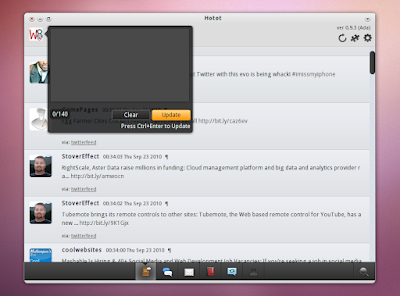
Hotot: A New Lightweight Twitter Client For Linux

Hotot twitter client

Hotot is a new lightweight Twitter client for Linux (though I see there's also a Windows package available too) which although still in Alpha, it already looks very interesting! It doesn't come with many features by default for now (other than the basic features you would expect to find in a Twitter client, including search), but it's extensible through add-ons.

The version I've tested comes with 3 preinstalled addons: Gmap (geolocation information of tweets), image uploader and image preview. Also, Hotot comes with native notification system for both Gnome and KDE (and NotifyOSD for Ubuntu users).


One interesting feature in Hotot is that you can close the window and then bring it back using a keyboard shortcut (Alt + C by default) so it never stays in your way yet always runs in the background waiting to be summoned. And the keyboard functionality doesn't end there as Hotot can be fully controlled using the keyboard: you can go to the previous or next page (where the pages are: your home timeline, replies, direct messages and so on), move between tweets, enter compose mode and so on. You can see all the available keyboard shortcuts by going to "Help & About" in the Hotot menu.


Try Hotot

The Hotot download page doesn't hold any packages yet, though it seems it will soon offer packages for all major Linux distributions. Until then you can run it in Ubuntu using the commands below:
sudo apt-get install python-webkit python-notify python-keybinder mercurial python-distutils-extra
cd
hg clone https://hotot.googlecode.com/hg/ hotot
cd hotot/
python ./hotot/hotot.py


Update: Hotot has an Ubuntu daily PPA. To use it, paste the following commands in a terminal:
sudo add-apt-repository ppa:hotot-team
sudo apt-get update
sudo apt-get install hotot


Thanks to Linux Und Ich for the news!

Minggu, 12 September 2010

How To Use TweetDeck With Identi.ca [w/ Adobe Air Ubuntu Installation Instructions]

Tweetdeck ubuntu

TweetDeck added an option recently (I'm not really sure when, I for one only noticed this today thanks to NicoLargo) to add a custom Twitter Base URL. Using this option, you'll be able to use Identi.ca in TweetDeck.


Install AdobeAir in Ubuntu


Ubuntu - 32bit:

AdobeAir is available in the Ubuntu Partner repository so Ubuntu users (32bit) can install it from this repository:

1. Press Alt + F2 and enter:

gksu /usr/bin/software-properties-gtk

Then on the "Other Software" tab, enable the first repository (the one which says "partner"). Then click "Close and when prompted, click "Reload".

2. Search for Adobe Air in the Ubuntu Software Center or install it using a terminal:
sudo apt-get install adobeair


Ubuntu - 64bit:


1. 64bit Ubuntu users must install ia32-libs:
sudo apt-get install ia32-libs

2. And then download the Adobe Air .deb from Adobe's website and install it with:
sudo dpkg -i --force-architecture adobeair.deb


Install TweetDeck

Once you've installed Adobe Air, simply go to the TweetDeck website and click the Install button.


Use Identi.ca in TweetDeck


Tweetdeck Identi.ca

And now finally you can set up Identi.ca in TweetDeck. Once you start Tweetdeck, add your Twitter account (or skip this), then go to the TweetDeck settings, then on the Account tab click: Add New Account > Twitter, then click "Advanced options" and enter the following URL:
http://identi.ca/index.php/api/

In the username and password fields, enter your Identi.ca username and password and then save the settings.


Now you can enjoy both Twitter and Identica in TweetDeck.


Many thanks to NicoLargo for the info!

Kamis, 09 September 2010

Post The Song You're Listening To In Rhythmbox To Twitter Or Identi.ca [Rhythmbox Microblogger Plugin]

Rhythmbox microblogger

Rhythmbox MicroBlogger is a new Rhythmbox plugin which sends the music you're listening to on Twitter, Identi.ca or any StatusNet account.

The song format is completely edibable and it also lets you edit the message to be posted so you can add context or other miscellaneous details before posting.


I found out about Rhythmbox MicroBlogger the day Twitter introduced OAuth only for all clients and Rhythmbox MicroBlogger didn't have OAuth so this post has been pending since then. But today, Rhyhmbox Microblogger finally got OAuth for Twitter so it works again!

Install Rhythmbox MicroBlogger


cd ~/.gnome2
mkdir -p rhythmbox
cd rhythmbox/
mkdir -p plugins
cd plugins/
wget http://github.com/downloads/aliva/rhythmbox-microblogger/rhythmbox-microblogger-0.4.tar.gz
tar -xvf rhythmbox-microblogger-0.4.tar.gz

Then simply open Rhythmbox, go to Edit > Plugins and enable the Microblogger plugin, then add your Twitter or Identi.ca account and you'll notice there's a new button (the Twitter or Identi.ca logo) in the Rhythmbox toolbar - click this button whenever you want to post the song you're currently listening to on Twitter or Identi.ca. Upon clicking this button, you'll be able to edit the text that will be posted.


If you want to manually install Rhythmbox Microblogger, download it from HERE, then go to ~/.gnome2/rhythmbox/plugins (create the folders if they don't exist) and extract rhythmbox-microblogger there.

Selasa, 07 September 2010

How To Get Pino Without OAuth To Work With Twitter Again

Pino

As you probably know, the Twitter OAuthpocalypse took place and all the Twitter clients which do not use OAuth no longer work.

One such Twitter client is Pino which unfortunately has not yet been updated to use OAuth and no longer works. But you can still get Pino to work, even though it doesn't support OAuth - and this might also work for other Twitter clients, but I've only tested it for Pino. Here's what you need to do.

How to make Pino with no OAuth work with Twitter

1. Go to http://www.supertweet.net/ and click the "Sign in with Twitter" button, then allow it to connect to Twitter.

2. Then you'll notice that the status on supertweet.net says "Inactive (Activate)" - click on "Activate":

supertweet

Once you click "Activate", you'll have to enter a password for supertweet.net - this is not your Twitter password! Enter some other password and click "Submit".

3. Open Pino and either add a new account or edit an existing one and enter the following info for the new account:

Username: your Twitter username
Password: your supertweet.net password which you've set in step 2
Service: Other
Api proxy or other service: http://api.supertweet.net/1/

Pino account

Important: Even though the Supertweet website says to use http://api.supertweet.net, use http://api.supertweet.net/1/ or else the mentions and direct messages will not work!


Click OK and you're ready to use Pino again!


See also: upgrade Gwibber to get it to work with OAuth.


Thanks to Cipi for the tip and linux.videotutorial.ro (needs a minor tweak to get everything to work).

Selasa, 31 Agustus 2010

Twitter's OAuthpocalypse Today - Upgrade Your Gwibber!

gwibber

Today is Twitter's OAuthpocalypse: Twitter is shutting down basic authentification so all clients not using OAuth will stop working and one of these Twitter clients is Ubuntu's default microblogging client: Gwibber. That means that you need to upgrade if you want to continue using Gwibber.

An official Gwibber PPA for both Ubuntu 10.04 Lucid Lynx and 10.10 Maverick Meerkat has been created - for testing purposes! - with an updated Gwibber version which uses OAuth.


To add the Gwibber (with OAuth) PPA and install it, use the following commands:

sudo add-apt-repository ppa:ubuntu-desktop/ppa
sudo apt-get update
sudo apt-get upgrade

Then restart gwibber-service:
gwibber-service restart

And you should then be prompted to authorize Twitter. If that doesn't happen, simply open Gwibber (Applications > Internet > Gwibber Social Client), click on Edit > Accounts and authorize your Twitter account:

gwibber oauth


Note: Twitter will definitely stop working if you don't upgrade. This PPA is not a daily builds PPA! Yes, it's a testing PPA (they didn't mention this but probably these packages are going into the Ubuntu official repositories if the tests are successful) though. I can tell you that I've upgraded to the package in the PPA in Ubuntu 10.10 and everything is working fine. Tomorrow I'll also test it in Ubuntu 10.04.


[via Ubuntu Desktop mailing list]

Selasa, 03 Agustus 2010

Turpial 1.4 Alpha 1 Gets Identi.ca Support

Turpial Identi.ca

Turpial is a native Linux Twitter - and now Identi.ca too - client.


The latest Turpial from GIT (currently version 1.4 alpha 1) finally adds Identi.ca support - but unfortunately you won't be able to login to both Twitter and Identi.ca in the same time.

There are some other interesting features in Turpial 1.4 alpha 1 such as Twitter Lists support, a refresh button for Replies, Timeline and Direct Messages and also, the notification area now lets you know when you have new tweets:

turpial 1.4


Turpial notification area


The latest Turpial 1.4 alpha 1 is available in our unstable PPA (the version in the PPA is named 1.3.3+git20100802 but that's actually 1.4 alpha 1) so you can install it in Ubuntu Karmic, Lucid and Maverick using the following commands:

sudo add-apt-repository ppa:webupd8team/unstable
sudo apt-get update
sudo apt-get install turpial

Remember, this is an alpha version so expect to find some bugs!


Thanks to Ubuntizando El Planeta for the news!

Jumat, 18 Juni 2010

Turpial 1.3.3 Final Released [Native Linux Twitter Client]

turpial 1.3.3

After a long period of testing, Turpial (native Linux Twitter client) 1.3.3 has been released, this new version bringing many new features such as: multiple language support (English, Spanish, Portuguese, Traditional Chinese and Taiwanese, French, German, Italian, Norwegian and Russian), proxy support for the Twitter API, spell checker, added support for Yfrog services, img.ly, Mobypicture and twitgoo to upload images, zi.ma, SigueMiLink and ur1.ca short urls, fixed the bug that prevented you to close Turpial from the notification area and many more.

If you've been using Turpial from the development PPA, you already have most of the new features but the final version also comes with many fixes.


Initially version 1.3.2 was released today but because of a bug, the version was bumped to 1.3.3 which comes with a fix.
Turpial 1.3.3 is not yet available in its PPA, but we've uploaded it to the WebUpd8 PPA so you can easily install it using the following commands:

sudo add-apt-repository ppa:nilarimogard/webupd8 && sudo apt-get update
sudo apt-get install turpial


You can also manually download the .deb file if you don't want to add the WebUpd8 PPA.

Sabtu, 05 Juni 2010

Turpial 1.3.2 Beta 2 Released, Finally Fixes The Crash On Exit Bug [Twitter Client For Linux]

turpial

Turpial is a great Twitter client for Linux which we covered before. The latest 1.3.2 version finally added English (as well as other languages) but there was a very annoying bug - when you tried to close the application, it froze and the only way to exit Turpial was to kill it via command line.

But this bug was finally fixed in the latest 1.3.2 beta 2 version.

To install Turpial 1.3.2 beta 2, use the following commands (Ubuntu Karmic, Lucid and Maverick):
sudo add-apt-repository ppa:effie-jayx/turpial-devel
sudo apt-get update && sudo apt-get install turpial

Jumat, 04 Juni 2010

Use Twitter Like An IM Protocol With Prpltwtr [Pidgin, Empathy - Includes Saved Searches, More!]

prpltwtr

Prpltwtr is a Pidgin (or Empathy) plugin which makes Twitter feel a lot like an IM: you can see your followers in the list (this can be disabled and is recommended to disable it if you have a lot of followers) as well as saved searches and so on. Direct messages will open in new conversation tabs, you can reply, retweet and much more!

There is already a plugin to use Twitter in Pidgin - MBPurple, but I find Prpltwtr to be far superior because it really makes Twitter feel like a IM protocol.


The developer also lists Identi.ca and Status.net under the supported microblogging protocols, however I couldn't figure out how to add my Identi.ca account - if you find how to do it, please let us know in the comments (Update: after compiling it again, Identi.ca and Status.Net showed up).

Prpltwtr works with Empathy too but I've only tested it with Pidgin and the installation instructions below will be for Pidgin only. For Empathy, see THESE installation instructions.

Installing Prpltwtr in Pidgin (Ubuntu) is very easy, all you have to do is download the source files from HERE, extract it, navigate to its folder using the terminal and then:
sudo apt-get install libpurple-dev
make && sudo make install


Once the installation is over, enable Prpltwtr in the Pidgin Plugins dialog, then add your account just like you add any IM account in Pidgin. On the "Modify Account" window, click the "Advanced" tab to see all the available options for the Twitter protocol.


You can also use Prpltwtr in Windows - see it's download page.

Selasa, 01 Juni 2010

Watch Any Website For Changes With Specto (Updated Ubuntu .deb) [Including Facebook, Google Reader And Twitter]

specto notifications

Specto is a desktop application that will watch for events (website updates, emails, file and folder changes) which we covered a long long time ago.

The latest version of Specto* can be used to notify you about events on websites such as Facebook, Google Reader, Twitter, Last.fm and also email accounts including Gmail, any IMAP or POP3 email account, Evolution and even Google Wave and of course, any website you want to watch for changes.

Specto also supports applications such as: music players (Amarok, Banshee and Rhythmbox), Pidgin and even a port, process, folder or BAZAAR branch.


The Facebook notification only tells you how many new messages, status updates and so on you have in a notifyOSD bubble and Indicator Applet, but the Specto dialog also specifies what the updated items are actually about:

specto

But what I like the most about Specto is that you can basically use it for any website - I for one have always searched for a desktop application that can notify you when the content on a website changes.

Also, the Gmail notification module allows you to only check for new mail from a Label you select - something I've been missing in a lot of Gmail notifiers - just make sure you don't have spaces in the label name! (if you find a fix for using spaces in the label names, please let us know in the comments!)


*Specto is available in the official Ubuntu repositories, however the latest BAZAAR branch has some nice new features and tweaks. Even the version in Maverick Meerkat is older than this package.


Here are the improvements in the latest BZR version:
  • DBUS watches (including Pidgin, Evolution, Rhythmbox, and a bunch of others)
  • Integration with Ubuntu's indicator applet
  • Use GStreamer for playing sounds
  • Fix the Google Reader watch
  • Various other enhancements

To install the latest Specto from BZR in Ubuntu Karmic, Lucid or Maverick, run the following commands in a terminal:
sudo add-apt-repository ppa:nilarimogard/webupd8 && sudo apt-get update
sudo apt-get install specto

Minggu, 30 Mei 2010

Microblog-Purple (Twitter In Pidgin Plugin) 0.3 Has Been Released [Linux, Windows]

twitter in pidgin

Microblog-Purple (MBPurple) is a Pidgin plugin for Windows and Linux which integrates Twitter, Identi.ca and Status.net server through the conversation windows.

Microblog-Purple version 0.3 with OAuth support for Twitter has just been released. The package is not yet available in its official PPA, but you can install 0.3 in Ubuntu Karmic and Lucid via Frasten PPA:

sudo add-apt-repository ppa:frasten/ppa && sudo apt-get update
sudo apt-get install pidgin-microblog


To enable the plugin in Pidgin, go to Tools > Plugins and enable "Twidgin". Then simply add a new account and on the account type select Twitter, Identi.ca or Status.Net.


Using the plugin is very easy: you have a "rt" button, you can reply by clicking a username and so on.


You can also use the following commands in the conversation window:

/replies - to get all replies to you
/refresh - get new tweets instantly
/tag, /btag, /untag - automatically tag all your message, good for tagging messages with some hash tag (Example: #ubuntu)

For more commands, type "/help".


For other Linux distributions and Windows, download microblog-purple from HERE.

Kamis, 13 Mei 2010

Turpial Native Linux Twitter Clients Finally Available In English [Ubuntu .deb Download]

turpial english ubuntu

Turpial is an amazing native Twitter client for Linux which up until today was only available in Spanish. However, the latest version 1.3.2 alpha 1 finally adds support for English as well as other languages such as Portuguese, Traditional Chinese, French, German, Italian and so on.


Turpial has all the features you would expect in a Twitter client and more, yet it's very lightweight. Among the Turpial features you'll find options to set the notifications you want to receive, select one of the many url shortening services as well as mute people without them ever knowing.

turpial 1.3.2 ubuntu english


Turpial also comes with 2 interfaces: compact and wide:

turpial 1.3.2 english interface ubuntu


Once thing missing in Turpial is creating custom columns for different searches but hopefully this will be added soon.


Download Turpial 1.3.2 alpha 1


Turpial 1.3.2 alpha 1 is not yet available in its PPA, but I've build some Ubuntu .deb packages for Ubuntu Karmic and Lucid which you can download:

Ubuntu 10.04 Lucid Lynx: turpial_1.3.2-a1~webupd8~lucid8_all.deb (490.1 KiB)
Ubuntu 9.10 Karmic Koala: turpial_1.3.2-a1~webupd8~karmic8_all.deb (494.3 KiB)


You can also download a Fedora .rpm package provided by Fedora-VE (many thanks!).


Update: Turpial now has a development PPA so you can install 1.3.2 alpha 1 from there.

For other Linux distributions, see Turpial's download page (look for GIT instructions to get the latest version).