Powered By

Powered by Blogger

Tampilkan postingan dengan label xfce. Tampilkan semua postingan

Jumat, 04 Februari 2011

gMusicBrowser To Replace Exaile In Xubuntu 11.04

WebUpd8 reader Tinhed who is a long time Xubuntu user let us know that gMusicBrowser will replace Exaile in Xubuntu 11.04.

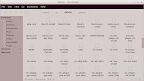
gMusicBrowser will probably use the Shimmer interface by default (as we've seen in our last gMusicBrowser post, this amazing music player comes with lots of layouts) but with some further tweaks which include sort-by-artist mode for mosaic, rename the layouts, make a netbook layout and more:

gMusicBrowser Shimmer layout
(Shimmer Layout - SongTree View)


gMusicBrowser shimmer layout
(Shimmer Layout - Mosaic View)


Here is a screenshot with the netbook layout:

gMusicBrowser netbook layout


gMusicBrowser is not yet default in Xubuntu, but it can be installed by using the Shimmer PPA. Instructions can be found HERE.


The news comes from yesterday's Xubuntu Community Team meeting which also reveals that LightDM is considered to replace GDM (not decided for now).

The meeting also raised the problem of XFCE PPAs - there are currently no official XFCE PPAs (at least not for XFCE 4.8) however no decision to create an official PPA has been taken yet.


Thanks to Tinhed for the tip and Simon Steinbeiß for the gMusicBrowser netbook layout screenshot; via xflinux

Minggu, 30 Januari 2011

XFCE 4.8 Ubuntu 10.04 And 10.10 PPA

XFCE 4.8 was released about two weeks ago, bringing GVFS support for Thunar (so it can now browse remote shares using FTP, Windows Shares, WebDav and SSH), XFCE panel improvements and more.


Here are a couple of XFCE 4.8 screenshots:

XFCE 4.8

This is XFCE too, using the default Xubuntu 10.10 theme:

Xubuntu 10.10 XFCE 4.8


Install XFCE 4.8 in Ubuntu 10.04 and 10.10 via PPA


There was a XFCE 4.8 PPA for Ubuntu 10.04 for some time but none for Ubuntu 10.10  - until today when XFCE 4.8 was uploaded to a PPA so the Ubuntu 10.10 users can enjoy it too!

Add the XFCE 4.8 Ubuntu 10.04 PPA and install XFCE 4.8 using the following commands (32bit only!):
sudo add-apt-repository ppa:alexx2000/xfce
sudo apt-get update
sudo apt-get install xubuntu-desktop

Add the XFCE 4.8 Ubuntu 10.10 PPA and install XFCE 4.8 using the following commands (both 32bit and 64bit):
sudo add-apt-repository ppa:koshi/xfce-4.8
sudo apt-get update
sudo apt-get install xubuntu-desktop

Note: neither of the above PPA repositories are official so use them at your own risk.


If for some reason you want to revert all the changes made by one of the two XFCE 4.8 PPAs above, you can use PPA-Purge (PPA Purge will downgrade all the packages installed from the above PPAs):

- in Ubuntu 10.10, install PPA Purge and purge the XFCE 4.8 PPA using the following commands:
sudo apt-get install ppa-purge
sudo ppa-purge ppa:koshi/xfce-4.8

- in Ubuntu 10.04, you may have to manually install PPA Purge - you can get it from the WebUpd8 PPA. Then, purge the XFCE 4.8 PPA using the following commands:
sudo ppa-purge ppa:alexx2000/xfce

Thanks to Ken Harkey for PPA the tip!

Selasa, 18 Januari 2011

RabbitVCS: The Perfect TortoiseSVN Alternative For Linux, Now With GIT Integration As A Plus

RabbitVCS screenshot

Sure, you can always work with SVN repositories from the command line but sometimes a graphical SVN client is more convenient - for example you can use it to check which files are not added to the repository yet. And when it comes to graphical SVN clients, I'm sure most of you will agree when I say that RabbitVCS, a "set of graphical tools written to provide simple and straightforward access to the version control systems you use" inspired by the famous TortoiseSVN, is probably the best such tool for Linux.


RabbitVCS gedit
(RabbitVCS Gedit plugin)


Not just for SVN / Nautilus


RabbitVCS has most of the TortoiseSVN features and nicely integrates into the GNOME desktop thanks to a Nautilus Extension and a Gedit plugin for easy access to everything you need. Further more, even though its main page doesn't mention this, RabbitVCS is not just for Nautilus / SVN! It works with GIT (starting with version 0.14, released on January 4th, 2011) too and it also has a Thunar plugin so you can use it under XFCE too.


RabbitVCS


Those of you who haven't tried Rabbitvcs lately will be glad to know that since version 0.14.1.1 things became quite stable and Nautilus now stays responsive while the plugin checks for changes in the background. In fact, the v0.14 release cycle ended and the RabbitVCS developer posted a roadmap for the v0.15 cycle which includes: recursive/async status monitor for Nautilus, RabbitVCS menu items and emblems to the Gedit file browser plugin and refactor VCS abstraction code to make it easier to add new VCSs and UIs. He needs some help with all this so if you can, help him out!


Install RabbitVCS in Ubuntu

1. Add the RabbitVCS Ubuntu PPA:

- for Ubuntu Karmic and newer (Lucid, Maverick, etc.):
sudo add-apt-repository ppa:rabbitvcs/ppa && sudo apt-get update

- For Ubuntu Hardy or Jaunty:
echo "deb http://ppa.launchpad.net/rabbitvcs/ppa/ubuntu $(lsb_release -sc) main ## RabbitVCS PPA" | sudo tee -a /etc/apt/sources.list && sudo apt-get update

2. Install RabbitVCS:

- For Nautilus:
sudo apt-get install rabbitvcs-core rabbitvcs-nautilus rabbitvcs-cli

- For Thunar:
sudo apt-get install rabbitvcs-core rabbitvcs-cli rabbitvcs-thunar

Once installed, restart Nautilus / Thunar (for Nautilus, type "nautilus -q" in a terminal).


Optional: If you also want to install the RabbitVCS Gedit extension, use the following command:
sudo apt-get install rabbitvcs-gedit


And an extra tip: by default, GNOME (starting with version 2.28) doesn't show icons in the menus which is something RabbitVCS could really use (both in Nautilus and Gedit). To enable icons in the menus, run the following command in a terminal:
gconftool-2 --set /desktop/gnome/interface/menus_have_icons --type bool true


If you're not using Ubuntu, download RabbitVCS from HERE.


Most of the info in this post was sent by WebUpd8 reader Sander (many thanks!)

Minggu, 05 September 2010

Xubuntu 10.10 Maverick Meerkat Beta Screenshot Tour

Because I do not use Xubuntu, I can't spot the exact changes between Xubuntu 10.04 and Xubuntu 10.10, but I'll try to post an overview of Xubuntu 10.10 beta anyway. For reference, here is how Xubuntu 10.04 Lucid Lynx used to look.


Xubuntu 10.10 Maverick Meerkat, the XFCE Ubuntu flavor got a lot of changes since 10.04, starting with a new default wallpaper and theme:

Xubuntu 10.10 screenshot wallpaper

Xubuntu 10.10 screenshot theme


The theme looks amazing, don't you think? The GTK+ theme is based on Zuki Blues and the Xfwm theme on axiom. The icons, just like in Xubuntu 10.04 are Elementary Xubuntu.


I believe this is the only Ubuntu flavor that comes with a branded wallpaper. But who knows, maybe Xubuntu will also get a new wallpaper until 10.10 final is released, even though the UI freeze has passed (like it will happen for Ubuntu 10.10).


There are also some new applications in Xubuntu 10.10 beta! Totem has been replaced with Parole Media player and Brasero with Xfburn:


Xubuntu 10.10 screenshot multimedia apps


The other default applications remain unchanged: GIMP Image Editor, Exaile, Firefox, Pidgin, Thunderbird, Abiword, Ubuntu Software Center, and so on. You know, all the cool applications which are missing from the default Ubuntu installation. And of course, Xubuntu also comes with a clipboard manager installed by default - Clipman:

Xubuntu 10.10 screenshot clipman


Changes have also been made to the way the login screen looks like:

Xubuntu 10.10 screenshot login screen


And to the shutdown dialog:

Xubuntu 10.10 screenshot shutdown dialog

Senin, 21 Juni 2010

Victory Is An Amazing, Fully Customizable GNOME / XFCE Theme [New Version Released]

victory gnome theme

Victory is an amazing minimalistic GNOME / XFCE theme that is easily customizable so you can use whatever colors you want.

A new version was released today with many changes which include: re-themed panel, all menus have been themed - this includes the GNOME MenuBar, GNOME Main Menu, SUSE Slab, USP, mintMenu, Cardapio -, many Metacity tweaks and lots of fixes.


Here are some Victory theme variations:

victory themevictory themevictory gtk theme

You can find more screenshots, HERE. But of course, you can use whatever colors / icons you like.


The Victory theme requires Murrine from GIT (20100323 or newer) with GNOME 2.30 - this means it will not work for Ubuntu 9.10 Karmic users (and below). It is recommended to use Nautilus Elementary to get the nice breadcrumbs you see in the screenshot.

Optionally, you can also install the Moblin icons. In Ubuntu, you can install them via Ubuntu's repositories:
sudo apt-get install moblin-icon-theme


You can also use this modified Moblin Icon theme (but it doesn't play nice with the GNOME Panel - resulting in huge panel icons but you can fix it by merging it with another icon theme).

To fix the OpenOffice icons, there is a tweak included in the theme - see the instructions on Victory's Gnome-Look page (link below).


Download Victory GNOME / XFCE theme


Many thanks to Ubuntu Life for the Victory theme link!

Minggu, 17 Januari 2010

Parole: Lightweight Media Player For Linux

parole media player

Parole is a simple media player for Linux based on GStreamer, designed specially for Xfce, but of course, you can use it in Gnome too.

With low resource usage and being very simple, Parole really deserves a test-run at least.

Parole Media Player also comes with a few basic plugins:

  • System tray icon, minimize Parole to the system tray.
  • Stream Properties plugin, change stream meta data.
  • Window title, Set parole window title to the current playing stream.
  • Power Manager, prevents the power manager from activating the automatic sleep while playing VCD and DVD.

Download Parole for Ubuntu:

-Karmic:
32bit: parole_0.2.0.1-1~kkxfce1_i386.deb (330.1 KiB)
64bit: parole_0.2.0.1-1~kkxfce1_amd64.deb (338.0 KiB)

-Lucid:
32bit: parole_0.2.0.1-1~llxfce1_i386.deb (327.6 KiB)
64bit: parole_0.2.0.1-1~llxfce1_amd64.deb (341.8 KiB)

Download for other Linux distributions