Powered By

Powered by Blogger

Tampilkan postingan dengan label exaile. Tampilkan semua postingan

Sabtu, 26 Juni 2010

Exaile 0.3.2 Has Been Released [PPA]

exaile 0.3.2

Exaile 0.3.2 has been released, just 10 days after the release of RC1. The final version doesn't come with new features, only bug fixes.

As usual, the latest version (0.3.2) is available in the WebUpd8 PPA so you can install it using the commands below (for Ubuntu Karmic, Lucid and Maverick):

sudo add-apt-repository ppa:nilarimogard/webupd8 && sudo apt-get update
sudo apt-get install exaile

Rabu, 16 Juni 2010

Exaile (Music Player) 0.3.2 RC1 Has Been Released [PPA]

exaile 0.3.2

Exaile is a lightweight music player for the GNOME desktop but which also works great in XFCE or LXDE.

Version 0.3.2 RC1 has just been released and since the Exaile developer says:

It should be stable enough for normal use, and we’ll follow it with the final version shortly.

... I decided to upload it to the WebUpd8 PPA.


Changes in Exaile 0.3.2 release candidate 1:

  • Improved support for covers embedded in ogg and flac files
  • Gapless playback by default (via playbin2)
  • Many dialogs replaced with gtk InfoBars
  • Preference items that require a restart now prompt for it
  • Vastly improved lyricsviewer plugin
  • Drag and drop on the main cover display to set and retrieve covers
  • Track counts in collection panel
  • New tooltip for tray icon and minimode that displays cover and progress
  • Custom playback sink support
  • Display cover art when dragging from side panels
  • Read-only support for Matroska tags


Install Exaile 0.3.2 RC1 In Ubuntu


To install Exaile 0.3.2 RC1 in Ubuntu (9.10, 10.04 or 10.10), paste this in a terminal:
sudo add-apt-repository ppa:nilarimogard/webupd8 && sudo apt-get update
sudo apt-get install exaile


Senin, 31 Mei 2010

Exaile 0.3.1.2 Has Been Released [Linux Music Player]

exaile

Exaile 0.3.1.2 has just been released, this being a bug-fix only release.

Among the changes in this version are:
  • Full python2.5 compatibility was restored
  • A bug resulting in unexpected duplicate playlist entries was fixed
  • Several stability and interface issues were resolved

Exaile 0.3.1.2 is not yet available in its PPA but you can install it via WebUpd8 PPA (for Ubuntu 9.10 Karmic Koala and 10.04 Lucid Lynx):

sudo add-apt-repository ppa:nilarimogard/webupd8 && sudo apt-get update
sudo apt-get install exaile

Kamis, 08 April 2010

Exaile 0.3.1.1, SubtitleEditor 0.36.2, Terminator 0.92 [Small Updates]

exaile 0.3.1.1

Exaile 0.3.1.1 was just released, fixing some nasty bugs:

  • an issue that could cause exaile to be unable to run without installing was fixed
  • the tagger now only writes to changed files, not all selected files
  • an edge case that could result in new playlists not being saved was resolved
  • album shuffle now properly respects discnumber tags and double-digit tracknumber tags
  • arguments passed to the installed exaile script are now properly quoted, resolving issues with using filenames that had spaces or unusual characters in them.
  • a number of additional minor issues were resolved

The Exaile 0.3.1.1 in the official Exaile PPA is actually 0.3.1 (you can look at the date it was published in the PPA). But we've updated Exaile in the WebUpd8 PPA so you can easily install it in Ubuntu 9.10 Karmic and 10.04 Lucid. Installation instructions: HERE.


SubtitleEditor also got a new release this week (0.32.2):
  • New subtitle format SBV
  • Small fixes (typo and HIG)
  • New Greek translation (by Manolis Stefanis)
  • Update French translation
And of course, this latest 0.32.2 is available in the WebUpd8 PPA. Installation instructions: HERE.


And finally, Terminator 0.92 was released today, fixing some bugs too:

This is another bugfix release, stomping on as many regressions from 0.14 as we can find. Many, many thanks to all of the people who have been in touch with the project to tel us about the things that are affecting them. If you find more regressions/bugs, please let us know!
Also in this release the Palette section of the Profile editor in the Preferences GUI is now fully active, which means that all of the config file options should now be fully editable in the GUI.


Also, great news for Ubuntu users: Terminator 0.9x has been added to the official Ubuntu 10.04 repositories! If you're not using Ubuntu 10.04 Lucid Lynx, see installation instructions HERE.

Selasa, 16 Maret 2010

Exaile 0.3.1 Has Been Released! [And Available In WebUpd8 PPA]

exaile 0.3.1

Exaile 0.3.1 has been released today. There are no new features since the beta, but a lot of bugs have been fixed.

Exaile 0.3.1. brings some pretty exiting new features (since 0.3.0):
  • A completely revamped and much more powerful tag editor
  • An equalizer!
  • Collection panel should now be faster
  • Better support for non-standard filename encodings
  • A standalone lyrics pane plugin
  • Plugins for DAAP music sharing support
  • Better display of compilation albums


exaile 0.3.1 context panel

You can download Exaile 0.3.1 source files from HERE. There is also an Ubuntu PPA, but there are no Exaile 0.3.1 packages available yet. However, you can install beta 4 from Exaile PPA. Because we didn't want to wait for the official Ubuntu builds, we've uploaded Exaile 0.3.1 in the WebUpd8 PPA for Ubuntu Karmic and Lucid.

To add the WebUpd8 PPA (which has many experimental packages so check it out before using it!), paste this in a terminal:
sudo add-apt-repository ppa:nilarimogard/webupd8

Then install Exaile 0.3.1:
sudo apt-get update && sudo apt-get install exaile exaile-plugin-moodbar exaile-plugin-contextinfo


You can of course just download the .deb files instead of adding the PPA if you want: https://launchpad.net/~nilarimogard/+archive/webupd8/+packages

Notes:
  • the db for 0.3.1 is not backwards compatible with 0.3.0. A backup of any existing 0.3.0 db will be made when you upgrade to enable easy downgrades, but it is advised that you make you own backup as well if you care about saved ratings, playcounts, etc.
  • the 64bit packages in the WebUpd8 PPA will start being built in about an hour.

Sabtu, 06 Februari 2010

Exaile 0.3.1 Beta Released, Features An Equalizer And A Revamped Tag Editor

exaile 0.3.1b


Exaile 0.3.1 beta (a music manager and player for GTK+ written in Python) has been released today and it's a preview of the new 0.3.1 version but should still be pretty stable to use already! The new Exaile version finally adds a long awaited equalizer, but also includes a revamped and much more powerful tag editor (ExFaso):

exaile 0.3.1b equalizer tag editor


Other changes:
  • Collection panel should now be faster
  • Better support for non-standard filename encodings
  • A standalone lyrics pane plugin
  • Plugins for DAAP music sharing support
  • Better display of compilation albums

The lyricswiki plugin seems to have been dropped from Exaile 0.3.1 and has been replaced with lyricsfly (lyricsfly.com), however this new plugin doesn't seem to fetch any lyrics for me. Still, this is the only issue I've been having with Exaile 0.3.1 beta. If you've been using Exaile 0.3.0 and older, you should note that the db for 0.3.1 beta is not backwards compatible with 0.3.0. A backup of the 0.3.0 db will be made when you upgrade to enable easy downgrades, but it is advised that you make you own backup as well if you care about saved ratings, playcounts, etc.


If you want to install Exaile 0.3.1 beta, you'll be glad to know it has been uploaded to Web Upd8 PPA (only for Ubuntu Karmic and Lucid users), so you can either add the PPA or directly download the .deb files. Keep in mind that WebUpd8 PPA comes with development packages for some applications (such as VLC 1.1. GIT, etc.), so use at your own risk!

To add the PPA:
sudo add-apt-repository ppa:nilarimogard/webupd8

Then install Exaile:
sudo apt-get update && sudo apt-get install exaile

Or upgrade from an older Exaile version:
sudo apt-get update && sudo apt-get upgrade


If you want to download the .deb packages, get them from HERE.

More info and source file downloads @ Exaile.org

Jumat, 18 September 2009

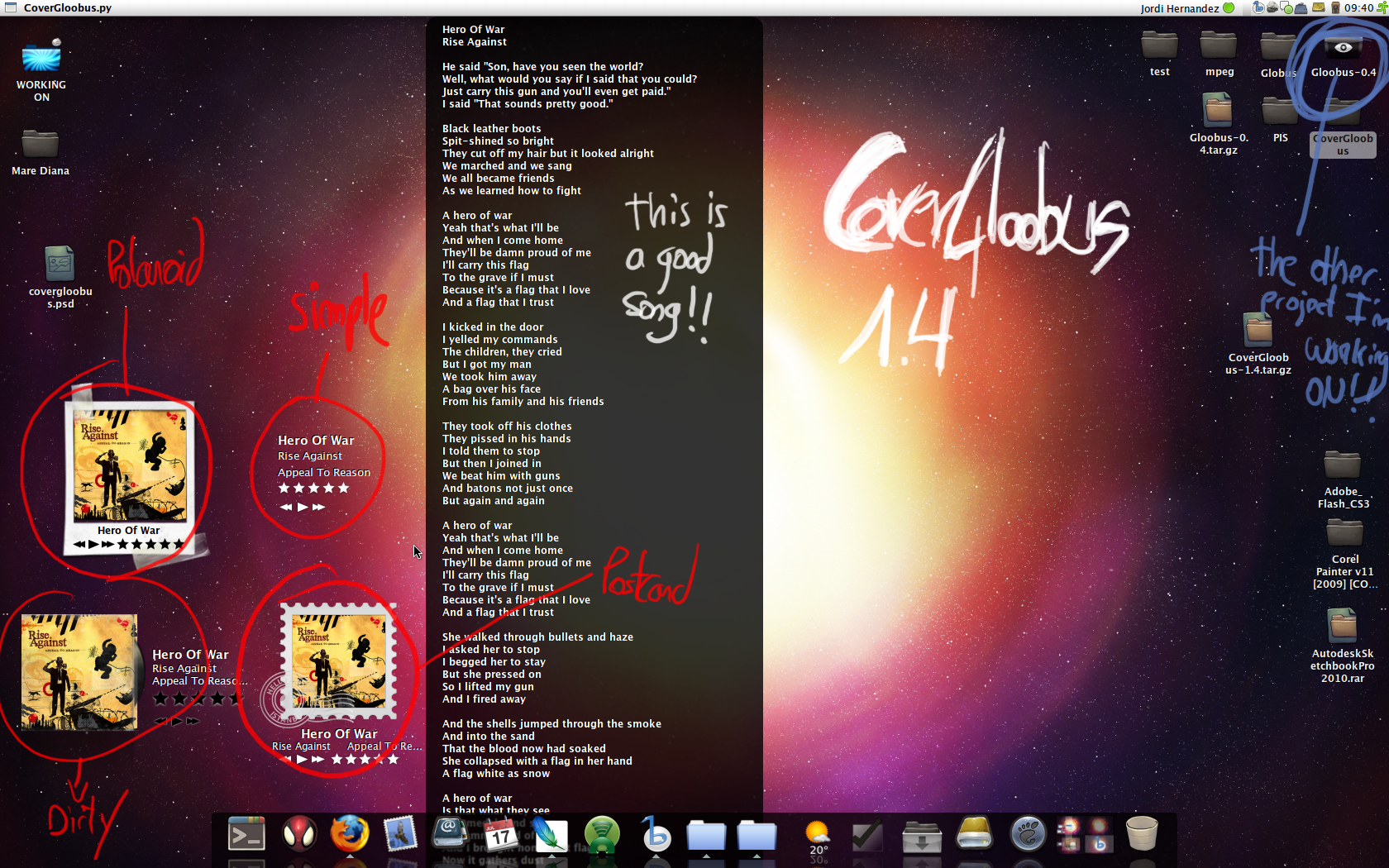
CoverGloobus Displays Cover Art, Lyrics And More On Your Desktop [Linux]

covergloobus

[Linux] From the same author as Gloobus, the amazing files preview applications which we recently covered, comes yet another great application: CoverGloobus, which is an audio player controller that sits on your desktop and can display the album cover, lyrics, etc. (similar to Rhythmbox Cover Art Plug-in).

CoverGloobus supports the following audio players: Banshee, Rhythmbox, Listen and Songbird.

You can also use it with Exaile, by downloading this file, extract it to the Players folder in the CoverGloobus directory and then add:
from Exaile import *
to CoverGloobus.py, on line 49 (just use gedit and you will easly see which that line is, because the lines are numbered).

CoverGloobus features:

-audio player controls
-album covers are automatically downloaded and displayed
-middle click CoverGloobus to display the lyrics for current playing song
-ratings system
-multiple skins

covergloobus desktop pantera

How to use CoverGloobus

1. Download CoverGloobus from HERE and extract the archive contents to any folder.

2. Open a terminal and navigate to the folder where you extracted CoverGloobus. Then, type this:
./CoverGloobus-config.py
This will open the CoverGloobus configuration dialog. You can now choose which theme CoverGloobus should use, the position it should star in, and what audio player you are using.

3. Now you can start CoverGloobus. Again, use the terminal to navigate to the folder where you extracted it, and run it using the following command:
./CoverGloobus.py

4. Optional: you can create a script which will automatically open CoverGloobus when you power-up your audio player, and kill it when you close your audio player. Here's how (the following example is for using CoverGloobus with Banshee; you can replace Banshee with Rhythmbox, etc):

-create a new, blank file, let's call it banshee_cg.sh and paste this:

#!/bin/bash
/path/to/CoverGloobus/CoverGloobus.py &
CoverGloobusPID=$!
banshee-1 --redirect-log --play-enqueued %U
kill $CoverGloobusPID
where you need to replace /path/to with the path to the CoverGloobus folder; the whole banshee-1 --redirect-log --play-enqueued %U line with the command to start another audio player such as Rhythmbox, if you don't plan on using Banshee.

-save the file, open a terminal, navigate to it's folder and make the script executable with this command: chmod +x banshee_cg.sh

-now you can open the script either by double-clicking it, or thtough a terminal: sh banshee_cg.sh

Senin, 07 September 2009

Exaile 0.3.0.1 Fixes 14 Bugs Found in 0.3.0

Exaile is a music manager and player for GTK+ written in Python. I recently wrote about the newly released 0.3.0 which is a complete re-write of Exaile and because of that, there were quite a few bugs. Exaile 0.3.0.1 is a bugfix release for 0.3.0. It contains no new features, however it does fix several (14) bugs from 0.3.0. In particular:
  • A severe bug preventing migration from 0.2.14 in certain installations was fixed. If you already have an 0.3.0 profile, you can start exaile with —force-import to overwrite your 0.3.0 profile with data from 0.2.14 (lp #420965)
  • A bug causing volume to not restore properly when playback resume is enabled was fixed (lp #406400)
  • and several more.

Rabu, 26 Agustus 2009

Exaile 0.3.0 Has Finally Been Released [Linux]


(Screenshot of Exaile 0.3.0a3)

Exaile is a music manager and player for GTK+ written in Python. It incorporates automatic fetching of album art, lyrics fetching, artist/album information via Wikipedia, Last.fm scrobbling, support for many portable media players including iPods, internet radio such as shoutcast, and tabbed playlists. It is kind of a Gnome Amarok (If I may call it that...).

Exaile 0.3.0 is a complete rewrite of Exaile from the ground up, and should make development of future versions much easier. A quick overview of what’s new in comparison to 0.2.14:

  • Last.fm cover support
  • Autodetection of cds and media players
  • An optional shiny new context panel, like that of Amarok 1.x
  • Experimental support for gapless (must be enabled in prefs)
  • New artwork throughout exaile
  • A librivox plugin
  • UI has been improved in several places
  • and more!
You can download Exaile source code from here. There is also a PPA for Exaile, but currently only the Ubuntu Karmic packages are available.

Update: Ubuntu Jaunty packages are ready, so to install Exaile 0.3.0, open a terminal and paste the following commands:
sudo sh -c "echo 'deb http://ppa.launchpad.net/exaile-devel/ppa/ubuntu jaunty main' >> /etc/apt/sources.list"
sudo apt-key adv --keyserver keyserver.ubuntu.com --recv-keys 43CBFCC0
sudo apt-get update & sudo apt-get install exaile

If you use Ubuntu Karmic (9.10), just replace Jaunty in the first command above, with Karmic

If you wish to download the latest development code, you can type the following:

bzr checkout lp:exaile

and to update it:

bzr update