Powered By

Powered by Blogger

Tampilkan postingan dengan label applet. Tampilkan semua postingan

Rabu, 30 Maret 2011

Indicator Applet To Mount CD / DVD Images: Mounty

Mounty

Mounty is a very simple indicator applet you can use to mount CD / DVD images. It supports ISO, IMG, BIN, MDF and NRG and besides mounting, it can also burn the images to a CD/DVD.

Mounty can also remember the mounted images and add it to startup with a single click. It's a very simple but effective little indicator applet.

Install Mounty in Ubuntu


Mounty is available in the TahuTEK PPA. Add it and install Mounty in Ubuntu 10.04, 10.10 or 11.04 using the following commands:
sudo add-apt-repository ppa:tldm217/tahutek.net
sudo apt-get update
sudo apt-get install mounty

Once installed, you'll find it under Applications > Accessories > Disk Image Mounter (Mounty).


Thanks to Damar for the PPA; AppIndicator created by Kasimir @ skss.learnfree.eu for creating this applet.

Jumat, 18 Februari 2011

Recent Notifications Applet Can Now Blacklist Applications

Recent Notifications applet

Recent Notifications is a GNOME applet that collects recent messages sent with libnotifiy to a notification daemon, such as notify-osd.

Just one day after we wrote about the Recent Notifications applet, it got a cool new feature but we never got to write about it because of the many news that came up this week.

The feature I'm talking about is an option to blacklist applications within the applet. For example if you get a lot of notifications in Pidgin, simply right click a Pidgin notification in Recent Notifications and select "Blacklist Pidgin" - the same goes for any application. If you want to remove an application from the blacklist, right click the Recent Notifications applet and uncheck the app you want to remove from the "Blacklist" tab:

Recent notifications applet

But that's not all; the applet got no less then 8 updates since our post last week. Most of them were bug fixes, but there are also a few other minor features that were introduced, like debug messages or set the message limit.

If you didn't try Recent Notifications applet already, you really should! Add the Recent Notifications PPA and install the applet in Ubuntu using the following commands:
sudo add-apt-repository ppa:jconti/recent-notifications
sudo apt-get update
sudo apt-get install recent-notifications

Sabtu, 12 Februari 2011

Never Miss A NotifyOSD Notification With "Recent Notifications" GNOME Applet

Don't you wish you could see the recent NotifyOSD notifications? I know I would - for instance I use a nifty application called Android Notifier that displays NotifyOSD notifications on my computer when I get a new SMS or call on my Phone, but if I'm doing something else when that happens and I miss the notification, there's no way to see it on my computer. And that's just an example, there are many other applications which display NotifyOSD notifications that you might like to see later on in case you've missed the actual notification (like some Twitter clients, etc.).


Recent Notifications Applet


Recent Notifications applet

Well, that's what the Recent Notifications applet was created for: it displays the recemt NotifyOSD notifications. The applet is very simple and doesn't come with tons of features but does its job very well: its icon turns green when you have some unread notifications, you can sort the notifications by application, copy text or link from a notification (useful at times) and that's about it. Simple, easy to use yet so useful!


Here's another screenshot - Recent Notifications lets you copy the text or link from a notification as well as directly visit the link:

Recent notifications copy link


Something like this should really be default in Ubuntu!


Install the Recent Notifications applet in Ubuntu


Recent Notifications applet comes with a PPA for Ubuntu Karmic, Lucid and Maverick. Add the PPA and install Recent Notifications using the following commands:
sudo add-apt-repository ppa:jconti/recent-notifications
sudo apt-get update
sudo apt-get install recent-notifications

Once installed, right click a GNOME panel, select "Add to panel" and add "Recent Notifications".

Minggu, 06 Februari 2011

DockBarX Applet 0.43 Released With Helpers, Media Buttons [PPA]

DockBarX 0.43

DockBarX, an amazing Gnome panel / Avant Window Navigator taskmanager applet was updated to version 0.43 today, this new release bringing media buttons for all music players that show up in the Ubuntu Sound menu and DockManager support which means that you can use the Docky helpers in DockBarX.

To enable the Helpers, in DockBarX Preference (Applications > Accessories), on the "Plugins" tab, enable "Use DockManager", then click on "Helpers" and enable some plugins. The media buttons are enabled by default but if you want to turn them off, uncheck "Use media buttons" on the Plugins tab.

DockBarX helpers


Other changes in DockBarX 0.43:
  • Prism applications are separated from each other instead of being grouped together now.
  • Small visual changes to window list and group menu. The look when using DockbarX without compositing is imporved a bit.
  • DockbarX uses its own log now. When reporting bugs, include the file ~/.dockbarx/log/dockbarx.log (or any other of the numbered log files in that directory depending on how many times you restarted dockbarx since the bug last occurred)

Here are some more screenshots featuring the latest DockBarX 0.43 used both with Avant Window Navigator and a regular Gnome panel:

DockBarX rhythmbox controls

DockBarX pidgin helper

DockBarX gnome panel

DockBarX gnome panel screenshot


Install DockBarX 0.43 in Ubuntu from the WebUpd8 PPA

DockBarX 0.43 is not yet available in the official DockBar PPA, but as usual we've uploaded the latest version to the WebUpd8 PPA (for Ubuntu Karmic, Lucid, Maverick and Natty). Add the WebUpd8 PPA and install DockBarX 0.43 using the following commands:
sudo add-apt-repository ppa:nilarimogard/webupd8
sudo apt-get update
sudo apt-get install dockbarx dockbarx-themes-extra
The above command will install both DockBarX and an extra themes package. If you want even more themes (and you use Avant Window Navigator / Faenza icons), see: DockBarX Theme Pack For Avant Window Navigator / Faenza Users.

To be able to use the Helpers, you also need to install the following packages:
sudo apt-get install dockmanager dockmanager-daemon libdesktop-agnostic-cfg-gconf libdesktop-agnostic-vfs-gio

For Zeitgeist support, add the Zeitgeist PPA and upgrade to the latest Zeitgeist:
sudo add-apt-repository ppa:zeitgeist/ppa
sudo apt-get update
sudo apt-get dist-upgrade

And finally, if you want to use DockBarX in Avant Window Navigator, you need to install the AWN DockBarX applet:
sudo apt-get install awn-applet-dockbarx


Tip: to be able to use the Window Previews feature, firstly enable it from DockBarX (Applications > Accessories > DockBarX Preference, on the Window List tab enable "Show previews") and then in CompizConfig Settings Manager make sure the "KDE Compatibility" plugin is enabled and that both options for this plugin (Support Plasma Thumbnails and Support Present Windows) are enabled.


If you're not using Ubuntu, you can download the latest DockBarX 0.43 via Gnome Look.

Report any bugs you may encounter @ Launchpad!

Minggu, 16 Januari 2011

Weather Indicator Lives On, Gets A New PPA

Weather Indicator

Weather Indicator is an Ubuntu appindicator that displays the current weather. Its development stopped a while back and the PPA was removed but Vadim Rutkovsky brought Weather Indicator back to life - for the past two weeks he's been fixing bugs for the old Weather Indicator and also, he has created a new PPA for easy installation.


Weather Indicator features:
  • Notifications support for severe weather or every weather condition change
  • the temperature unit can be set to Celsius, Fahrenheit or Kelvin
  • Multiple locations support
  • Extended weather
  • Sunlight/Sunset support with day/night icons
  • The Applet can find your location for you


Weather indicator forecast
(Weather Indicator Forecast)


See our previous posts on Weather Indicator for more info:


Install Weather Indicator

To add the new Weather Indicator PPA and install it in Ubuntu Maverick and Natty, use the following commands:
sudo add-apt-repository ppa:weather-indicator-team/ppa
sudo apt-get update
sudo apt-get install indicator-weather

Then you can start the initial setup assistant by going to System > Preferences > Weather Indicator Preferences.

Remember to submit any bugs you may find @ Launchpad.


See also: 'My Weather Indicator': A New Ubuntu Weather Appindicator

Sabtu, 25 Desember 2010

DockBarX 0.42 Brings Improved Window Previews

DockBarX 0.42

After the great new features it got two weeks ago, a new DockBarX version (0.42) has been released today, bringing some tweaks and improvements to those new features:
  • It's now possible to scroll through windows (by using mouse or keyboard shortcuts) without raising all of them.
  • Opacify now fades in and out.
  • If the previews takes up too much space to fit the screen, a list without previews will be shown instead.
  • The size of previews are now set in such a way that the window is shrunk until it fits a in box with the same size aspect ratio as the monitor (the size you set from preference window is the height of this box). Previously it was fitted into a square (size*size). This makes the height of the previews more even.
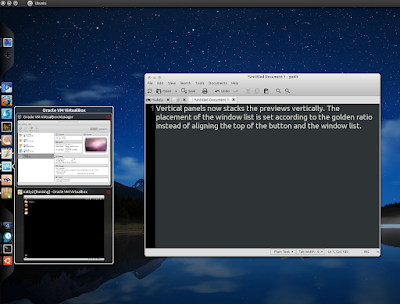
  • Vertical panels now stacks the previews vertically. The placement of the window list is set according to the golden ratio instead of aligning the top of the button and the window list.
  • For those of you who doesn't like the new menu: The old gtk menu is back and you can choose to use it from preference window.

Install DockBarX 0.42 in Ubuntu

DockBarX 0.42 is of course available in the WebUpd8 PPA for Karmic, Lucid, Maverick and Natty. Add the PPA and install DockBarX 0.42 using the following commands:

sudo add-apt-repository ppa:nilarimogard/webupd8
sudo apt-get update
sudo apt-get install dockbarx dockbarx-themes-extra

The last command above will install both DockBarX and the extra DockBarX themes pack. To also install the Avant Window Navigator DockBarX applet, use the following command:


sudo apt-get install awn-applet-dockbarx


If you're not using Ubuntu, download DockBarX via Gnome Look.

Rabu, 22 Desember 2010

Window Applets 0.2.10, Released

Gnome Window Applets

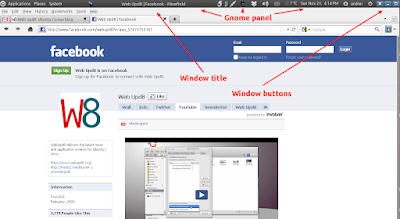
Window Applets is a package that comes with two Gnome panel applets: Window Title and Window Buttons which are basically controls for windows that are placed on the Panel instead of the window. They provide a clever way to increase vertical screen space.


New features / changes in Window Applets 0.2.10:
  • Disabled applet hiding by default (it was causing confusion with new users)
  • Added option to override button orientation (automatic/default, horizontal and vertical)
  • Added option to reverse button order
  • Updated themes: Ambiance-Maverick, Radiance-Maverick (thank you Cierreics)
  • Saturate title icon and darken text on inactive
  • Select a more apropriate non-custom title text color
  • Added options to set both active and inactive font/color
  • Added experimental option to show window action menu on title right click. Warning: Overrides applet menu over title.


To install Window Applets 0.2.10 in Ubuntu, you can use the WebUpd8 PPA:
sudo add-apt-repository ppa:nilarimogard/webupd8
sudo apt-get update
sudo apt-get install gnome-window-applets

Then, right click the Gnome Panel, select "Add to panel" and add "Window Title" and "Window Buttons".

Minggu, 19 Desember 2010

DockBarX Theme Pack For Avant Window Navigator / Faenza Users

DockBarX big dock

"DBX big dock" pack is a DockBarX theme package especially created for those that use DockBarX with Avant Window Navigator and comes with updated "Unite" themes (Unite_v and Unite_h) with new blink attenton effects as well as versions for these themes without backgrounds and bigger icons for Faenza icon theme users (the themes are called Faenza_Unite_v and Faenza_Unite_h). The pack also includes a mod of the DockBarX "dock" theme with nice colors and attention effects.

All the themes in the "DBX big dock" come with 2 versions: for horizontal and vertical dock.

DockBarX faenza
(DockBarX Faenza_Unite_H)


Installation

Download the "DBX big dock" pack from Gnome Look and extract it on your desktop, then run the following commands:
cd ~/Desktop/136409-Dock-pack/themes
sudo cp * /usr/share/dockbarx/themes/

Then, open the DockBarX preferences (Applications > Accessories) and try out the new themes!


See also: DockBarX 0.41 installation instructions (including extra themes and AWN applet)

Jumat, 17 Desember 2010

CPU Frequency Scaling AppIndicator

Indicator CPUfreq

Yet another very useful Gnome applet got an appindicator: CPU frequency scaling applet. By using an appindicator, this tiny application will be able to run in Ubuntu 11.04 without using a Gnome panel (the Unity panel doesn't support the regular Gnome applets).

For now it still depends on gnome-applets, but this might change in the future.


It's nice to see that most applets are getting an appindicator and will thus work on future Ubuntu versions, but it's a shame for all the good applets that will be lost in this transition. And it's not just Ubuntu - Gnome Shell won't support all these applets either.


Install Indicator Cpufreq in Ubuntu

Add the PPA and install Indicator-Cpufreq in Ubuntu Maverick or Natty by using the following commands:
sudo add-apt-repository ppa:artfwo/ppa
sudo apt-get update
sudo apt-get install indicator-cpufreq

Then to run it, press ALT + F2 and enter: "indicator-cpufreq" (without the quotes).


Indicator Cpufreq is very new so you may find bugs - report them @ Launchpad!


[via Corridor Nine; thanks to Артём for uploading Maverick packages too!]

Rabu, 15 Desember 2010

Cardapio Gets An Avant Window Navigator Applet

Avant Window Navigator Cardapio

Cardapio is a simple menu for the GNOME desktop that comes with a lot of useful plugins. It can launch applications, run a command, pin items, search through your Firefox bookmarks or Ubuntu Software Center, includes a file search and full text search and more.

After getting a Docky helper two weeks ago, an update today brings a Cardapio Avant Window Navigator applet too so you can finally use Cardapio like any other AWN applet (it was previously possible to use Cardapio in AWN by using a small "hack").

Install Cardapio Avant Window Navigator applet:

sudo add-apt-repository ppa:cardapio-team/unstable
sudo apt-get update
sudo apt-get install cardapio cardapio-awn

If you've already had Cardapio installed, make sure to upgrade to the latest version before installing the AWN applet.


Thanks to Thiago for the tip!

'My Weather Indicator': A New Ubuntu Weather Appindicator

My Weather Indicator

The new indicator-datetime (clock indicator) which was released in Ubuntu 10.10 Netbook Edition (and will also be default in 11.04 Desktop edition too) doesn't provide any weather info like the old Gnome Clock applet.

A while back, a weather indicator was released, however its PPA is empty for a long time and it seems its development has stopped but luckily, Atareao @ atareao.es has started a new project called "My Weather Indicator" designed to bring back the weather conditions to your panel.


Besides the info available in the appindicator (temperature, termic sensation, wind velocity, humidity and so on), 'My Weather Indicator' also displays NotifyOSD notifications on conditions change and you can get an extended weather forecast by clicking the "Forecast" option in its menu:

My weather indicator notifyosd

My Weather Indicator forecast


This being the first release, there are some bugs too, most of them probably because of the weather service it uses (The Weather Channel): sometimes it takes a long time for the Forecast dialog to open; also, I've tried various cities in my country and for some, the weather wasn't displayed correctly while for others, the city wasn't found at all. Further more, the application lacks an option to change the measuring unit (so for now you're stuck with °C and km/h).


Install "My Weather Indicator" in Ubuntu


To add the PPA and install My Weather Indicator in Ubuntu Lucid, Maverick or Natty, use the following commands:
sudo add-apt-repository ppa:lorenzo-carbonell/atareao
sudo apt-get update
sudo apt-get install my-weather-indicator

Once installed, run it by going to Accessories > My Weather Indicator.


Unfortunately My Weather Indicator doesn't have a Launchpad page so you can't easily submit the bugs may find. However, you can let the author know if something doesn't work @ atareao.es.

Selasa, 14 Desember 2010

Change Avant Window Navigator Applets Icon By Using Drag-and-Drop [Quick AWN Tip]

AWN change applet icon

Here's a quick AWN tip which I for one didn't know of: Avant Window Navigator lets you change the icon for an applet by simply dragging and dropping an icon onto the applet. This only works with single-icon applets (like YAML, File Browser Launcher, Show Desktop and so on).

To reset it, simply remove the applet from the dock and then re-add it.


Thanks to Mahdi for the tip!

Selasa, 07 Desember 2010

DockBarX 0.41 Released With Redesigned Window Previews And Menu (Looks Amazing!)

DockBarX 0.41 has just been released, featuring redesigned window previews and menu as well as a close button for the window previews. Before more info on the latest DockBarX, here are some screenshots:

DockBarX 0.41 running in Avant Window Navigator
(DockBarX 0.41 running in Avant Window Navigator)

DockBarX 0.41 - Gnome Panel applet
(DockBarX 0.41 - Gnome Panel applet)

DockBarX 0.41 running in Avant Window Navigator
(DockBarX 0.41 running in Avant Window Navigator - recent items menu)


Matias Särs, the DockBarX developer notes:

In DockbarX 0.41 the looks of the window list and the group button menu change quite a bit. The reason for these changes is the changes that other parts of the linux desktop is going through. Previous versions of DockbarX were made to blend in with gnome 2 and ubuntu notifications. DockbarX 0.41 is made to look more like Untiy, gnome-shell and docks. The new look is also a result of the positive response BigRZA's mockup got a few months back. As you can see for yourselves I've followed it quite closely.


Install DockBarX 0.41 in Ubuntu

The DockBarX repository has not been updated yet, so as usual I've uploaded it to the WebUpd8 PPA (using the original packaging by T. Scott Barnes so many thanks to him!). To add the WebUpd8 PPA and install the latest DockBarX in Ubuntu Karmic, Lucid, Maverick and Natty, use the following commands:
sudo add-apt-repository ppa:nilarimogard/webupd8
sudo apt-get update
sudo apt-get install dockbarx dockbarx-themes-extra

To also install the Avant Window Navigator DockBarX applet:
sudo apt-get install awn-applet-dockbarx


Important: to use the window previews, you need CompizConfig Settings Manager (sudo apt-get install compizconfig-settings-manager) and then check the "KDE Compatibility" plugin in CCSM (System > Preferences > CompizConfig Settings Manager) - yes, even in GNOME. Once you enable this plugin, in DockBarX preferences (Applications > Accessories > DockBarX Preference), on the "Window List" tab, enable "Show Previews".

If you also want blur for the window previews and menu items, in CompizConfig Settings Manager enable the "Blur Windows" plugin, then on its settings, under "Blur filter" select "Gaussian". You can also want to tweak the "Gaussian Radius" or "Gaussian Strength" a bit (to whatever values you like).

Minggu, 21 November 2010

Window Applets 0.2.9 Finally Gets Emerald Support, Comes With 4 New Themes

Window applets


Window Applets are 2 Gnome panel applets that display the window tile and buttons.

Because we got a lot of comments from people not understanding what Window Applets does, here's a short description (and a new screenshot - hopefully it's clear now): 

You can set Window applets to control only maximized windows (but Window Applets can control non-maximized windows too) and remove the maximized windows titlebar, thus gaining some extra vertical space, but still see the window title and control the windows using the Window Applets. Ubuntu 10.10 Netbook edition has something similar by default, but what's so great about Window Applets is that the Window Title and Window Buttons are 2 separate applets so you can place each wherever you want (like for instance: the Window Title in the middle of the panel and Window Buttons on the right, after the Session Indicator applet). 

Also, unlike the Ubuntu 10.10 Netbook Edition applet, "Window Applets" supports themes for the buttons on the panel - and comes with a lot of themes by default, as well as many other customizations.


Window Applets 0.2.9

Window Applets 0.2.9 was released yesterday, adding 4 new themes: Blubuntu, Equinox Glass, Plano and New Hope. Also, starting with the latest version, Emerald is finally working with Window Applets.


Here are the complete Window Applets 0.2.9 release notes:
  • Major code cleanups, rearangements and optimizations
  • Added plaintext settings backend (enable by setting PLAINTEXT_CONFIG to 1)
  • Fixed desktop detection (+ got rid of potential segfaults)
  • Bugfix: hide_on_unmaximized causes buttons to not reappear if disabled when currentwindow not present
  • Changed theme model from 16 to 24 images (added 2 new unfocused states) and made it backwards compatible
  • Fixed Compiz detection for maximized windows. Coincidentally this also makes Emerald work
  • Added new themes: Blubuntu, Equinox-Glass, Plano, New-Hope
  • Bugfix: Ensure the title gets truncated if it runs out of space
  • Forced the Expand option due to GTK+ bugs. It can be disabled in gconf-editor, but then you should also set a fixed title_size
  • Bugfix: Icon padding wrong on different panel orientations


Install Window Applets 0.2.9 in Ubuntu

I've been waiting for T. Scott Barnes's Misc PPA to get an update with the latest Window Applets but unfortunately the update didn't came (yet) so I've uploaded the latest Window Applets 0.2.9 in the WebUpd8 PPA.

To add the WebUpd8 PPA and install Window Applets 0.2.9 (available for Ubuntu 10.04 and 10.10), use the following commands:
sudo add-apt-repository ppa:nilarimogard/webupd8
sudo apt-get update
sudo apt-get install gnome-window-applets

Then, right click the Gnome Panel, select "Add to panel" and add "Window Title" and "Window Buttons". The applets are set to only be displayed for maximized windows so for chaging their settings, maximize a window so you can actually see the applets, then right click each of the two applets and select "Prefereces", then set everything to suit your needs.

If the Window Buttons applet doesn't show up on the panel after the installation even when maximizing a window, run the following command:
killall gnome-panel

And it should then work.


For other Linux distributions, see Window Applets page @ Gnome Look.


Thanks to Hadret for the debianization! You can install Window Applets in Debian by using Hadret's repository.

Jumat, 19 November 2010

Use MintMenu In Avant Window Navigator [AWN Applet]

MintMenu Avant Window Navigator

Avant Window Navigator already has some menu applets, but none as good as MintMenu.

But now you can use MintMenu in AWN, thanks to Neelance who maintains a PPA for MintMenu AWN applet which you can install (Ubuntu Lucid and Maverick; should work in Linux Mint) using the following commands:
sudo add-apt-repository ppa:neelance/awn
sudo apt-get update
sudo apt-get install awn-mintmenu

You'll also need the regular MintMenu installed (<-- click for installation instructions) to be able to use this!

Then add the MintMenu applet to AWN. If it takes too long for the menu to load, quit AWN and start it again (this is a known issue that occurs sometimes as noted in the PPA description).


A big thanks to Kevin McDole for sending us the tip!

DockBarX 0.40 Has Been Released

DockBarX

DockBarX 0.40 has been released last night, bringing the following changes:
  • The default theme has changed. The new default theme DBX is made by BigRZA. It's made to look good with Radiance and Ambiance. (The old default theme is still included under the name Old.)
  • Another theme by BigRZA, Sunny Colors is also included by default
  • The theme Human bar is removed since it was pretty much an older version of the new default theme.
  • Number of entries in recent and most used menus are increased to eight (for real this time).
  • A few new languages and updates to translations.


Dockbarx 0.40 new default theme
(The new default theme in DockBarX 0.40)


For those who are not familiar with DockBarX: it's a taskbar with grouping and group manipulation which works as an applet for both the GNOME Panel (see the images above) and Avant Window Navigator (image below):

DockBarX Avant Window Navigator


As usual, I've uploaded the latest DockBarX 0.40 in the WebUpd8 PPA, along with an updated extra themes package (it's required to upgrade to the latest dockbarx-themes-extra version if you've ever installed it or else you'll get an error when installing DockBarX) and the AWN applet. With this update, I've also uploaded packages for Ubuntu 11.04 Natty Narwhal (for all the DockBarX related packages).

To add the WebUpd8 PPA and install DockBarX and the extra themes, use the following commands:
sudo add-apt-repository ppa:nilarimogard/webupd8
sudo apt-get update
sudo apt-get install dockbarx dockbarx-themes-extra

To also install the Avant Window Navigator applet:
sudo apt-get install awn-applet-dockbarx

Senin, 08 November 2010

Panflute: Control Your Favourite Music Player From The Gnome Panel

Panflute

Your favourite music player is not supported by the new Ubuntu 10.10 sound menu or not using Ubuntu 10.10 Maverick Meerkat yet? Then try Panflute, a gnome Panel applet and daemon which can control whatever music player is currently running. It can play/pause/stop, display/rate songs, display artist/song title, song change notifications and more. Each of these can be removed from Panflute so you can show only the song info or controls that you want.

The latest Panflute 0.7 adds support for music players such as Clementine, Decibel, Pithos, and Qmmp along the already supported Amarok, Rhythmbox, Guayadeque, Audacious, Banshee, Exaile, Listen, MOC, Muine, Quod Libet, Songbird and VLC.

Panflute 0.7 also comes with an option to control the player volume, seek using the mouse scroll wheel on the time display and more.


To install the latest Panflute 0.7 in Ubuntu Karmic, Lucid or Maverick (from the official Panflute PPA), use the following commands:
sudo add-apt-repository ppa:kuliniew/ppa
sudo apt-get update
sudo apt-get install panflute-applet


Then right click the Gnome Panel, select "Add to panel" and add Panflute.


[Thanks to LFFL!]

Kamis, 14 Oktober 2010

Window Applets 0.2.8 Released With 6 New Themes

Window Buttons

Window Applets are 2 Gnome panel applets which can display the maximized window title and buttons on the panel (and hiding them on the actual window). This can be very useful for getting more vertical screen space for maximized windows (see the screenshot). Since this is separated into 2 applets, it means you can place the title and buttons independently, wherever you want on the panel.

Ubuntu 10.10 Netbook Edition features a similar applet by default, however UNE 10.10 doesn't allow you to customize anything about it: you can move it around or use a different theme for the buttons - as opposed to Window Applets which comes with many default themes, allows you to customize the button order and other options.


Window applets

The latest Window Applets 0.2.8 (which has been released yesterday) comes with 6 new themes: Radiance, WoW, Ambiance-X-Studio, Sorbet, Ambiance-Maverick, Radiance-Maverick, a new option to expand the applet and of course, bug fixes.


Install Window Applets in Ubuntu

There is a PPA which provides the latest Window Applets 0.2.8 for Ubuntu 10.10 Maverick Meerkat and 0.2.7 for Ubuntu 10.04 Lucid Lynx (sorry, the Maverick version won't work in Lucid!):
sudo add-apt-repository ppa:tsbarnes/misc
sudo apt-get update
sudo apt-get install gnome-window-applets

Once installed, right click a Gnome panel, select "Add to panel" and search for "Window Buttons" and "Window Title", then add both of these applets to the panel. You can then right click the applets to select a new theme and tweak other settings.

Senin, 04 Oktober 2010

DockBarX Gets Closer To Version 0.40 Stable (DockBarX 0.39.8 aka 0.40 RC, Released)

DockBarX

DockBarX is a taskbar with grouping and group manipulation which works as an applet for both the GNOME Panel and Avant Window Navigator. DockBarX 0.39.8 (codename 0.40 release candidate) has just been released, bringing 2 changes:
  • The tooltip for pinned programs with no open windows shows name and description now, just as normal Gnome launchers do.
  • The width of the window list frame is slightly smaller.

DockBarX 0.39.8 (0.40 RC) also fixes many bugs, including pinning WINE, MONO and KDE applications related bugs and so on. A complete list of changes is available @ DockBarX Gnome-Look page.


Install DockBarX and Avant Window Navigator DockBarX applet in Ubuntu

DockBarX has its own PPA but it hasn't been updated with the latest version and also that PPA doesn't have the AWN DockBarX applet.

But the WebUpd8 PPA has been updated with the latest DockBarX 0.40 RC (aka 0.39.8) and our PPA also provides the AWN DockBarX applet (thanks to Hadret!).

To install the latest DockBarX 0.40 RC (0.39.8) in Ubuntu 9.10 Karmic Koala, 10.04 Lucid Lynx and 10.10 Maverick Meerkat, use the following commands:
sudo add-apt-repository ppa:nilarimogard/webupd8
sudo apt-get update
sudo apt-get install dockbarx dockbarx-themes-extra

The last command above will install DockBarX as well as a package which has a lot of extra DockBarX themes (thanks to T. Scott Barnes for this package!)


Avant Window Navigator DockBarX

To install the Avant Window Navigator DockBarX applet (which you can see in the screenshot above) in Ubuntu, run the following command (make sure to also add the WebUpd8 PPA and install DockBarX as explained above):
sudo apt-get install awn-applet-dockbarx

Important: to use DockBarX with AWN, you obviously need to install AWN. See how to install Avant Window Navigator in Ubuntu.

Debian Repository for DockBarX and AWN DockBarX Applet

Hadret maintains a Debian repository for both DockBarX, the extra DockBarX themes and the AWN DockBarX Applet (among many other packages which include Nautilus Elementary, covergloobus, Gloobus Preview, deadbeef, Equinox Engine and themes, Faenza icon theme, Zeitgeist, Mint Menu, NotifyOSD and others - all for Debian). You can find instructions for adding and using Hadret's Debian repository @ http://hadret.rootnode.net/


How to enable live Window previews for DockBarX

To enable live window previews in DockBarX (like you can see in both screenshots in this post), you need to install CompizConfig Settings Manager:
sudo apt-get install compizconfig-settings-manager

Then go to System > Preferences > CompizConfig Settings Manager and enable the "KDE Compatibility" plugin (even if you're in GNOME), and also make sure all the "KDE Compatibility" plugin options are enabled. Then also enable window previews in DockBarX and it should work (Applications > Accessories > DockBarX Preference, on the "Popup Window" tab, check the "Show previews" option).


DockBarX is very close to the 0.40 final release. Please report any bugs you may find @ Launchpad

Kamis, 30 September 2010

AWN Radio Applet Is Available In The WebUpd8 PPA

AWN Radio Applet

If you want to play a radio stream in the background without having to open a separate application for this, you can use AWN Radio, an unobtrusive AWN applet which sits in your Avant Window Navigator dock and can play a radio stream of your choice in just 2 clicks.

AWN Radio Applet is as minimalistic as it gets: you only get the list of radio streams you've added and a stop button. The preferences dialog only allows you to add radio streams and logs the radios stations you're listening to.

Because AWN Radio Applet uses Mplayer as its back-end, it supports all the formats that work with Mplayer.


Install AWN Radio Applet in Ubuntu (9.10, 10.04 and 10.10):
sudo add-apt-repository ppa:nilarimogard/webupd8
sudo apt-get update
sudo apt-get install awn-applet-radio

Note: I've only tested it with AWN 0.4.1+ from the AWN testing PPA!


If you're not using Ubuntu, you can grab the AWN Radio Applet source code from Launchpad.


AWN Radio Applet has been created Bryan Blunt who's also behind the AWN Window Manager Applet. And speaking about the AWN Window Manager, a lot of changes were made to this new applet last night and among the changes there's also a fix for the icon size so now the applet should respect your AWN icon size. Also, the plugin will now show up as "Window Manager" in the AWN applets list (instead of "Tile windows"). The new version has been uploaded to the WebUpd8 PPA. Instructions on installing it: AWN Window Manager (Tile) - New Avant Window Navigator Applet.