Powered By

Powered by Blogger

Tampilkan postingan dengan label audio player. Tampilkan semua postingan

Rabu, 04 Agustus 2010

WebUpd8 PPA Updates: gThumb 2.11.6, Audacious 2 2.4 Beta 2, Newsbeuter 2.3

I updated a few packages in the WebUpd8 main PPA as well as in the Unstable PPA so I though I'd let you know what's going on.


gThumb 2.11.6 was released - there aren't major new features just some small ones such as the ability to sort by path. A full list of changes can be found @ Gnome Announce mailing list.

I don't know if you noticed this, but we've updated the gThumb 2.11.5 package with support for Clutter - Ubuntu 10.04 Lucid Lynx only. With the new gThumb 2.11.6, we've compiled both the Lucid and Maverick packages with Clutter - this means you can get some fancy slideshow effects. To use it, in gThumb go to Edit > Extensions and enable the Slideshow extension. Then, under Edit > Preferences you should have a new "Slideshow" tab where you can set the transition effect.

Thanks to Guido for the Clutter tip!


Unfortunately for Ubuntu 9.10 Karmic Koala users, gThumb 2.11.5 will be the last version they will be able to update to. Starting with gversion 2.11.6, gThumb requires gtk+-2.0 >= 2.20.0 and Karmic comes with GTK+ 2.18.3, so we'll no longer provide gThumb updatesfor Ubuntu Karmic users.

In case you're not using our PPA, add it and install gThumb 2.11.6 for Ubuntu 10.04 Lucid Lynx or 10.10 Maverick Meerkat (or gThumb 2.11.5 for Ubuntu 9.10 Karmic Koala) using the following commands:
sudo add-apt-repository ppa:nilarimogard/webupd8
sudo apt-get update
sudo apt-get install gthumb

We also provide a separate PPA for gThumb only.


Audacious2 2.4 Beta 2 was released to Ubuntu 10.10 Maverick Meerkat last night so we've uploaded it to our Unstable PPA. This version comes with bug-fixes only.

Install Audacious2 2.4 Beta 2 in Ubuntu 9.10 Karmic Koala and 10.04 Lucid Lynx using the following commands:
sudo add-apt-repository ppa:webupd8team/unstable
sudo apt-get update
sudo apt-get install audacious audacious-plugins


Newsbeuter is an open source command line feed reader for Linux, FreeBSD, Mac OS X and other Unix-like operating systems. It has Google Reader and Bloglines sync support as well as other amazing features. Version 2.3 which we've uploaded to the WebUpd8 PPA fixes Google Reader authentication, HTML rendering of bold and underline text when light background is configured and many other bugs.

Install it in Ubuntu 9.10 Karmic Koala, 10.04 Lucid Lynx or 10.10 Maverick Meerkat using the following commands:

sudo add-apt-repository ppa:nilarimogard/webupd8
sudo apt-get update
sudo apt-get install newsbeuter

Selasa, 03 Agustus 2010

Install Audacious2 2.4 In Ubuntu, Now With An Improved GTK Interface, Last.fm Scrobbler Plugin And More

Audacious2 is a audio player that looks a lot like Winamp 2.x and it also has some similar features such as "J" for searching the playlist, song adding functions are similar to Winamp and it even supports Winamp 2.x skins. Audacious also comes with a GTK interface so if you don't like the way Winamp looks, you can always make Audacious look like your current GTK theme.

Besides the usual features every music player has, Audacios also comes with a lot of great plugins: Audio Compression plugin (AudioCompressor AGC) to keep volume normalized at a specific level, Echo enhancing plugin, Crystallizer enhancing plugin, Voice Removal plugin, Sound stretching plugin, lots of visualisation plugins (Blur scope, Spectrum analyzer, RockLight and so on) and even a stream browser plugin which includes the most popular streaming directories. There's a huge list of plugins so better install Audacious and try them for yourself.


Since the new Audacious2 is becoming an amazing audio player, we've backported Audacious2 2.4 from Ubuntu 10.10 Maverick (so if you're running Maverick, you can install it from the official repositories) to Ubuntu 10.04 Lucid Lynx and 9.10 Karmic Koala. Update: since Audacious 2.4 final has been released and is not yet available in Maverick, we've updated the PPA with Audacious 2.4 final for Ubuntu Karmic, Lucid and Maverick!

Audacious2 2.4 comes with a lot of important bug fixes, a reworked GTK interface and also the Last.fm scrobbler plugin returns, this time threadless and without memory corruption problems.


Here is the new GTK interface:

audacious2 2.4 gtk interface

As you can see, the GTK interface looks clean, simple (DeadBeef like) yet very powerful through the amazing plugins Audacious2 comes with.


Audacious2 Windamp-like interface:

Audacious2 2.4 winamp interface


We've uploaded Audacious 2.4 to the webupd8team/unstable PPA (the PPA also comes with the Sezen Applet, the latest Freetype backported from Maverick as well as the latest mc).

To install Audacious2 2.4 in Ubuntu 9.10 Karmic Koala, 10.04 Lucid Lynx or 10.10 Maverick Meerkat run the following commands in a terminal:
sudo add-apt-repository ppa:webupd8team/unstable
sudo apt-get update
sudo apt-get install audacious audacious-plugins


Update: initially the package in our PPA was Audacious 2.4 beta 1, but we have updated it to Audacious 2.4 final! Also, the Audacious 2.4 packages are now also available in the main WebUpd8 PPA.

Selasa, 16 Maret 2010

Amarok 2.3

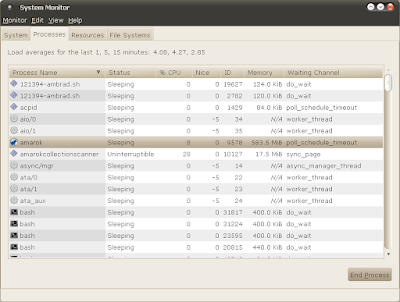
Amarok 2.3 was released yesterday and I wanted to see how the new version is working, the system resources it uses and so on.

I've installed it (see here Karmic and Lucid PPAs), and then tried to load my ~30.000+ music collection. Now that's a nice memory usage:

amarok 2.3

and it took Amarok 2.3 about ~30 minutes to index my music collection. So my review ended here. There's no point in using such an application when we have so many to choose from. I'll be sticking with GMPC.


Now, I realize Amarok is a KDE application and I was running it in Gnome, but I used to do that all the time with Amarok 1.4 and it worked just fine.

Exaile 0.3.1 Has Been Released! [And Available In WebUpd8 PPA]

exaile 0.3.1

Exaile 0.3.1 has been released today. There are no new features since the beta, but a lot of bugs have been fixed.

Exaile 0.3.1. brings some pretty exiting new features (since 0.3.0):
  • A completely revamped and much more powerful tag editor
  • An equalizer!
  • Collection panel should now be faster
  • Better support for non-standard filename encodings
  • A standalone lyrics pane plugin
  • Plugins for DAAP music sharing support
  • Better display of compilation albums


exaile 0.3.1 context panel

You can download Exaile 0.3.1 source files from HERE. There is also an Ubuntu PPA, but there are no Exaile 0.3.1 packages available yet. However, you can install beta 4 from Exaile PPA. Because we didn't want to wait for the official Ubuntu builds, we've uploaded Exaile 0.3.1 in the WebUpd8 PPA for Ubuntu Karmic and Lucid.

To add the WebUpd8 PPA (which has many experimental packages so check it out before using it!), paste this in a terminal:
sudo add-apt-repository ppa:nilarimogard/webupd8

Then install Exaile 0.3.1:
sudo apt-get update && sudo apt-get install exaile exaile-plugin-moodbar exaile-plugin-contextinfo


You can of course just download the .deb files instead of adding the PPA if you want: https://launchpad.net/~nilarimogard/+archive/webupd8/+packages

Notes:
  • the db for 0.3.1 is not backwards compatible with 0.3.0. A backup of any existing 0.3.0 db will be made when you upgrade to enable easy downgrades, but it is advised that you make you own backup as well if you care about saved ratings, playcounts, etc.
  • the 64bit packages in the WebUpd8 PPA will start being built in about an hour.

Kamis, 11 Maret 2010

Banshee 1.5.5 Released With Grid View, YouTube Plugin And Gapless Playback

banshee 1.5.5

Banshee 1.5.5 was released just a few hours ago. Like we told you a few days ago, Banshee 1.5.5 (aka 1.6 RC1) got a very nice new YouTube extension but the new version also brings some other new features like Grid View and Gapeless Playback:

Banshee 1.5.5 was just released, including gapless playback, a grid album browser, and a YouTube extension! It contains lots of good bug fixes as well - those of you burned by the 1.5.4 SQL crash will be pleased with the additional QA given to this release.


The Banshee Community Extensions 1.5.5 package got five new extensions: CoverWallpaper, LiveRadio, Magnatune, Telepathy, and Ubuntu One Music Store (not ready for users yet).

Other changes in Banshee 1.5.5:

  • The Mirage shuffle/fill by-similar mode has been greatly improved. It's smarter, now looking for tracks similar to the last several you've played, and dissimilar from ones you've skipped.
  • Improve search responsiveness on large libraries
  • Add icons for Nexus One and Audiobooks
  • Play Queue item count, size, duration now ignores old tracks
  • Muinshee fixes: disable Auto-DJ, allow reordering, hide previous song
  • Fix a very common, SQL-related crash in 1.5.4
  • Fix saving equalizer settings in culture-invariant way
  • Jumping to a source's prefs via its context menu works again
  • Usage data not submitted more than every 48 hours
  • Fix repeatedly resyncing some files to a device b/c transcoded
  • Clear the redo stack on shuffle mode change
  • Accept feeds with empty title
  • Uri encode file location queries, making them work properly
  • Fixes to the OS X build


The new Grid View:

banshee 1.5.5 grid view
(You can also see the new YouTube Related videos at the bottom)

The Grid View will will be used for Videos, Audiobooks, and more in future releases.


Watching a YouTube Video:

banshee youtube video


Ubuntu installation: Banshee 1.5.5 is not yet available in the Banshee stable PPA but if you want to try out the new features already, you can get it from the daily Banshee PPA, using the following commands:
sudo add-apt-repository ppa:banshee-team/banshee-daily
sudo apt-get update && sudo apt-get install banshee


If you're not using Ubuntu, see the Banshee download page.


The next release, Banshee 1.6.0 (stable) should be out on March 31.

Selasa, 09 Maret 2010

Banshee Telepathy Extension Allows You To Stream And Share Music With Your Jabber (Including Gtalk) Empathy Contacts

banshee telepathy extension

Speaking of Banshee extensions and Jabber, I've recently came across a very interesting Banshee extension which I'm sure many of you will find to be useful.

The extension is called Banshee Telepathy Extension and you can use it to share or stream music through Empathy instant messaging client with your contacts (Jabber (including GTalk) only) through a p2p protocol.


Banshee Telepathy Extension features:
  • Download your friends' Banshee library metadata and check out what they listen to, their ratings, BPM values, etc.
  • View your friends' playlists and export them to disk
  • Share what you're listening to with all your instant messaging friends by advertising the track, artist, and album of the currently playing track in Empathy's status message. This can be toggled on / off
  • Download your friends' music; one track at a time or a selection. You can cancel ones in progress, queued, individually or all at once. The sender has the option to cancel all in progress / queued only. Both sender and receiver get a progress bar. File sharing can be toggled on / off
  • Stream your friends' music. Streaming can be toggled on / off.


If you use both Banshee and Empathy IM client, you should give this extension a try.

A note before you try it out: it seems you need to restart the plugin after both you and your friend(s) have logged in for Banshee to see you. This can easily be done by going to Banshee: Edit > Preferences > Extensions and disable and then re-enable the Telepathy plugin.

I tried testing this plugin but I then realized the computer I use at work uses an firewalled internet connection with most of the ports blocked so it seems it's up to you to try out this great Banshee / Empathy extension. See the installation instructions below.


Install Banshee Telepathy Extension in Ubuntu


Installing Banshee Telepathy Extension in Ubuntu is pretty easy as there is a .deb package available (if you want, you can also add the PPA) but unfortunately for Ubuntu Karmic only. However the package might work in Lucid too (please let us know in the comments if you try this in Lucid).

Download Banshee Telepathy Extension .deb:


Ubuntu Karmic users will also need a newer version of Telepathy-gabble:

Install Banshee Telepathy Extension in openSUSE


There are also packages available for openSUSE (including dependencies). Grab them from HERE.


If you don't use Ubuntu or openSUSE or just want to install the latest version of the Banshee Telepathy Extension, see it's github page.

For more info and how to use, see this README.

Banshee To Add A New YouTube Related Videos Plugin

Gnomeuser @ubuntuforums reports that Banshee just added a new Youtube plugin to GIT that allows showing related Youtube videos in the context pane.

I for one didn't get a chance to play with this new plugin as GIT is blocked where I work, but it should be available soon in the Banshee daily PPA.

This makes the future development of Banshee (1.5.5) - a music player written in MONO - which is supposed to be released tomorrow even more interesting.

Banshee 1.6.0, the stable release should be out on March 31.

Listen Music Player Comes With Lots Of Useful Features, Plugins. Try It!

listen music player 0.6.5

Listen is an audio player which comes with many very useful features such as Podcasts management, browse Shoutcast directory, provides direct access to lyrics, lastfm (currently playing song info and future events) and wikipedia information:

listen music player future events

One feature I really enjoy in Listem Music Player is it's option to create playlists for you by retrieving information from last.fm and what you most frequently listen to. And another feature creates dynamic playlist based on some criteria you choose:

listen dynamic playlist


Here is the list of plugins which currently power Listen:

listen music player 0.6.5 plugins


Listem Music Player 0.6.5 was released yesterday and it comes with many changes and fixes:

* Playlists order are keeped
* Fixed some encoding problem when downloading podcast
* Write a new API to display html
* New preference window layout
* Ensured dialog window are open on the top of main window when it was in fullscreen
* Big code cleanup with pylint
* Updated gajim api
* Suppression current playing song from gajim or pidgin status when exiting
* Fixed flickering in top left screen, when pressing cover button
* Decreased listen load time a lot
* Resolved stream end and stop to this track conflic problem
* Add viewport for webkit


In my tests, Listen 0.6.5 used around 30mb of RAM but I didn't have too many music files on the computer on which I've tested it (only around 1000). As a reference, using the same music library of ~1000 songs Goggles Music Manager used only 14 MB of RAM, Rhythmbox - 17mb, while GMPC only 5,5 MB, but Listen looks a lot better than Googles Music Manager, has a lot more useful and interesting plugins than Rhythmbox and is a lot easier to set up than GMPC so here are 3 reasons why you might want to try Listen Music Player.


Install Listen Music Player in Ubuntu


You can install Listen Music Player 0.6.5 (latest) in Ubuntu either by downloading the following .deb files:

-Karmic:
32bit: listen_0.6.5-0~ppa1~karmic_i386.deb
64bit: listen_0.6.5-0~ppa1~karmic_amd64.deb

-Jaunty:
32bit: listen_0.6.5-0~ppa1~jaunty_i386.deb
64bit: listen_0.6.5-0~ppa1~jaunty_amd64.deb


Or by adding the Listen Music Player PPA so you'll stay up to date (paste the following commands in a terminal):

-Karmic:
sudo add-apt-repository ppa:listen-devel/ppa


-Jaunty:
sudo bash -c "echo 'deb http://ppa.launchpad.net/listen-devel/ppa/ubuntu jaunty main' >> /etc/apt/sources.list"
sudo apt-key adv --keyserver keyserver.ubuntu.com --recv-keys AA832887


And then to install it either in Ubuntu Karmic or Jaunty:
sudo apt-get update && sudo apt-get install listen


If you're not using Ubuntu, get Listen Music Player source code from HERE.


[thanks to: ubuntutips & LinuX Freedom for Live for their posts about Listen]

Senin, 16 November 2009

Goggles Music Manager For Linux

Goggles Music Manager is a music collection manager and player that automatically categorizes your music files based on genre, artist, album, and song. It supports gapless playback and features easy tag editing.

Goggles Music Manager

Features

  • Fast and light weight. Quick startup, no splash screen needed!
  • Supports Ogg Vorbis , FLAC, MP3 , MP4 , ASF and Musepack music files.
  • Support for AlbumArt embedded in tag or as separate file on disk.
  • Tag editing and file renaming capability (batch). One or more tracks may be edited at the same time.
  • Smart sorting with user configurable leading word filter to prevent sorting on common words like the, a or an.
  • Support for play lists. Play lists may be played in a certain configurable order, or browsed through like the main music library.
  • Export music library and play lists to XSPF,PLS,Extended M3U,M3U and CSV.
  • Clipboard & DND (drag-and-drop) support to arrange playlists and dragging to and from gnome / kde applications.
  • Uses xine multimedia library for gapless playback.
  • Written using FOX, one of the fastest GUI toolkits available. Support for FOX-1.6.x and the latest development version FOX-1.7.x.
  • Customizable icons. Either use building icons or use an existing gnome/kde icon theme.
  • Configurable user interface from minimalistic to detailed view. Full screen mode available with FOX-1.7.11.
  • Clean and fast database backend using SQLite 3.
  • Last-FM audio scrobbler support.
  • Replay Gain support (Ogg Vorbis, FLAC and mp3 with APE tags).
  • Equalizer


Basically, it's a simple music player that does it's job and works really fast. Other than it's speed, I was also impressed with how little system resources it uses: 8.7 MB of RAM (on my system) and never more than 2% CPU (my music collections is something near 40.000 songs).


Please note that to install it in Ubuntu, you can't have Nvidia 190 drivers (because libxine1 depends on nvidia185 drivers).

Download Goggles Music Manager:

Make sure you also install libxine-extracodecs (in Ubuntu Jaunty) or libxine1-ffmpeg (in Ubuntu Karmic Koala) so that Goggles Music Manager can actually play the music:
sudo apt-get install libxine1-ffmpeg

or:
sudo apt-get install libxine-extracodecs

Selasa, 10 November 2009

Cuberok: Multi-Platform Audio Player - Amarok 1.4 Style (Qt Based)

Cuberok is a music player and collection manager which resembles a lot to the very popular Amarok 1.4. It is based on Qt4 and has a lightweight interface, music collection support and many features, e.g. music autorating and Last.FM scrobbler.

Cuberok works on Linux, Windows and Mac OSX but for now I have only tested it in Linux (Ubuntu).


Cuberok features


* English and Russian interface.
* CUE support. Codepage selection for CUE sheets
* Shoutcast/icecast support (for GStreamer and Phonon)
* Support internet services Jamendo and MagnaTune (New in v.0.0.9)
* Last.FM and Libre.FM scrobblers
* Downloading images for albums and artists from Last.FM
* Loading artist and album info from Last.FM, loading lyrics from LyricWiki.org
* Auto rating for songs. Rating for albums, artists and genres automatically calculated from rating of songs.
* Easy collection browsing. Just double click on genre to view all artist in this genre.
* Smart playlists (custom SQL requests)
* Support for AlbumArt as separate file on disk. Art can be assigned to genre and artist too.
* Many supported music formats.
* DND (drag-and-drop) support to collect music and append playlists.
* Support for many play lists at one time. Play lists may be played in a certain configurable order, or browsed through like the main music library.
* Tag editing capability. Built-in tag converter QTagConvert
* Save/Load play lists to/from XSPF and M3U.
* Collect playlist files into Library. Supported XSPF, M3U, ASX/ASP and CUE files.
* Installer for Windows.
* Clean and fast database backend using SQLite 3.
* Configurable user interface.


I only wish I have kept my Amarok 1.4 library, as Cuberok has an option to import the Amarok 1.4 library:


cuberock


Cuberok is not perfect. Actually, far from that: it still has bugs, not a lot of configurable options, but the look, feel and a lot of Amarok 1.4 features can be found in Cuberok:

cuberok collection

cuberok

To install Cuberok in Ubuntu (even though the package is called _jaunty_, it also works in Karmic), download the Ubuntu .deb file from HERE.

To get it to work, I installed a lot of dependencies manually. I don't remember them exactly, but these must be most if not all of them (sorry, I didn't keep a list of each dependency installed): phonon phonon-backend-gstreamer libaudiere-1.9.4 libtaglib2.0-cil sqlite3 libqt4-sql libqt4-sql-mysql libqt4-sql-sqlite libqtscript4-sql

To install them all in Ubuntu Karmic with one command, run this in a terminal:
sudo apt-get install phonon phonon-backend-gstreamer libaudiere-1.9.4 libtaglib2.0-cil sqlite3 libqt4-sql libqt4-sql-mysql libqt4-sql-sqlite libqtscript4-sql


More about the dependencies, on Cuberok homepage.

DOWNLOAD: For Debian, Windows, Mac OSX and source files, see the download page.

Minggu, 18 Oktober 2009

MPD + Sonata = Powerful Audio Player For Linux

A lot of people are praising MPD (Music Player Daemon) + Sonata so an article on this was probably expected.

But what is MPD and what is Sonata?

Music Player Daemon (MPD) is a flexible, powerful, server-side application for playing music. Through plugins and libraries it can play a variety of sound files while being controlled by its network protocol.

Sonata is a GTK+ music client for the Music Player Daemon (MPD).


Basically, Sonata is a GUI for MPD. I don't mind having a CLI tool for listening to music, but MPD never really seemed like the perfect chioce for me (for a CLI music player, I prefer CMus). But the MPD + Sonata combination is another deal. Try it and you will surely love it!


Sonata features:

- Expanded and collapsed views
- Automatic remote and local album art
- Library browsing by folders, or by genre/artist/album
- User-configurable columns
- Automatic fetching of lyrics
- Playlist and stream support
- Support for editing song tags
- Drag and drop to copy files
- Popup notification
- Library and playlist searching, filter as you type
- Audioscrobbler (last.fm) 1.2 support
- Multiple MPD profiles
- Keyboard friendly
- Support for multimedia keys
- Commandline control
- Available in 24 languages

Sonata screenshots:

mpd sonata linuxsonata mpdsonata


Installing MPD + Sonata


Firstly, you need to install MPD which should be available in your Linux distribution repositories.

For Ubuntu:
sudo apt-get install mpd mpc


Sonata should also be available in your distro repositories. For Ubuntu, if you want the latest version, you can downloaded the Debian version which works just fine (I've tested it in Ubuntu 9.10 Karmic Koala)

For getting the latest version for your Linux distribution, see Sonata download page.

Ubuntu: if you want to use the version available in the repo:
sudo apt-get install sonata


If you want to edit tags, also install:
sudo apt-get install python-tagpy libtaglib2.0-cil


Configuring Sonata + MPD

To configure MPD for your user, see HERE. The steps below will configure MPD for system-wide use.


For me, it didn't work right out of the box but it should just take a few seconds for configuring Sonata + MPD.

Update: To add you music to the MPD database you can simply run the following command (where "YOUR_MUSIC_FOLDER" is the exact path to your music folder):
sudo ln -s YOUR_MUSIC_FOLDER /var/lib/mpd/music/

Alternatively you could enter directly the path to your music folder in the MPD config file but there are some strange permisison errors reported by the users when doing this. Anywhow, to do this, press Alt + F2 and paste (for Gnome, if you use KDE, replace gedit with kate, etc):
gksu gedit /etc/mpd.conf

And on line 8, you should see "music_directory". Next to it, enter the path to your music folder. Basically, this is how it should look:
music_directory "/home/Muzica"


If you have more than 1 music folder, you have to create symbolic links to the other music folders, in your main music folder. This can be easily done in Gnome / Nautilus: right click a folder, select "Create link" and copy the newly created link to your main music folder.


Replacing /path/to/music with the path to your music folder (which you've set in the mpd.conf file also). Alternatively, you can also comment out the "user" and "group" lines in the mpd.conf file (Press Alt + F2, enter this: gksu gedit /etc/mpd.conf, search for "user" and put a "#" in front of it and then do the same for the "group" line) - this solves some permission errors.

After you have completed all this, save the file and run this in a terminal:
sudo mpd --create-db 

To create your music database. Leave MPD to finish adding all your songs.

NOTE: the sudo mpd --createdb command doesn't work with the latest MPD (available through a PPA for Ubuntu). Instead, after installing Sonata, go to the Library tav, right click and Update database or use:
sudo /etc/init.d/mpd start-create-db
or:
mpc update


If your sound doesn't work, set mpd to use Pulseaudio:
gksu gedit /etc/mpd.conf

And paste this at the end of the file:
audio_output {
type "pulse"
name "mpd-pulse"
}

Just one last thing for getting MPD + Sonata to work with pulseaudio: press Alt + F2, type:
gedit /etc/pulse/default.pa

And paste this at the end of the file:
load-module module-native-protocol-tcp auth-anonymous=1

Now you need to restart your system and then finally, you can start Sonata from Applications > Sound and Video.

If Sonata cannot connect, try running MPD first (in a terminal, type: sudo mpd).

More about MPD and Pulseaidio.


Update: you might also want to take a look at the latest Gnome Music Player Client (GMPC), another amazing client for MPD.

Minggu, 11 Oktober 2009

6 Plug-ins / Tools To Improve Rhythmbox [Linux]

1. Desktop Art plug-in - already covered, read about it HERE.

2. 10 Band Equalizer plug-in

Installation:
mkdir -p ~/.local/share/rhythmbox/plugins && wget http://www.lirmm.fr/~morandat/pub/upload/Main/rb-equalizer.tar.bz2  -O- | tar xvjf - -C ~/.local/share/rhythmbox/plugins 

3. Last.fm Recommendations Plugin - Chooses the next song to queue based on the currently played track. Makes use of Last.fm recommendations.

Installation:
mkdir -p ~/.local/share/rhythmbox/plugins && wget http://airmindprojects.googlecode.com/files/lastfm_queue_0.3.tar.bz2  -O- | tar xvjf - -C ~/.local/share/rhythmbox/plugins 

4. New Style Last.fm for Rhythmbox - This is a modified Rhythmbox version. It scrobbles via the lastfm client instead of submitting directly, just like scrobbling on OS X and Windows. And you can love the currently playing song.

Installation and how to use instructions.

5. Use Rhythmbox with Spotify - you need to compile Rhythmbox to enable this. Instructions, HERE.

6. Gnome Do + Rhythmbox - my favourite: an external tool which I am sure you've heard of: Gnome DO. Using it with Rhythmbox is AWASOME! How-to: Use Gnome-Do To Control Rhythmbox, Banshee, Exaile and XMMS2

Sabtu, 03 Oktober 2009

Gmusicbrowser 1.0.2 Released

gmusicbrowser 1.0.2

Gmusicbrowser, one of the best music players for Linux was updated to version 1.0.2. If you read Web Upd8 constantly, you must have heard of it by now.

1.0.2 changelog:

- updated fetch_cover and lyrics plugins
- updated translations : de fr
- new translation : zh_CN
- added support for reading pictures in flac files
- add "Now Playing" support for last.fm
- new plugin : notify
- new layout : 'Tabbed Lists, Library & Context'
- add support for using ogg123 to play flac files
- improved the Makefile
- Implement "CopyFields" DBus function
- fix accumulation of mplayer processes if -cache option enabled by using -nocache option
- fix to support amixer controls with spaces in their name
- other small fixes

Download gmusicbrowser 1.0.2 (packages available for Ubuntu (.deb and repository), Mandriva, Fedora, Archlinux and Gentoo)

Jumat, 02 Oktober 2009

The Final Version Of Amarok 2.2 "Sunjammer" Released [Linux]

amarok 2.2 finalAmarok 2.2 comes with an almost completely new look and feel. It now has a new layout for the Browser Pane on the left and an easier navigation using "bread crumbs" on top. All elements, the Browser Pane, Context View and the Playlist are dockable widgets, which you can place how and where you like. It is even possible to stack or remove them. Of course it's up to you to change the position, width and height to your liking.

Read the complete Amarok 2.2 release announcement to see what's new.

Amarok 2.2 marks the start of a series of 2.2.x releases that will focus on improving what is there rather than adding major new features. A new release will follow approximately every 6 weeks and bring with it bugfixes and improvements, as well as a few new features. So look forward to more regular Amarok updates in the near future.

(K)ubuntu Linux 9.10 the "Karmic Koala" will include Amarok 2.2 as its default Audio player! Packages for 2.2 will be uploaded to Karmic shortly.

Instructions for installing Amarok 2.2 in (K)Ubuntu Jaunty Jackalope (it also includes instructions for installing Amarok 2.2 in Fedora).

Other Linux distributions: download / installation instructions for Amarok 2.2

Senin, 28 September 2009

Install Amarok 2.2 In Ubuntu Jaunty and Fedora

Amarok 2.2 was released a few days ago. For complete changelog, visit this page.

amarok 2.2 ubuntu

I loved Amarok 1.4 and even used it in Gnome. Then, I really hated all the 2.x series until this 2.2. It's kind of slow, but it finally looks like a real music player and reminds me why I liked Amarok so much. I'm currently using it in Ubuntu Jaunty and since there are only .deb files for Ubuntu Karmic posted on the announcement download link (actually those are for version 2.2 beta), I thought I'd let you know how to install it in Ubuntu Jaunty.


Installing Amarok 2.2 In Ubuntu Jaunty


1. Add the following repository (run the command in a terminal):
sudo sh -c "echo 'deb http://ppa.launchpad.net/project-neon/ppa/ubuntu jaunty main' >> /etc/apt/sources.list"


2. Add the GPG key:
sudo apt-key adv --keyserver keyserver.ubuntu.com --recv-keys 0F7992B0

3. Install Amarok 2.2:
sudo apt-get update && sudo apt-get install amarok-nightly

This will install Amarok 2.2 separately of any version of Amarok you may have installed. To run it, click the "Amarok Nightly" icon, not "Amarok".


Installing Amarok 2.2 In Fedora


amarok 2.2 fedora

1. Add the KDE RedHat repository:
su -c "wget http://apt.kde-redhat.org/apt/kde-redhat/fedora/kde.repo -O /etc/yum.repos.d/kde.repo"


2. Install Amarok 2.2 in Fedora:
su -c "yum --enablerepo=kde-unstable -y install amarok"


Fedora installation credits: Fedora-ES.com

Update: I updated the post from Amarok 2.2 RC to Amarok 2.2 Final as now the Uubntu PPA contains the final build of Amarok 2.2.

Jumat, 25 September 2009

Jaangle: Excellent Windows Music Player

JaangleJaangle is a free media/music player for Windows which, besides the normal audio player capabilities, offers online integration (automatically downloads and displays artist information and artwork from the net) as well as integrated audio tag editing for every imaginable audio format. Jaangle and foobar2000 are the only Windows music players that come close to my favourite Linux player, gMusicBrowser and it's my favourite Windows music player, for now anyway!

The application downloads free information from the Internet that music fans will appreciate, including artist photos, album covers, song lyrics, music tablatures, album reviews, and artist biographies. For example, if you right-click on an artist in the library and then select "LastFM - load picture," it will download an additional free artist picture (if available) each time it is clicked, turning the relevant photo into a slide show. Apart from playing most of the common music formats Jaangle will also play some video formats with the possibility that in the future .flv files will be included.

Features

This is a short list of the main features.

Jaangle works on Windows XP/2003, Vista, is freeware and you can download it from HERE. The installer is about 2.2 mb and only uses ~25 mb of RAM.

[via freewaregenius, image credits: jaangle.com, I'm using Linux right now so I couldn't grab a screenshot]

Rabu, 23 September 2009

Quick Tip: Listen to 4000+ Radio Stations in VLC

VLC has yet another hidden feature I just discovered (others might know it, I didn't...). You can listen to 4000+ radio stations without installing any additional software, by just using VLC. Here is how:


First thing: make sure you have the latest VLC version installed. If now: download it from HERE | How to install it in Ubuntu

Then, go to Media > Services Discovery > Shoutcast radio listings:

vlc enable radio stations

Then go to View > Playlist and click on "Shoutcast radio listings" on the left. You should then see a bunch of music genres:

vlc radio

Double click one and you'll see all the radio stations for that genre.

Oh, and there's also a search function (obviously).

Senin, 21 September 2009

Rhythmbox 0.12.5 Released [Ubuntu .deb Download]

Rhythmbox 0.12.5 was released yesterday, bringing mostly bug fixes, but also 3 notable improvements:

* New cover art search code using discogs.com and MusicBrainz, replacing
the Amazon cover art search that no longer works (Jonathan Matthew)
* Updated Coherence UPnP plugin (Frank Scholz)
* Clicking on the status icon summons the main window to the current
workspace
(Steve Fracinaux)

Bugs fixed:

410684 - MusicBrainz cover art search
590184 - Update .desktop file for new GenericName conventions
592404 - use correct icon name for the throbber
592763 - fix some button definitions so the button-images setting works
593494 - display location column in playlists if enabled
594008 - fix reading of symlinks with non-ASCII targets
594124 - fix incorrect variable name in gio chunk loader
594419 - disable non-functional lyricwiki search
594728 - deadlock setting replaygain-adjusted volume

Download Rhythmbox 0.12.5: Ubuntu .deb | Other Linux distributions

Jumat, 18 September 2009

CoverGloobus Displays Cover Art, Lyrics And More On Your Desktop [Linux]

covergloobus

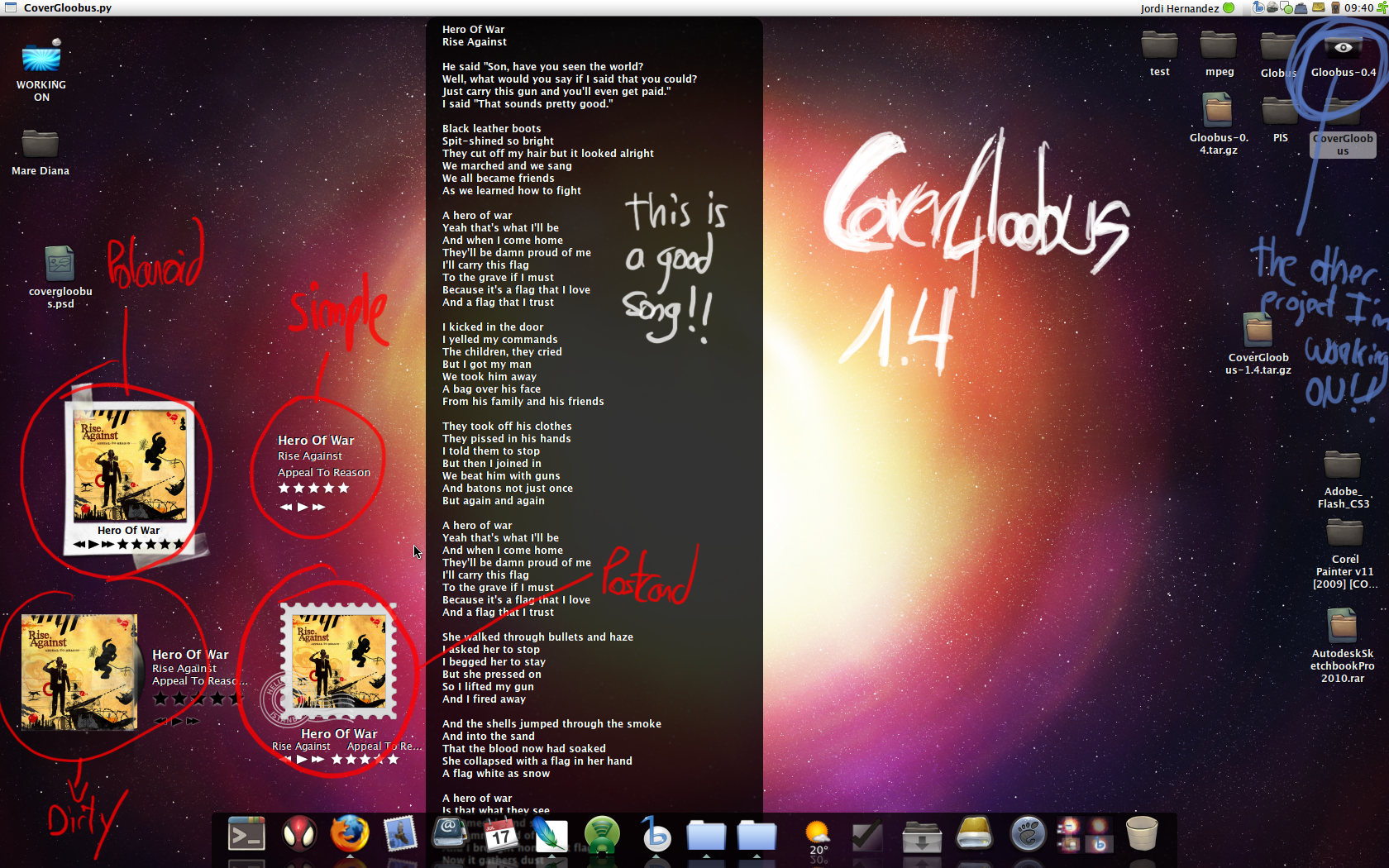
[Linux] From the same author as Gloobus, the amazing files preview applications which we recently covered, comes yet another great application: CoverGloobus, which is an audio player controller that sits on your desktop and can display the album cover, lyrics, etc. (similar to Rhythmbox Cover Art Plug-in).

CoverGloobus supports the following audio players: Banshee, Rhythmbox, Listen and Songbird.

You can also use it with Exaile, by downloading this file, extract it to the Players folder in the CoverGloobus directory and then add:
from Exaile import *
to CoverGloobus.py, on line 49 (just use gedit and you will easly see which that line is, because the lines are numbered).

CoverGloobus features:

-audio player controls
-album covers are automatically downloaded and displayed
-middle click CoverGloobus to display the lyrics for current playing song
-ratings system
-multiple skins

covergloobus desktop pantera

How to use CoverGloobus

1. Download CoverGloobus from HERE and extract the archive contents to any folder.

2. Open a terminal and navigate to the folder where you extracted CoverGloobus. Then, type this:
./CoverGloobus-config.py
This will open the CoverGloobus configuration dialog. You can now choose which theme CoverGloobus should use, the position it should star in, and what audio player you are using.

3. Now you can start CoverGloobus. Again, use the terminal to navigate to the folder where you extracted it, and run it using the following command:
./CoverGloobus.py

4. Optional: you can create a script which will automatically open CoverGloobus when you power-up your audio player, and kill it when you close your audio player. Here's how (the following example is for using CoverGloobus with Banshee; you can replace Banshee with Rhythmbox, etc):

-create a new, blank file, let's call it banshee_cg.sh and paste this:

#!/bin/bash
/path/to/CoverGloobus/CoverGloobus.py &
CoverGloobusPID=$!
banshee-1 --redirect-log --play-enqueued %U
kill $CoverGloobusPID
where you need to replace /path/to with the path to the CoverGloobus folder; the whole banshee-1 --redirect-log --play-enqueued %U line with the command to start another audio player such as Rhythmbox, if you don't plan on using Banshee.

-save the file, open a terminal, navigate to it's folder and make the script executable with this command: chmod +x banshee_cg.sh

-now you can open the script either by double-clicking it, or thtough a terminal: sh banshee_cg.sh

Rabu, 16 September 2009

Cactus Jukebox - Fast Audio Player For Linux and Windows Which Can Synchronize Your Music Collection With An USB Device

Cactus Jukebox is an audio player and music organizing tool. You will love this audio player for Linux and Windows (experimental on Windows) if your focus is on usability and speed. Cactus Jukebox still runs smoothly with 15GB of music files on an old computer like a P3 @ 500MHz. Another great thing about Cactus Jukebox is that it features an option to synchronize your music collection with a mobile player device (USB).

Features:

+ Fast database
+ Audio CD ripper
+ Webradio support
+ Upload/synchronize to mobile players
+ Plattform independent(GTK, GTK2, win32)
+ Browse your music collection by artist, albums and titles
+ Save and load m3u playlists
+ ID3 tag support
+ Easy tagging of mp3-files

What's coming next:

+ Support flac, wma
+ Audio CD Player
+ Burn CD's
+ Support more plattforms(MacOSX, QT,...)
+ Many bugfixes
+ And more

Screenshots:

The main window Linux/GTK2Cactus Jukebox on WindowsXP


Download Cactus Jukebox (Ubuntu .deb (both 32 and 64 bit), openSUSE .rpm and Windows .exe) | via ubuntu tips