Powered By

Powered by Blogger

Tampilkan postingan dengan label wallpapers. Tampilkan semua postingan

Senin, 25 April 2011

Ubuntu Unity Keyboard Shortcuts Wallpapers

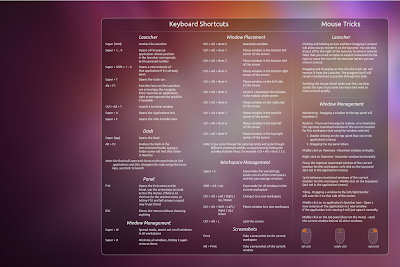
Can't remember all the Unity keyboard shortcuts? Then check out the AskUbuntu keyboard shortcuts thread - you'll find two wallpapers (one is also available in German) with most of the Unity mouse tricks / keyboard shortcuts:

Ubuntu Unity Shortcuts wallpaper

Ubuntu Unity keyboard shortcuts wallpaper

Unfortunately there's no SVG available so if the wallpaper resolution doesn't match your monitor, try tweaking it via the Appearance preferences (stretch/zoom, etc).


Get the full-size wallpapers @ AskUbuntu

Rabu, 23 Maret 2011

Ubuntu 11.04 Community Wallpapers Revealed, Default Wallpaper Slightly Modified [Download]

The "ubuntu-wallpapers" package has just been updated in Ubuntu 11.04 Natty Narwhal and it now includes wallpapers from the Ubuntu 11.04 community contest:

Ubuntu 11.04 community wallpapers

wallpapers

Ubuntu 11.04 community wallpapers

Ubuntu 11.04 Natty Narwhal community wallpapers

Ubuntu 11.04 community wallpapers

Ubuntu 11.04 community wallpapers

Ubuntu 11.04 community wallpapers

Ubuntu 11.04 community wallpapers

Ubuntu 11.04 community wallpapers

Ubuntu 11.04 community wallpapers

Ubuntu 11.04 community wallpapers

Ubuntu 11.04 community wallpapers

Ubuntu 11.04 community wallpapers

Ubuntu 11.04 community wallpapers

Ubuntu 11.04 community wallpapers

Ubuntu 11.04 community wallpapers


These seem like the best community wallpapers so far and I'm really glad they've finally decided to include some non-photos as wallpapers (we've had enough flowers in 10.10).


The default Ubuntu 11.04 wallpaper has been slightly modified:

I have made subtle changes and introduced new light refractions. We can continue to add light streams and re-balance with each release - the landscape becomes gently lighter and brighter and gains in complexity to reflect our drive towards 12.04 :)

IMHO as we move towards becoming more of a 'household' platform and with the great changes coming with Unity (launcher/dash) general users will get reassurance from the familiarity of the wallpaper and will also identify with it as part of our personality in new screenshots.

-via LP

Ubuntu 11.04 default wallpaper


Download all the Ubuntu 11.04 community wallpapers from HERE (I didn't link to the .deb because it would replace your current community wallpapers package).

Minggu, 20 Maret 2011

Lubuntu 11.04 Gets New Default Theme, Wallpaper

Lubuntu is an unofficial Ubuntu flavor based on LXDE.

Remember Ozone, the theme proposed to become default in Lubuntu 11.04? Well, the theme got some improvements and it's now a lot faster so it was made default starting today. Here's how Ozone looks now:

Lubuntu 11.04 new default theme


Today's update also brings a new wallpaper (well, you've already seen it when we've talked about Ozone) to match Ozone:

Lubuntu 11.04 new default wallpaper

For those interested in using the new Lubuntu wallpaper, get it from here.

Jumat, 18 Maret 2011

Xubuntu 11.04 Default Wallpaper Announced

Pasi Lallinaho, the Shimmer Project leader, announced the Xubuntu 11.04 Natty Narwhal default wallpaper:

Xubuntu 11.04 default wallpaper

You can grab the full size image from HERE.

The source image for the wallpaper is a picture by Simon Steinbeiß and it’s from the Austrian Alps:

Xubuntu 11.04 source wallpaper photo


What do you think?


Senin, 28 Februari 2011

Top 10 Box Office Movies Wallpaper Generator

IMPloader is a script that fetches the posters for the top 10 Box Office movies of the week and automatically generates a wallpaper. You can customize how many images are used (but there's a maximum of 10), the style (black, white and polaroid), width and height of the wallpaper and border of the images.

Here are two examples of wallpapers generated using IMPloader:

IMPloader

IMPloader


Usage


To use it, you'll need Ruby and Imagemagick. Install these packages in Ubuntu using the following commands:
sudo apt-get install ruby imagemagick

Then, download the script from Gnome Look and extract it on your desktop.

Now you'll have to run the script - the first time is for generating the config file:
cd ~/Desktop/118501-Desktop
./imploader.rb

This will create a new config file under ~/.imploaderrc. Open it with gedit:
gedit ~/.imploaderrc

Here you can customize everything about your wallpaper. The config file is well documented so I'll not get into details. If you do not edit the "TEMPPATH" variable inside the config file, the new wallpaper will be created on your desktop (and it will be called collage.jpg).

Once you're done with the config file, run the script again and it should generate the wallpaper:
./imploader.rb

If you want the wallpaper updated once a day you can add a cron-job for this or simply add the imploader.rb script to your startup applications to generate a new wallpaper each time your computer starts.


Want more cool wallpapers? Check these out:

Ubuntu Mascots Wallpaper

I recently came upon a beautiful wallpaper that includes all the Ubuntu mascots and wanted to share it with you:

Ubuntu Mascots Wallpaper


The wallpaper was created for the Ubuntu Karmic Koala release and it initially  only included the middle shelf animals but it was recently updated with all the new mascots.


Download @ DeviantArt

Senin, 10 Januari 2011

Download A Collection Of ~1000 Widescreen HD Wallpapers

1000 hd wallpaper collection
(A few random wallpapers from the ~1000 widescreen HD wallpaper collection)

On the Wallch (Wallpaper Changer) Launchpad page I've found a link to a collection of around 1000 widescreen HD wallpapers and thought I'd share the link with you.

The wallpapers are nicely organized into categories such as: Abstact, Animals, Black&White, Dragons, One Color, Music, Technology, Cars and so on (there's a total of 20 categories).


You can use these wallpapers to automatically set a random wallpaper every X minutes using an application such as Wallch, Wally, Webilder, CreBS and so on.


Download the ~1000 HD wallpaper pack (436.4 MB)


Also see: widescreen HD wallpaper pack: 1 2 3

Kamis, 30 Desember 2010

Updated: Ubuntu And Fedora Wallpaper Pack [Official Wallpapers]

Ankur has updated the wallpaper collection we've mentioned a while back that includes all the Ubuntu and Fedora official wallpapers in the 4:3 and 16:10 formats. The update includes the Fedora 14 and Ubuntu 10.10 wallpapers along with 10 extra wallpapers (from Linux Mint, Mandriva and the latest KDE 4.6 wallpaper):


Download Ubuntu & Fedora wallpaper pack (includes 84 wallpapers): Mirror 1 | Mirror 2


Thanks to Ankur for the tip!

Browse more wallpaper posts on WebUpd8.

Selasa, 02 November 2010

Realtime Sunlight Wallpaper Sets Your Wallpaper To An Image Of Earth's Sunlight/Darkness

realtime sunlight wallpaper app

Realtime Sunlight Wallpaper is an application which sets your wallpaper to an image of the Earth's sunglight/darkness - updated every 30 minutes. The wallpaper also displays clouds which are updated every 3 hours with the current weather satellite imagery.

A few days ago, version 0.3 was released which adds options to change the wallpaper style and background color. I wanted to write about Realtime Sunlight Wallpaper back when version 0.3 was released, but the application failed to start for some users (including myself). Luckily, a new version (0.3.1) has been released today which fixes this.

Here are some of the available (almost)-real-time wallpapers included in the Realtime Sunlight Wallpaper application:

Realtime sunlight wallpaper
(World sunlight map)

moon phases wallpaper
(Moon phase)

dawn to dusk
(Dawn to dusk)

To install Realtime Sunlight Wallpaper in Ubuntu (10.04 Lucid and 10.10 Maverick only!), use the following commands:
sudo add-apt-repository ppa:realtime.sunlight.wallpaper/rsw
sudo apt-get update
sudo apt-get install gtk-sunlight

Update: the Ubuntu 10.04 Lucid Lynx dependency bug has been fixed so now Realtime Sunlight Wallpaper should install in Lucid too!


Once installed, launch it from Applications > Accessories > Real-time Sunlight Wallpaper.

From the application's options you'll be able to select the World Sunlight map projection, use the Moon phases instead, make the wallpaper start at login and so on.

Senin, 27 September 2010

40 Amazing Abstract Wallpapers

abstract wallpapers
(Only a few of the pr09studio wallpapers - using different colors)


The guys at pr09studio have an amazing abstract wallpaper collection which you can check out here. Some are Ubuntu / Linux / Gnome / KDE branded but there are also unbranded wallpapers (yes, I know, some of you don't like branded wallpapers).

If you don't like the default color for some wallpapers, you should download the archive anyway since some of them come in lots of different colors (like you can see in the screenshot above).


Thanks to Ubuntu Life for the link!

Sabtu, 11 September 2010

Linux Commands Wallpaper [Productivity]

So you keep forgetting some basic Linux (or Mac) terminal commands? Try out this productive wallpaper which comes with the basic cli commands:

cli commands wallpaper


Download the full version wallpaper @ TuxTraining.


See also: Amazing GTD productive wallpaper


Selasa, 31 Agustus 2010

3 Amazing Ubuntu 10.10 Wallpapers

There are no "best wallpapers" or "best themes", as it depends on one's taste. But for me, these are the best 3 Ubuntu 10.10 wallpapers so far:


ubuntu 10.10 amazing wallpapers

Download

You can also download the first wallpaper without text from HERE (thanks to hhh for the tip!).


Ubuntu 10.10 fantasy wallpaper


Thanks to phyx and UbuntuRoot!

Kamis, 26 Agustus 2010

Ubuntu 10.10 Default Wallpaper Revealed, Updated Community Wallpapers And Light Themes

The new Ubuntu 10.10 default wallpaper came in an update today and looks... well, take a look for yourself:

Ubuntu 10.10 default wallpaper


The community wallpapers were also updated in Ubuntu Maverick and they now include the wallpapers from the community contest:

community wallpapers ubuntu 10.10 maverick meerkat


If you're not running Ubuntu 10.10 Maverick Meerkat, you can download both the new Ubuntu 10.10 default wallpaper and the community wallpapers from HERE.


In other news, the Ubuntu Light Themes were also updated. There doesn't seem to be any changes to Ambiance but only on Radiance this time:

radiance ubuntu 10.10

Also, the themes have been renamed back from -beta to Ambiance and Radiance.


We've uploaded the new Light Themes version to our Light Themes PPA along with the latest Murrine Engine and new icons so you can install all these from Maverick in Ubuntu 10.04 Lucid Lynx. To upgrade these packages in Lucid, use the following commands:

sudo add-apt-repository ppa:webupd8team/light-themes
sudo apt-get update
sudo apt-get upgrade

Selasa, 24 Agustus 2010

Wally (Automatic Wallpaper Changer) 2.4 Adds deviantArt, Vladstudio And Google Image Sources

wally 2.4

Wally is an automatic wallpaper changer for Windows, Linux and Mac OSX which uses many sources for getting the images: local folders, Flickr, Yahoo!, Panoramio, Pikeo, Ipernity, Photobucket, Buzznet, Picasa, Bing and Smugmug images.

What exactly does that mean? Well, you can enter a keyword for Wally to search Google, Flickr, Bing or whatever and Wally will automatically download the images it finds and sets them as your wallpaper - either automatically (every X seconds) or you can manually change it by right clicking the Wally icon in the notification area. You can also tweak lots of settings regarding the images you want Wally to download, like: only use landscape oriented photos, photo has to be bigger than the desktop size and the wallpaper position.


A new Wally version - 2.4 - has been recently released, featuring new modules for fetching the wallpapers: Google, deviantArt and Vladstudio. Besides the new modules, Wally 2.4 also adds more photo layouts, Snow Leopard support and fixes quite a few bugs.


Download Wally 2.4 (download links include Ubuntu / Debian .deb files, Windows .exe and Mac OSX .dmg files)


See also:


[thanks to Ubuntips for the news!]

Selasa, 27 Juli 2010

Download All The Official Ubuntu And Most Fedora Wallpapers

Anchor Schmidt @ Ubuntuforums created a pack with all the official Ubuntu wallpapers and the Fedora wallpapers from Fedora Core 5 onwards. The wallpaper pack only includes the wallpapers which were default in each Ubuntu / Fedora version, and not the extra wallpapers. The wallpapers are available both for widescreen and 4:3 formats.


There is a video with all these wallpapers, which you can watch below:


I didn't make the video so if you don't like the slideshow transitions, don't blame it on me =)


Download the Ubuntu / Fedora wallpaper pack: Mirror 1 | Mirror 2


Thanks to Anchor Schmidt

Rabu, 14 Juli 2010

Download SHI10 GTK Linux Suite, An Amazing Theme Pack (GTK, GnoMenu, AWN, Emerald, More)

SHI10 GTK Linux Suite

Searching for something totally unrelated, I stumbled upon an amazing theme pack created by Izo called "SHI10 GTK Linux Suite". It includes a GTK theme, two Emerald themes, a DockBarX theme, a GnoMenu theme, icon theme for the desktop, docks and so on as well as wallpapers and an Avant Window Navigator theme.

To find out how to install each of the themes included in this pack, see the README in each folder.

Selasa, 29 Juni 2010

Download 175 Amazing Widescreen HD Wallpapers [HD Wallpaper Pack 3]

hd wallpapers 3

Sckyzo posted yet another amazing HD wallpaper pack for wide screens. The pack comes with 175 wallpapers, most of which are at least 1920 x 1200 pixels.


Once you download the wallpapers, you can use Wally or CreBS to automatically rotate these wallpapers on a given interval.

You may also want to take a look at the first 2 Widescreen HD Wallpaper packs: 1 2.


Note: I'm not aware of the license these wallpapers come with.


Many thanks to Sckyzo for the wallpaper pack!

Senin, 28 Juni 2010

Download All The KDE SC 4.5 Wallpapers

kde sc 4.5 wallpapers

The wallpaper contest for KDE SC 4.5 ended today resulting in 12 new beautiful wallpapers.

You can download these 12 new wallpapers as well as the old wallpapers (most of them coming in many resolutions so they should fit any screen) from HERE.

Senin, 07 Juni 2010

CreBS Creates Background Slideshows In Seconds (Version 0.93 Released!) [GNOME]

crebs

Create Background Slideshow (CreBS) is a python script (don't get scared now, it comes as a deb with an Ubuntu PPA) which can be used to create XML slideshow backgrounds for the GNOME desktop. The XML file can then be used as an automatic changing wallpaper.


Create Background Slideshow (CreBS) 0.93 was released today with some nice features:
  • Added file overwrite warning - a file-overwrite warning will now prompt you if you try to create a second slideshow with the same filename, preventing accidental loss
  • Integrated with Nautilus's right-click menu - you can now right click some JPEG, PNG, GIF, or SVG images and select "Open with" > "Create Background Slideshow" from within Nautilus.

But the most interesting new feature is the addition of command-line options. Just an example: adding a command like this: "crebs -gq -d 3600 -n "Slideshow Name" /path/to/folder/*" to your startup applications will keep your wallpaper updated as you add images to the folder over time.


Install Create Background Slideshow (CreBS) in Ubuntu:
sudo add-apt-repository ppa:crebs/ppa && sudo apt-get update
sudo apt-get install crebs


Once installed, you'll be able to access it via the System > Preferences > Create Background Slideshow menu item.

For other Linux distributions, download the source from HERE.

Sabtu, 05 Juni 2010

Amazing Productivity Wallpaper [Getting Things Done]

Here is an amazing wallpaper you can use to organize your your desktop(s) to increase productivity:

productivity wallpaper

You can download a PSD for single and multiple monitors from HERE.


The wallpaper in this post was adapted for Ubuntu by Ubuntu Life (thanks!).


Some other Getting Things Done wallpapers, here.