Powered By

Powered by Blogger

Tampilkan postingan dengan label encryption. Tampilkan semua postingan

Selasa, 20 Juli 2010

Encrypt Files And Partitions Using TrueCrypt 7.0, Now With Hardware Acceleration For AES Encryption

truecrypt

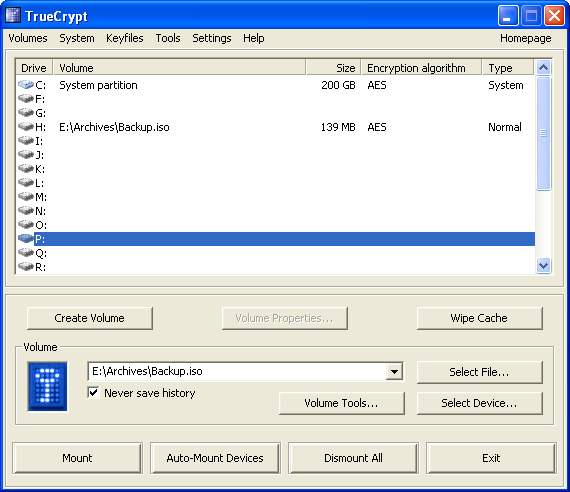
TrueCrypt is a software application used for real-time on-the-fly encryption. It is distributed without cost, and has source code available, although under a restrictive license and works on Windows, Linux and Mac OSX. TrueCrypt can encrypt files, partition and removable media.


TrueCrypt 7.0 was released yesterday with an important new feature: hardware acceleration for AES encryption which is supposed to be 4-8 times faster than encryption performed by the purely software implementation on the same processors.

The H Online states that in their tests, TrueCrypt 7.0 with hardware acceleration had a performance increase for AES encryption and decryption from 287 MBytes/s to 2 GBytes/s. However, even the unaccelerated AES throughput is too fast for modern hard disks so you basically can't take advantage of this for now, but it still frees CPU resources and potentially has some benefits on battery drain in mobile systems.

A complete changelog for TrueCrypt 7.0 can be found here.


To install TrueCrypt in Linux, simply download the standard Linux x86 or x86_64 archive, extract it and then double click the extracted file and follow the on-screen instructions. Once installed, you can access TrueCrypt by going to Applications > Accessories > TrueCrypt.

Jumat, 30 Oktober 2009

ScramDisk for Linux: Truly Open Source On-The-Fly-Encryption Software

scramdisk for linux

Many people believe TrueCrypt is open-source but actually is not because even though the source code is available, it's development is kept secret and it isn't considered Free Software by the FSF nor Open Source by the OSI. A truly open source application for encrypting your partitions is DiskCryptor, but this app only works on Windows.

So if you want an open source application for Linux which works great, you should try ScramDisk.

ScramDisk for Linux (SD4L) is a great OTFE alternative that also supports TrueCrypt containers. Official description:

SD4L is a suite of Linux tools and a graphical user interface (GUI) which allow the creation of, and access to ScramDisk encrypted container files. In particular, SD4L provides a Linux driver which enables mounting ScramDisk containers. ScramDisk for Linux also encrypts partitions on a hard disk or storage media such as USB sticks or floppy disks entirely as devices. Version 2.0, moreover, opens and creates TrueCrypt containers from TrueCrypt version 4.1 to 6.2.


ScramDisk for Linux features:

  1. Access to ScramDisk containers generated on other platforms — either by another SD4L installation, or by the original Windows ScramDisk v3.01r3c version.
  2. Creation of compatible ScramDisk containers.
  3. Access to TrueCrypt containers generated on other platforms — either by another SD4L installation, or by the TrueCrypt software versions 4.1 to 6.2 on Windows, MacOS or Linux.
  4. Creation of compatible TrueCrypt containers which can be opened by the TrueCrypt versions which are equal or higher than the chosen format version.
  5. On Linux, SD4L would provide privacy for sensitive data through the use of strong encryption, which are transparently accessible via a mounted container.
  6. SD4L includes a repair tool for damaged ScramDisk and TrueCrypt 6 containers. It is accessable by the Change button in the GUI or by sdchange.
  7. ScramDisk containers can be reformatted to TrueCrypt containers without creating a new container and copying its contents. The created formats are that of TrueCrypt 4 or 5.
  8. Containers can be automatically unmounted after they have been inactive for a period of time given on mounting the container. Here, inactivity means that no read or write operation has taken place on the container within this period of time.
  9. Encrypted hard disks or containers which comprise several partitions can be opened and the partitions will be automatically mounted on mount directories created below a chosen directory.
  10. A new container can be formatted as swap space and such a container can be used for swapping out areas of the main memory.

Download ScramDisk for Linux (SD4L) (Ubuntu .deb, Fedora .rpm and source files available).

Minggu, 25 Oktober 2009

Encrypt Files And Folders In Ubuntu Using Seahorse

Seahorse is a Gnome front end for GnuPG - the Gnu Privacy Guard program. It is a tool for secure communications and data storage. Data encryption and digital signature creation can easily be performed through a GUI and Key Management operations can easily be carried out through an intuitive interface.

In addition it includes an agent for storing private passphrases, as well as a GnuPG and OpenSSH key manager.


Using this small application in Ubuntu (Gnome), you can quickly secure confidential files. Here is how.

Install Seahorse:
sudo apt-get install seahorse-plugins

Then restart Nautilus:
killall nautilus && nautilus &


seahorse plugins

After the installation, go to System > Accessories > Passwords and Encryption Keys and select File > New > PGP Key, then enter your name, email. You may also change the encryption method (or just leave the default option) and the encryption key length, but be aware that the longer the key, the more it will take to secure a file (but obviously, the file will be more secure). When you finish with this, you'll have to enter a passwords. That's it.

encrypt files gnome

Now, to encrypt a a file or folder, right click it and select "Encrypt". This will pack the file / folder in an encrypted .pgp file. Double click that file to unpack your encrypted files (it will require a password, obviously).

decrypt files


[via UbuCentrum]

Kamis, 22 Oktober 2009

TrueCrypt 6.3 Brings Support For Windows 7 And Mac OS X 10.6 Snow Leopard

TrueCrypt 6.3 has been released yesterday.

TrueCrypt is a free software application used for real-time on-the-fly encryption, for Windows, Linux and Mac OSX.

Version 6.3 brings Windows 7 and Mac OS X 10.6 Snow Leopard support, and also the ability to configure selected volumes as "system favourite volumes" in order to, for example, mount them before the system and application services start, or before users start logging on.

Complete changes can be found HERE.

Download TrueCrypt 6.3

Minggu, 11 Oktober 2009

Encrypt Partitions, Files And Removable Media with Free Application TrueCrypt

photobucketTrueCrypt is a software application used for real-time on-the-fly encryption. It is distributed without cost, and has source code available, although under a restrictive licence and works on Windows, Linux and Mac OSX.

The application enables you to encrypt an entire partition or storage devices (USB flash drives, etc) or create a virtual encrypted disk within a file and mount it as a virtual disk, that can be accessed via a drive letter. Any file that is stored on this virtual drive is automatically encrypted on-the-fly, and can only be accessed while the drive is mounted with the correct password or key. TrueCrypt supports a variety of encryption algorithms, including AES-256, Blowfish (448-bit key), CAST5, Serpent, Triple DES, and Twofish. Other features include support for FAT32 or NTFS formatting, hidden volumes, hotkeys for mounting/dismounting and more.

It offers 11 algorithms for encrypting your private files in a password-protected volume. You can store your encrypted data in files (containers) or partitions (devices). TrueCrypt works hard to offer powerful data protection, recommending complex passwords, explaining the benefits of hidden volumes, and erasing telltale signs of the encryption process, including mouse movements and keystrokes.

TrueCrypt performs the following tasks:

  • Creates a virtual encrypted disk within a file and mounts it as a real disk.
  • Encrypts an entire partition or storage device such as USB flash drive or hard drive.
  • Encrypts a partition or drive where Windows is installed (pre-boot authentication).
  • Encryption is automatic, real-time (on-the-fly) and transparent.
  • Provides two levels of plausible deniability, in case an adversary forces you to reveal the password: 1) Hidden volume (steganography) and hidden operating system. 2) No TrueCrypt volume can be identified (volumes cannot be distinguished from random data).
  • Encryption algorithms: AES-256, Serpent, and Twofish. Mode of operation: XTS.

Users can even create a hidden operating system, encrypted away from nosy busybodies, but make no mistake--TrueCrypt is not for the casual encryption explorer. Be sure to thoroughly understand what you're doing with the program before you do something regrettable.

Download TrueCrypt (Windows ista/XP/2000 (Windows 7 is in the works) .exe, Mac OSX .dmg and Linux: OpenSUSE .rpm and Ubuntu .deb (both x86 and x86_64).

If you are looking for a 'completely' open-source alternative, see DiskCryptor.

Selasa, 06 Oktober 2009

Keep Your Data Private With DiskCryptor [Free Disk Encryption for Windows]

diskcryptorDiskCryptor is the only truly free disk encryption solution for Windows, provided under GNU General Public License (GPLv3), which offers encryption of all disk partitions, including the system partition. The application can encrypt hard disks, partitions, pen drives or CD / DVD, having a very low impact on performance. If you want to keep your data private, you should really try this application!

On the Intel Core 2 Quad Q6600 CPU, data encryption speed amounts to 104Mb/s per core. The maximum speed of reading the data from a single hard disk, equals to 80Mb/s, thus consequently, one can work with up to 5 different disks without the loss of performance, when using the aforementioned type of processor.

The encryption is performed on AES, Twofish, AES-Twofish, Serpent, Serpent-AES and others, so we will not be short in terms of security options. That if, in the case of CD / DVD and USB flash drives, one must bear in mind that to take them to another site and to use them, there also need to have installed DiskCryptor.


Features:

* Disk partition encryption of any configuration, including boot and system partitions.
* Choice to select an encryption algorithm: AES, Twofish or Serpent. Cascaded modes are available as well.
* Full support for dynamic disks.
* Full support for encryption of external USB storage devices.
* Ability to create encrypted CD's and DVD's.
* High encryption performance, comparable to efficiency of a non-encrypted system.
* Support for hardware cryptography found in VIA processors.
* Support for disk devices with large sector sizes, which is important when working with hardware RAID.
* Automatic mount of disk partitions and external storage devices.
* Extended configuration possibilities of booting an encrypted OS. Support for different multi-boot scenarios.
* Full support for 3rd party boot loaders (LILO, GRUB, etc.).
* Ability to place boot loader on external medium and to authenticate using the key medium.
* Support for key files.
* Support for hotkeys to dismount partitions, initiate emergency system stop, etc.
* Additional (to GUI) command-line interface (CLI).


DiskCryptor runs on Windows 2000 SP0-SP4, Windows XP (x86, x64) SP0-SP3, Windows Server 2003 (x86, x64) SP0-SP2, Windows Vista (x86, x64) SP0-SP2, Windows Server 2008 (x86, x64) RTM (SP1), SP2, Windows 7 (x86, x64).

Note: when encrypting your boot partition, only use [A-Z], [a-z] and [0-9] characters.

Download DiskCryptor.