Powered By

Powered by Blogger

Tampilkan postingan dengan label download. Tampilkan semua postingan

Selasa, 15 Februari 2011

How To Run Tribler 5.3.x From SVN In Ubuntu [Decentralized BitTorrent Client]

Tribler 5.3.x Ubuntu
*

Tribler is a decentralized, EU-funded BitTorrent client. That means that you can search for torrents from the peers themselves so you do not have to use external servers. You must have heard of it already as it was featured on many websits (like DownloadSquad, Lifehacker and so on).

Unfortunately is that there are no .deb packages for the latest Tribler 5.3.x and that's really a shame because the latest Tribler is a lot faster then the current 5.2.1 version for which .deb files are available and also it sports a new user interface.

But that of course doesn't mean you can't run the latest Tribler from SVN in Ubuntu (important: tested only in Ubuntu 10.10!) - here's how.


How to run the latest Tribler 5.3.x from SVN in Ubuntu


1. Install the dependencies:
sudo apt-get install python-m2crypto python-wxgtk2.8 python-apsw


2. Get the Tribler code from SVN:

cd && svn co http://svn.tribler.org/abc/branches/release-5.3.x/ tribler

3. Run Tribler:
cd
cd tribler
PYTHONPATH=$PYTHONPATH:.
export PYTHONPATH
python Tribler/Main/tribler.py

4. Optional: create a Tribler launcher:

Yes... those are a lot of commands to run Tribler. But you can create a file, let's call it "Tribler" in your home folder, paste the above commands (the ones required to run Tribler), save the file, then make it executable:
chmod +x Tribler

Then use the newly created file as the Tribler launcher - simply double click it whenever you want to run Tribler.

That's it! Tribler 5.3.x from SVN should run in Ubuntu 10.10 now. Unfortunately I couldn't get VLC to work with Tribler so I couldn't watch / listen to the torrents before they finished downloading but maybe you can figure out how to get it to work. If you do, please let us know how you did it, in the comments!


If you want, you can also run the old Tribler 5.2.1 (but remember, it's a lot slower and doesn't have the nice interface the latest 5.3.x has) for which a .deb is provided, however just installing the .deb won't work in Ubuntu 10.10 - at least in my test. But you can get Tribler 5.2.1 to start in Ubuntu by running the following commands:
if [ -d /usr/lib/python2.6 ] ; then sudo mkdir /usr/lib/python2.6/site-packages; sudo ln -s /usr/lib/python2.6/dist-packages/wx-2.8-gtk2-unicode /usr/lib/python2.6/site-packages/wx-2.8-gtk2-unicode ; fi
if [ -d /usr/lib/python2.8 ] ; then sudo mkdir /usr/lib/python2.8/site-packages; sudo ln -s /usr/lib/python2.8/dist-packages/wx-2.8-gtk2-unicode /usr/lib/python2.8/site-packages/wx-2.8-gtk2-unicode ; fi

Then Tribler 5.2.1 should start.


* No, that's not an XXX Big Buck Bunny in the screenshot but the original Big Buck Bunny by the Blender Foundation - someone though it's funny to label it as "XXX".

Kamis, 10 Februari 2011

Install Transmission BitTorrent Client 2.21 In Ubuntu (PPA)

Transmission 2.21

Transmission 2.20 was released a few days ago and today it was finally uploaded to the Transmission PPA (the version in the PPA is actually 2.21 which only fixes some compiling issues with 2.20). The new version comes with some very interesting features like remembering downloaded files when a drive is unplugged, better support for running a script when a torrent finishes downloading, shutdown transmission sessions via RPC and more.


Other changes include:
  • File re-verification is no longer needed in some situations
  • Improve support for running scripts when a torrent finishes downloading
  • Interface tweaks
  • Support ZIP and other compression formats in the blocklist downloader

A complete changelog can be found HERE.


To install Transmission 2.21 in Ubuntu (currently the PPA was only updated for Ubuntu Maverick and Natty, but packages for older Ubuntu versions will follow), run the following commands in a terminal:
sudo add-apt-repository ppa:transmissionbt/ppa
sudo apt-get update
sudo apt-get install transmission-gtk

When upgrading, you may encounter a problem about a file in some other package being overwritten by a file in transmission-common. Fix it using the following command (you may need to change the version in the filename to yours):
sudo dpkg -i --force-all /var/cache/apt/archives/transmission-common_2.21-0ubuntu1.10.10.1_all.deb

Rabu, 18 Agustus 2010

You Can Now Install Apt-Fast From A PPA Repository

apt-fast

Remember apt-fast? Allow me to remind you: apt-fast is a simple bash script that speeds up apt-get download speed (so you would run "sudo apt-fast install firefox" to install Firefox for example) by using Axel, a command line application which accelerates HTTP/FTP downloads by using multiple sources for one file. The author claims it's roughly 26x faster than the normal apt-get and I don't know if that's true, but a lot of users are reporting visible download speed improvements

A while back, Apt-Fast got full Apt-Get syntax replacement and now you can finally install Apt-Fast from a PPA so it's easier to install, even by non-technical users.

To install apt-fast in Ubuntu, simply copy/paste the following commands in a terminal:
sudo add-apt-repository ppa:tldm217/tahutek.net
sudo apt-get update
sudo apt-get install apt-fast

The above PPA is available for Ubuntu 9.10 Karmic Koala, 10.04 Lucid Lynx and 10.10 Maverick Meerkat!

From now on, you can use "apt-fast" instead of "apt-get" for installing packages via the command line. apt-fast doesn't just support "install" but also "upgrade" and so on.

Kamis, 21 Januari 2010

You Can Already Download Firefox 3.6 Final!

Like we told you yesterday, Mozilla will release Firefox 3.6 today. The official release time is 9:30am Pacific Standard Time.

But if you can't wait, you can already download the new Firefox 3.6, with a little tweaking on the standard download URL. So here you go:

Download Firefox 3.6 (Windows)
Download Firefox 3.6 (Linux)
Download Firefox 3.6 (Mac OS X)

The links above will download Firefox 3.6 for en-US language. To download it for another language, modify the "lang=en-US" in the urls above.

Ubuntu users: install Firefox 3.6 (daily builds!) from the Ubuntu Mozilla Daily PPA.

Sabtu, 16 Januari 2010

Microdc2: Fastest Direct Connect (DC++) Client For Linux (Console)

Microdc2 is a command-line based Direct Connect (I will refer to it as DC++ because that's what most people call it even when not using DC++ - the application) client for Linux. What's so great about it is the speed and low system resources required (like for any shell application). Another thing I really like about Microdc2 is that you can basically browse the files like you would on your own computer: once you connect to a user, simply use basic commands like "cd", "ls" and so on.

Microdc2 doesn't have an option to directly download files like the standard DC++ so you must manually browse a user after searching for a file, but I was doing that anyway so I don't find this to be very inconvenient. And since the DC++ clients for Linux constantly freeze my computer, I decided to try a console application for Direct Connect and so I find out about Microdc2.


Installing and using Microdc2 (Ubuntu)


Installation

I tried compiling Microdc2 on my computer, but even though it only has a few dependencies, it fails. It could have something to do with it being pretty old. But I found an Ubuntu .deb file which, even though it was created with checkinstall, it works if you install the dependencies manually. So here is what you need to do:

1. Install the dependencies (you can also try to compile it if you want, download microdc2 source package from HERE):
sudo apt-get install libreadline5-dev libxml2-dev libbz2-dev


2. Then, simply download THIS Microdc2 .deb package.


Configuration

Microdc2 doesn't remember some settings so you have create a config file. To create one, enter this:
sudo gedit ~/.microdc2/config


And enter this:

# Set active or passive and listen port. Note: listen port must be set before active/passive
#set listenport xxxx
set active on


# The following address should be set to your external ip address.
set listenaddr xxx.xxx.xxx.xxx

# Set auto reconnect on
set auto_reconnect on

# These should all be pretty self-explanatory.
set description microdc2
set email my@email.com
set nick YOUR-NICKNAME
#set password xxxx
set downloaddir /path/to/downloads

# The set speed option doesn't actually change anything, it only changes your REPORTED speed that other users see. The slot is how many simultaneous downloads people can get from you.
set speed 100
set slots 40

#This is the hub connect command, must be the last command in the config file
#connect xxx.xxx.xxx.xxx:pppp

Edit the file as you wish, enable and disable options, etc.


Then, start Microdc2 by typing "microdc2" in a terminal. Then type "help" to see the available options. To understand easily, I've created a small video with some basic usage (connect to a DC++ Hub, search for a file, browse a user and start downloading a file):

Sabtu, 12 Desember 2009

GIMP 2.6.8 Available On GetDeb [Ubuntu]

gimp 2.6.8The GNU Image Manipulation Program (GIMP) version 2.6.8 is available on GetDeb.net, even though this version is not yet available on the official website (so I cannot provide any release changes).

To install Gimp 2.6.8, you can download and install THIS package which will add the GetDeb repository to your sources, or you can follow the instuctions available HERE for adding the GetDeb.net repository.

Then, simply run these commands:
sudo apt-get update && sudo apt-get upgrade


In case you were wondering, no, Gimp 2.6.8 does not come with the single-window mode.

Minggu, 22 November 2009

Get A List Of Packages And Dependencies For Offline Installation [Ubuntu]

Some people do not have a permanent access to the Internet or the connection is limited; as an example, a friend can't download files larger than 10 mb. So how to install applications offline, in Ubuntu? Obviously, the packages have to be downloaded from another computer but this should include all the dependencies or else it would be useless.

The answer is a simple command:

sudo apt-get --print-uris --yes install PACKAGE_NAME | grep ^\' | cut -d\' -f2 >mydownload.txt


Where PACKAGE_NAME is the application you want to install and "mydownload.txt" is the output text file.

Basically, this command does not install the application, but creates a text file with the download URL for the application you want to install AND all its dependencies.

You can then download all the files from another computer, by using a download manager which supports downloading a list of urls from a file, or if you have access to another Linux machine, simply run this command to download all the packages:
wget --input-file mydownload.txt

The last (and worst) solution would be to enter each URL in a web browser and download them manually.

In case you did not understand how the command works, here is an example. To get a file with all the urls for the packages needed to install OpenOffice.org, you would run this in a terminal:
sudo apt-get --print-uris --yes install openoffice.org | grep ^\' | cut -d\' -f2 >mydownload.txt


The following URLs will then be written inside the mydownload.txt file:
http://archive.ubuntu.com/ubuntu/pool/main/o/openoffice.org/openoffice.org-filter-binfilter_3.1.1-5ubuntu1_i386.deb
http://archive.ubuntu.com/ubuntu/pool/main/libs/libservlet2.4-java/libservlet2.4-java_5.0.30-8ubuntu3_all.deb
http://archive.ubuntu.com/ubuntu/pool/main/h/hsqldb/libhsqldb-java_1.8.0.10-2ubuntu1_all.deb
http://archive.ubuntu.com/ubuntu/pool/main/o/openoffice.org/openoffice.org-java-common_3.1.1-5ubuntu1_all.deb
http://archive.ubuntu.com/ubuntu/pool/main/o/openoffice.org/openoffice.org-base_3.1.1-5ubuntu1_i386.deb
http://archive.ubuntu.com/ubuntu/pool/main/o/openoffice.org/openoffice.org-report-builder-bin_3.1.1-5ubuntu1_i386.deb
http://archive.ubuntu.com/ubuntu/pool/main/t/ttf-dejavu/ttf-dejavu-extra_2.29-2_all.deb
http://archive.ubuntu.com/ubuntu/pool/main/t/ttf-dejavu/ttf-dejavu_2.29-2_all.deb
http://archive.ubuntu.com/ubuntu/pool/main/o/openoffice.org/openoffice.org-officebean_3.1.1-5ubuntu1_i386.deb
http://archive.ubuntu.com/ubuntu/pool/main/o/openoffice.org/openoffice.org-filter-mobiledev_3.1.1-5ubuntu1_all.deb
http://archive.ubuntu.com/ubuntu/pool/main/o/openoffice.org/openoffice.org_3.1.1-5ubuntu1_i386.deb


Once you have the packages and dependencies on the computer with no, or limited internet access, simply copy all of them in a new folder and run this command:
sudo dpkg -i *.deb

This will install all the .deb files.

Please note: the computer on which you need to install the files needs to have an internet connection from time to time, to be able to update the package list (sudo apt-get update) so you'll be able to download the latest files.

Important: the mydownload.txt file will be empty if you run this command for an application which is already installed and up to date! Also, you have to create the list on the machine where you want the packages to be installed, otherwise some dependencies will not be displayed if they are already installed on that machine but not on yours.

Jumat, 30 Oktober 2009

aria2: Cross Platform Command Line Tool To Download Files From HTTP, FTP and Bittorrent

aria2 is a command line utility for Windows, Linux and Mac OSX you can use for downloading files, which supports HTTP(S), FTP, BitTorrent, and Metalink. The cli tool can download a file from multiple sources/protocols and tries to utilize your maximum download bandwidth. Really speeds up your download experience. Also, aria2 has all the features you want in a BitTorrent client: DHT, PEX, Encryption, Web-Seeding and Selective Downloads.

To install Aria2 in Ubuntu, simply run the following command in a terminal:
sudo apt-get install aria2

There is also an Ubuntu PPA.

If aria2 is not present in your Linux distribution repositories - download it (downloads also for Windows and Mac OSX). There is also a PAGE for distribution specific download / installation instructions.

Performance


aria2 is as lightweight as it gets and uses from about 4MiB of RAM (normal HTTP/FTP downloads) to 9MiB (BitTorrent downloads). CPU usage in BitTorrent with download speed of 2.8MiB/sec is around 6%.


Why aria2 and not Wget or another tool?


There are other alternatives, such as wget and curl, but aria2 has two distinctive features:

- aria2c can download a file from several URIs(HTTP(S)/FTP/BitTorrent)

- If you give aria2 a list of URIs, aria2 downloads them concurrently. You don't have to wait for the current download queue to finish one file at a time anymore. aria2 tries to utilize your maximum download bandwidth and downloads files quickly.


aria2 usage


-BitTorrent Download:
aria2c http://site/yourfile.torrent


- BitTorrent Download (torrent yourfile present locally)
aria2c –max-upload-limit=40K yourfile.torrent


- Repair damaged downloads (only for bitTorrent and metalink)
aria2c –check-integrity=true yourfile.metalink


- Download/upload speed throttling
aria2c –max-download-limit=100K http://server/yourfile


- Quickly specify multiple urls
aria2c -P http://{server1,server2,server3}/yourfile
aria2c -Z -P http://server/image[000-100].png (to download multiple sequentially named yourfiles)


A simple file download:
aria2c http://server/yourfile


To see all the available options, open a terminal and type: man aria2c or see THIS page.


GUIs for Aria2

If the command line tools scare you, there are some graphical front-ends for Aria2, and you can find all of them HERE.


Thanks to Gnome Tips for pointing out the application.

Kamis, 15 Oktober 2009

Download Firefox 3.6 Beta

With a bit of a delay (announced for October, 13), Firefox 3.6 Beta RC is out and available for download.

I've been using Firefox 3.6 Beta1 Pre on my Linux PC for about a week and I can tell you that you will see a noticeable improvement in speed and scrolling from the first minutes of using it.

Download Firefox 3.6 Beta RC for Windows, Linux and Mac

Rabu, 07 Oktober 2009

Linux: Download Hundreds Of Wallpapers In Less Than A Minute

gnome wallpaperGnome-look.org has a LOT of wallpapers but to download all of them them, you need to do a lot of clicking. Here is how to download them all with a single command (thanks to Linuxologist!).

Firstly, use the terminal to navigate to the folder where you want to download the wallpapers (or create a new folder). Then, run the following commands:
ftp ftp.gnome.org
cd /pub/GNOME/teams/art.gnome.org/backgrounds
prompt off

Then enter anonymous for both the username and password.

And now you can start downloading all the wallpapers for a certain resolution:
mget *1280x1024.jpg

The above command will get all the wallpapers for 1280x1024 screen resolution. To download wallpapers for another resolution, just change the numbers (with 1024x768, 1600x1200 and so on).

Selasa, 15 September 2009

Amazing New Multimedia Wordpress Theme From SmashingMagazine

Smashing Multimedia

If you are thinking of building a blog mostly with videos, the new free theme designed by Sarah Neuber especially for Smashing Magazine called Smashing Multimedia has to be the best I've seen. The theme is just... impressive and comes with all associated PSD files which is great when it comes to adapting it to your needs.

The theme is also a great choice if you want to build a portfolio or a photo blog, and includes options in the Wordpress dashboard which makes it very easy to customize.

Smashing Multimedia was designed especially for podcasters, photographers and users who can now easily embed videos and images, rate them and showcase them in their own WordPress-based blog.


Smashing Multimedia Wordpress theme is totally free to use / modify, without any restrictions.

Full list of features and download | Demo

[via punto geek]

Senin, 14 September 2009

P2P Windows And Linux Client Tixati Supports Both BitTorrent Protocol And Magnet Links And Works Like A Charm

Tixati is a free, simple, and easy to use P2P client that is compatible with the BitTorrent protocol and also supports magnet links. I probably wouldn't have read about it if it didn't work on Linux, but that made me take a closer look and so I got to enjoy Tixati.

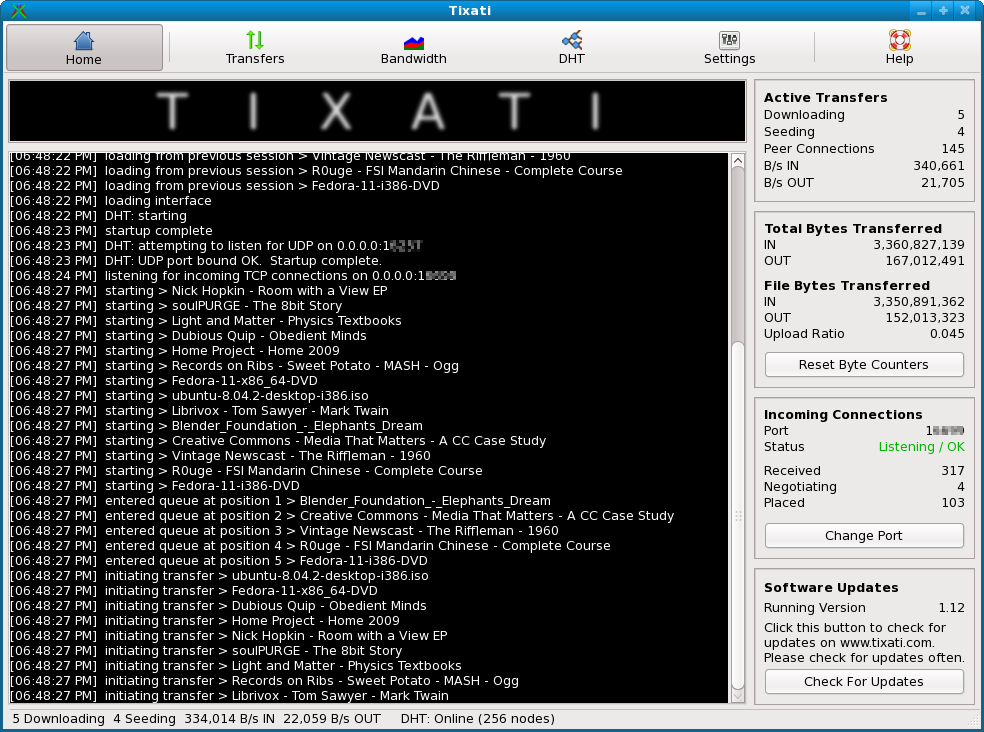
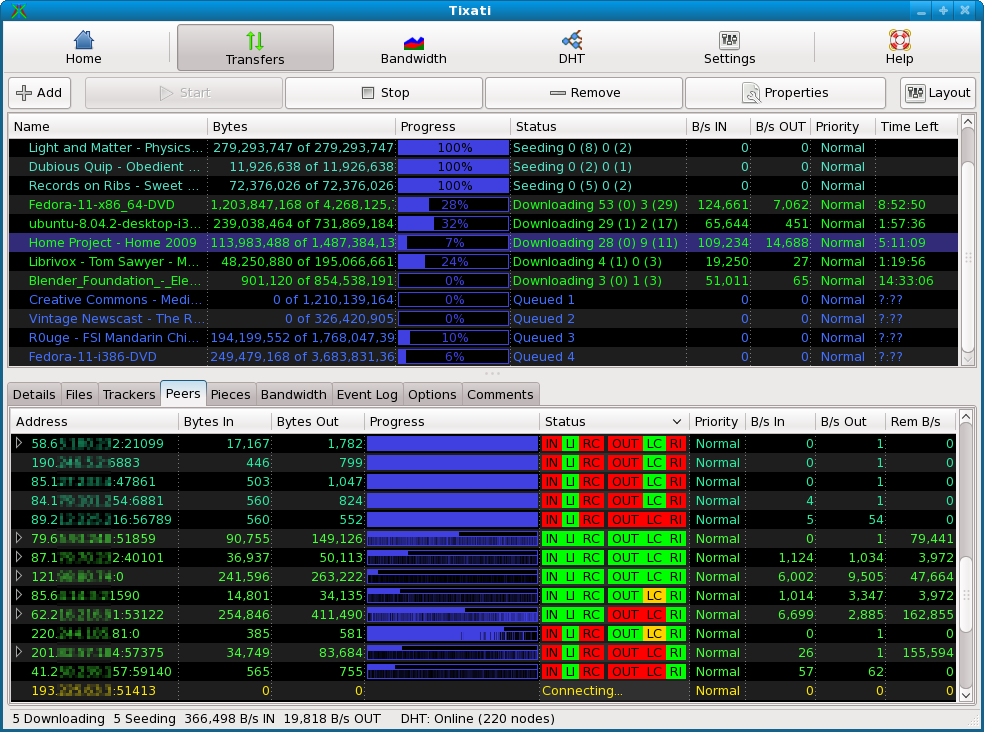
Tixati works on both Windows and Linux and it has a somewhat different user interface that what you are probably used too, which you can change: treeview, tabview or split and also dark or light colors, as you can see in the screenshots below:


Home View


(click for full-size image)


Transfers View - Peers Tab


(click for full-size image)


But having a different GUI doesn't mean it lacks any of the features most BitTorrent clients have: detailed user interface, with views of individual peers, detailed bitfield graphs, and bandwidth usage charting. One really interesting thing about it is that you can move downloaded files to new filesystem location while transfer is in progress, even to different partition. Also, in my ~1 hour tests so far (on Windows only for now), it seems like a really fast application.

Among other interesting Tixati features:

* 100% compatible bit-torrent client
* highly flexible bandwidth throttling, including trading/seeding share adjustment and adjustable priority for individual transfers and peers
* efficient peer choking / unchoking algorithms to ensure fast downloads
* support for UDP trackers
* message stream encryption for added security
* support for magnet links
* easy to create and seed new transfers
* peer, transfer, and system-wide event logging with adjustable detail level and backscroll size
* full DHT (Distributed Hash Table) implementation including detailed message traffic charting


The native Linux version of Tixati has been fully tested on Fedora 9 and Ubuntu 9.04 so far.

Download Tixati [.exe, .feb for Ubuntu - 32 and 64 bit, .rpm for Fedora - 32 and 64 bit] | via techie-buzz

Download 2 Free Books From Google About SEO

The following 2 books come directly from Google and are basically about SEO and how exactly Google works so that you build your website to get the most out of Google.

1. Google's Search Engine Optimization (SEO) Starter Guide:

Quote from the book:

Welcome to Google's Search Engine Optimization Starter Guide. This document first began as an effort to help teams within Google, but we thought it'd be just as useful to webmasters that are new to the topic of search engine optimization and wish to improve their sites' interaction with both users and search engines. Although this guide won't tell you any secrets that'll automatically rank your site first for queries in Google (sorry!), following the best practices outlined below will make it easier for search engines to both crawl and index your content.

Search engine optimization is often about making small modifications to parts of your website. When viewed individually, these changes might seem like incremental improvements, but when combined with other optimizations, they could have a noticeable impact on your site's user experience and performance in organic search results. You're likely already familiar with many of the topics in this guide, because they're essential ingredients for any webpage, but you may not be making the most out of them.


DOWNLOAD


2. Google: Making the Most of Your Content - A Publisher's Guide to the Web:


Quote:

At Google we’re frequently asked how web search works, and how web publishers can maximise their visibility on the Internet. We’ve written this short booklet to help you understand how a search engine ‘sees’ your content, and how you can best tailor your web presence to ensure that what you want to be found is found – and what you want to keep hidden, stays hidden. From webmaster tips and online tools, to a step-by-step guide to frequently asked questions, this booklet is geared towards small web publishers as well as owners of large sites. Just as the Internet itself has evolved dramatically in the past decade, so has Google’s own approach to web search and its relationship with site owners. We’ve created numerous tools to help webmasters maximise the visibility of their content, as well as control how their web pages are indexed. But there’s always more we can do. We hope that this booklet will encourage you to give us feedback and let us know what we can do to make the web an even better place for both searchers and publishers.


DOWNLOAD

Minggu, 13 September 2009

Free Google Book Downloader [Windows]

google book downloader

Google Book Downloader is a Windows utility that rips books from Google and saves them as PDFs so you can view them with any device or desktop that can view this file format. Using Microsoft’s .NET framework, the Google Book Downloader application allows users to enter a book’s ISBN number or Google link to pull up the desired book and begin a download, fishing off with exporting the file to a PDF.

Please note that Google Books Downloader is purely non-commercial and for educational purpose and does not promote any illegal conduct of any kind.

Features:


  • Download any book from Google Books marked as 'Full view'
  • Partially download any book from Google Books marked as 'Limited preview'
  • Access to any book available only for US citizens (instructions)
  • Searching for hidden pages (not indexed by Google Books)
You can either install Google Books Downloader or download a portable version which you can simply unzip and run from your hard drive or a removable disk.

In order to queue up a book for download, just open the "add book" dialog in the file menu and copy an paste the book code, link, or ISBN number, click search, and then select the book that shows up. To begin downloading, right click a title and hit "start." and to export a file as a PDF, right-click and hit "export."

For a complete guide on how to use Google Book Downloader, look HERE.

P.s.: Another way of downloading Books from Google, is by using a simple Greasemonkey Script and then to download the book:
  1. Install FlashGot add-on for Firefox and FlashGet
  2. Select all pages, right-click, choose FlashGot Selection
  3. Press OK to start downloading. Note : Download only one page at a time, or your IP will be banned
  4. After the downloading is finished, in FlashGet, left panel, choose Downloaded folder.
    Select all pages of the book, right-click, choose Rename -> Comment As Filename

Download Files Without Waiting From RapidShare, Megaupload, etc. For Free

Using Rapid8, there is no need to "sign out, delete cookies and reconnect with a different IP". It allows you to download any files shared and hosted on RapidShare, Megaupload, MegaShares, Easy-Share, MegaVideo, MegaPorn Video, NetLoad.in and Hotfile directly, by using premium accounts but you can use it from their website, for free.

The operation is very simple: you enter the URL of the file and press "Download", then a "Begin your download" button will be displayed and clicking it, you will start downloading you files without any other input from your side. This way, you get your files ready to download, no-code verification or further time loss.

Basically, what rapid8 does is download the files to their server and you download your files from rapid8 instead of Rapidshare, Megaupload, etc.

Minggu, 23 Agustus 2009

JDownloaded 0.7 (7.569) Released

jdownloader 0.7 (7.569)

JDownloader, the open source, platform independent Rapidshare, Megaupload (and others) download application, has been updated to version 0.7 (7.569).

JDownloader simplifies downloading files from One-Click-Hosters like Rapidshare.com or Megaupload.com - not only for users with a premium account but also for users who don't pay. It offers downloading in multiple paralell streams, captcha recognition, automatical file extraction and much more. Of course, JDownloader is absolutely free of charge. Additionally, many "link encryption" sites are supported - so you just paste the "encrypted" links and JD does the rest.


The most important, noticeable change is that JDownloader 0.7 (7.569) is a lot faster than the previous versions. Another interesting change is that now it supports anti-captcha for more than 60 websites. Read on to see a list of other important changes.

What's New in 0.7

  • After lots of complains about performance we redesigned the gui to be much faster.
  • Better Browser integration - The famous Firefox Extension Flashgot now supports JDownloader and is bundled together with it.
  • New, and most important, faster themes. Install Substance Themepack to get more Style and Themes.
  • Updated JDChat, Scheduler, LanguageFileEditor.
  • You can now continue downloading while updating.
  • The new External Interface provides an API for Websites to interact with JDownloader.
  • More supported Hosters and Decrypter than ever before.

[thanks Adrian for the tip]

Rabu, 19 Agustus 2009

Pidgin 2.6.1 Adds Voice and Video (Download Ubuntu .deb)

Pidgin 2.6.1 was released yesterday but it won't be updated in the Ubuntu repositories and not even in it's PPA. But Ubuntu users can download it from GetDeb (or add the GetDeb repository).

If you use another Linux distribution, you can download Pidgin 2.6.1 source files from HERE. There are also .rpm files available at the same location.

Windows users - just head over to Pidgin download page.

Version 2.6.0 includes major changes and improvements (2.6.1. fixes just 3 bugs and was released in the same day as 2.6.0):

Voice and Video support - Thanks to Mike Ruprecht and his Summer of Code project from 2008, libpurple now has a voice and video framework that can be used to add these features to Pidgin protocol plugins. Currently Pidgin supports these features only on XMPP, but Mike is working on other protocols. The biggest setback this far is that these features are not supported on Windows - but the Pidgin devs are working on it! One note though: it appears that the package from GetDeb does not provide voice/video support because Jaunty does not have the required library versions, so you probably must wait until Ubuntu 9.10 Karmic Koala.

Theme support - Another Summer of Code project from 2008, this time by Justin Rodriguez, adds theming support to libpurple and Pidgin. This currently isn't very well documented at all, but themes are now supported for the buddy list, sounds, and status icons.

For Yahoo! protocol:

-P2P file transfers
-Addition of MSN buddies to Yahoo accounts by adding them as 'msn/buddy@…' is now supported.

And another addition - very small but I really like it - Support saving animated custom smileys as animated images or animated custom smileys.

For full release details of versions 2.6.0 and 2.6.1, go here.

In case you don't know, Pidgin is an easy to use and free chat client (instant messenger) used by millions. Connect to AIM, MSN, Yahoo, and more chat networks all at once.

Update: I changed version 2.6.0 in this post to 2.6.1 as both versions came out yesterday.

Minggu, 16 Agustus 2009

Install Hundreds of Free Fonts In Ubuntu via Repositories

1. George Williams Fonts

A set of Free unicode True Type fonts made by George Williams. The package consists the following fonts:

Caslon:


Caliban:


CupolaUnicode Bold:


You can install these fonts in Ubuntu using the following command:

sudo apt-get install ttf-georgewilliams

2. Dustin (from dustismo.com)

Dustismo and Dustismo Roman are general purpose Sans Serif and Roman TrueType fonts (with bold, italic and bold-italic variations), and contain all the European Latin characters.

The other fonts are beautiful for special decorations and headlines, but they are limited to subsets of ASCII.

ttf-dustin font samples 1

ttf-dustin font samples 2


Install these fonts in Ubuntu using the following command:
sudo apt-get install ttf-dustin

3. Larabie Fonts

Decorative freeware TrueType fonts from Ray Larabie. There are about 300+ fonts so I will only post a sample:

Pyrite:


Quadaptor:


Quadrangle:


Install them using the following command:
sudo apt-get install ttf-larabie-deco ttf-larabie-straight ttf-larabie-uncommon

If you wish to preview them all, download THIS PDF.

4. Fossfonts

A collection of 108 GPL/Public-Domain licenced .ttf fonts. Included are the Tuffy family with extended members, and the Open Bar Codes project fonts.

Sample fonts:

Tuffy:
tuffy font

Dark Garden:
dark garden font

Evil Clown:
evil clown font

Mattts:
mattts font

Rockets:
rockets font

Architext Thin:
architext thin font

This package is not in Ubuntu since Fetsy or Gutsy, but you can install it by downloading the following Ubuntu .deb package: DOWNLOAD.

To install all the above fonts (except 4. FOSSFONTS which you need to manually download), you can run the following command in a terminal (just use copy & paste):
sudo apt-get install ttf-georgewilliams ttf-dustin ttf-larabie-deco ttf-larabie-straight ttf-larabie-uncommon


Please note that to be able to install some of the fonts above, you need to enable Universe and Multivers repositories.

If you need a tool to preview the fonts installed on your system, I recommend myFontBook which is a web app that does not require installation and works on any operating system.

Rabu, 12 Agustus 2009

Elltube Downloads and Converts YouTube Videos to Audio [Linux & Windows]

Of all the available tools for downloading and converting YouTube videos to audio (but it can convert to video formats too), Elltube was the easiest to install, get working, and the most reliable. With this tool you will find download and converting Youtube videos a nobrainer. There is only one small hitch. If you want to add mp3 support you will have to do some extra installation in Linux (In this case it means installing unsupported files).

Elltube can convert a YouTube video to the following formats:

-video: avi, mpeg, mp4, 3gp
-audio: mp3, wav, amr

Using Elltube to convert YouTube videos to audio in Windows

Download Elltube for Windows from HERE. Luckily, Elltube for Windows comes with everything you need, so all you have to do is paste a YouTube link into Elltube:

Elltube windows

and you can start downloading / converting.

Using Elltube to convert YouTube videos to audio in Linux / Ubuntu

I am going to provide installation instructions for the extra thing you'll be needing for Ubuntu only.

The good news is that everything you need, outside of Elltube itself, will be located in the default repositories. The bad news? You will have to install restricted applications. What this means is that Canonical is not responsible for the updating of these files.

Running the following command in a terminal will install everything you need to convert videos from YouTube by using Elltube:
sudo apt-get install lame ubuntu-restricted-extras ffmpeg

Optionally, you could you use these fixed Ubuntu Jaunty ffmpeg packages instead of the ones available in the Ubuntu restricted repository.

Now that everything you need has been installed, you can proceed to downloading the Elltube Ubuntu .deb package from HERE.

You will find Elltube in your Internet sub-menu of either your Main or Applications menu. Now you can just paste a YouTube video url and you can start downloading / converting:

Elltube ubuntu

Other Linux distributions

Archlinux

Mandriva

Other

  • You need to install next package from your distribution repositories:
    • Python > 2.4
    • PyQt4 > 4.0
    • FFmpeg (if you want conversion support)
  • Download Source Code tarball and extract it.
  • Inside created foler, run elltube.py to run program or execute sudo make install in order to install it.
  • Advanced installation options at INSTALL file.
Source code

For a web-based, audio only alternative, see Dirpy Studio.