Powered By

Powered by Blogger

Tampilkan postingan dengan label ubuntu software center. Tampilkan semua postingan

Sabtu, 26 Maret 2011

Ubuntu Software Center Lets You Test-Drive Applications Without Installing Them [Ubuntu 11.04]

Ubuntu Software Center got a really cool feature in Ubuntu 11.04: it lets you test drive applications without having to install them.

To get this to work you firstly must install a package called "qtnx":
sudo apt-get install qtnx

Then when you open Ubuntu Software Center you should see a new "Test drive" button next to the application screenshot. The applications run on a remote server so you must have a decent Internet connection and also, this is not available for all the applications in the Ubuntu Software Center, but nevertheless, this feature sounds awesome. Here's a video I've just recorded so you can see exactly how it works:


Thanks to Novatillasku for the news!

Jumat, 28 Januari 2011

A Cross-Distro Unified Installer Is On The Way

Developers from Fedora, Ubuntu, Debian, Suse, and Mageia attended to a conference last week in which they've tried to find a way to make "installing and removing software on Linux suck less."

I've kept wondering why all distributions duplicate so much work. Sometimes, there is a good reason, like a radically different technical approach. But sometimes, it looks like we're going different ways just for the sake of doing something ourselves. We should fix this. Cross-distro collaboration is not the way we usually do things, and I believe we're wrong most of the time. Cross-distro collaboration is a cultural shift for us. But it's very well needed.

- Vincent Untz

 It seems an unified way to install software is in the works which will use Ubuntu Software Center as a front-end. Richard Hughes says Ubuntu Software Center will be ported to PackageKit very soon (in the next couple of weeks) and describes how it will work his blog (so check out that link for more info).

Here is a video presenting the summary of Cross-Distro Application Installer meeting:


Oh, and here's something quite interesting from the specs:

Will add several new optional fields to desktop file specification upstream for the proper solution, more details to come soon. This will allows us to search for photoshop and return gimp in the search results.

Thanks to Zsolt Sándor for the tip!

Kamis, 27 Januari 2011

Ubuntu Software Center Gets Ratings And Reviews Support [Natty Updates]

An update in Ubuntu 11.04 Natty Narwhal finally brings ratings and reviews to Ubuntu Software Center.

They don't seem functional for now though - I was unable to rate or write a review but I see some applications were rated so maybe this is an issue on my system only. Either way, this is still work in progress so a lot should change later on (Natty didn't even each Alpha 2).

Here are some screenshots:

Ubuntu 11.04 software center ratings

Ubuntu software center reviews

Senin, 11 Oktober 2010

How To Make .deb Files Open With GDebi Instead Of Ubuntu Software Center In Ubuntu 10.10 Maverick Meerkat

Most of you probably like the fact that Ubuntu Software Center is now used for opening .deb files in Ubuntu 10.10 Maverick Meerkat, but I for one am not very happy with this change because Ubuntu Software Center is a lot slower then GDebi so why wait some extra seconds when I can do it faster with GDebi?

Also, Ubuntu Software Center doesn't display the dependencies that will be installed with the .deb so if for instance I download some .deb for KDE and don't realize this, Ubuntu Software Center will install hundreds of packages while GDebi will display the number of dependencies that are about to be installed so this can be avoided:

GDebi open deb Ubuntu 10.10


If you want to use GDebi again instead of Ubuntu Software Center to install .deb files in Ubuntu 10.10 Maverick Meerkat, the "fix" is actually quite easy. Firstly, install these packages:
sudo apt-get install gdebi gdebi-core

Gdebi open with deb

Then right click a .deb file, select "Properties", go to the "Open With" tab and select "GDebi Package Installer" instead of "Ubuntu Software Center". Click "Close" and double click the .deb file - it should now open with GDebi and not Ubuntu Software Center.


Note: I only used Amarok as an example, I obviously know Amarok is a KDE application.


Info thanks to PortalUbuntu

Kamis, 26 Agustus 2010

New Ubuntu Software Center Features: "Where Is It?", "Choose Addons"

ubuntu software center where is it

Here is a feature I've been waiting for ever since I first read about it on the Ubuntu Software Center blueprint which along with the "History" tab, makes Ubuntu Software stand out: "Where is it". I was a bit dissapointed after trying this out though, as it has nothing to do with the initial specs other then the purpose (it was supposed to point you to the menu item with animations and so on) but it's a great addition nevertheless.

Even though it may not seem like much, "Where is it?" (or "Find it at" - they should really stick with one name for this) can be of real help sometimes: it tells you where to find an application you've just installed (in the menu). You may not need it every time you install an application but sometimes you just can't spot the newly installed application.

Of course, those who use Cardapio or GnoMenu will probably not care much about this since they have a search. But it's great addition for the rest of the Ubuntu users.


Another new feature in Ubuntu Software Center called "Choose addons" displays the addons (if available) for an application when you try to install that application. This applies for browsers such as Firefox or Chromium, Pidgin and so on. Here's a screenshot:

usc addons


If you're running Ubuntu 10.10 Maverick Meerkat, simply do an upgrade and you should have these new features in USC.

Selasa, 24 Agustus 2010

Ubuntu Software Center 2.1.11 Comes With More Theme Tweaks [Ubuntu 10.10]

It seems each update brings some theme tweaks to the Ubuntu Software Center. Here's the latest Ubuntu Software Center 2.1.11:

Ubuntu Software Center 10.10 Maverick Meerkat


This last tweaks look nice but... really, blue?


Nothing else changed except for some minor tweaks under the hood. The new USC 2.1.11 should be available in the Ubuntu 10.10 Maverick Meerkat official repositories sometime later today.

Selasa, 27 Juli 2010

Ubuntu Software Center (2.1.6) Gets Yet Another Slight Redesign

Ubuntu Software Center 2.1.6

A new Ubuntu Software Center version (2.1.6) was just released in Ubuntu 10.10 Maverick Meerkat which brings some more design changes: everything in the main view is now more compact and there are no more borders separating the categories ("Departements") from the featured applications or "What's new".

The new Software Center also finally displays some applications under the "What's new" category - this category is supposed to hold the new applications in the extras.ubuntu.com repository but for now I don't yet understand on what criteria the applications show up under this category.


ubuntu software center maverick meerkat

And finally: the "Installed Software" now lists all the PPAs you have from which you've actually installed some applications and only the installed packages are displayed for each PPA (but all the packages and PPAs are listed under "Get Software").


The complete changelog for Ubuntu Software Center 2.1.6 can be found here.

Jumat, 16 Juli 2010

Ubuntu Software Center 2.1.5 Released With Plugin Support (But There Are No Plugins Available Yet) [Ubuntu 10.10 Maverick Meerkat]

Ubuntu Software Center 2.1.5 was released today in Ubuntu 10.10 Maverick Meerkat. This new version doesn't bring many visual changes but there's a lot going on under the hood. A major new feature in USC 2.1.5 is the implementation of plugin support (important for the oneconf integration). However, there are no plugins available for now.

But there are a few visual changes too: on the applications pane, the screenshots have been shrunken, the application installation date and remove / install button have been reorganized and there is also some extra info at the bottom: the license as well as information regarding the updates - as you can see in the screenshots below:


Ubuntu Software Center 2.1.5 - Already installed app

Ubuntu Software Center 2.1.5 - Installing an app


A complete changelog for Ubuntu Software Center 2.1.5 can be found here.

Want to try Ubuntu Software Center 2.1.5 in Ubuntu Lucid already? Until Guiodic uploads it to his PPA, you can download and install these dependencies: aptdaemon, python-aptdaemon-gtk and python-aptdaemon (all these debs work for both 32bit and 64bit) and then simply download the Ubuntu Software Center 2.15 from Ubuntu 10.10 Maverick Meerkat via Launchpad and install it.

Selasa, 13 Juli 2010

Unity, Ubuntu Software Center And Sound Indicator Video And Screenshots [Ubuntu / UNE 10.10 Maverick Meerkat]

Unity received yet another update in Ubuntu Netbook Edition 10.10 Maverick Meerkat yesterday. This version partially fixes the application search in the Unity application launcher and file browser - also known as Dash (the file search actually looks completely fixed). Also, Unity doesn't display all the files at once anymore - for this, a new toggle button was introduced for both the files and applications.

The Sound Indicator also got an update 2 days ago and it can now display the album artwork - but this might be working for some time now, I'm not really sure.

I took this opportunity to record a video with Unity (along with the new AppMenu, also known as Global Menu) so WebUpd8 readers can see where Ubuntu Netbook Edition stands right now. Since I promised this when Ubuntu 10.10 Alpha 2 was released, I also recorded the new Ubuntu Software Center. And finally to make this complete, you can also see the new Sound Indicator in action.


(You can also watch this video in HTML5 (with out without WebM) @ YouTube)

Make sure you watch the video in 720p or 1080p!


You can also spot a lot of the errors which exist in Unity right now in the above video (like not being able to click the indicator applet area or close applications at the end, the Unity applications and files search working but with some bugs and so on).


Update: here are also some screenshots to go with this video:


sound indicator when rhythmbox is closed
(Sound Indicator - Rhythmbox closed)


sound indicator rhythmbox playing
(Sound Indicator - Rhythmbox playing)


ubuntu 10.10 unity screenshot
(Unity applications - installed apps not expanded)


unity ubuntu 10.10 screenshot
(Unity applications - installed apps expanded)


unity ubuntu 10.10 files
(Unity files (Dash) - Today and Yesterday not expanded)


ubuntu 10.10 dash files
(Unity files (Dash) - Today and Yesterday expanded)


No screenshots for Ubuntu Software Center since it's the same version as in Ubuntu 10.10 Maverick Meerkat Alpha 2 and we already posted enough screenshots with it.

Please note that in this video, Unity and the AppMenu will be a part of Ubuntu Netbook Edition only while the Sound Indicator and Ubuntu Software Center versions are the same in both Ubuntu desktop and Ubuntu Netbook Edition.


If you want to install the Sound Indicator from Maverick in Lucid, Guiodic uploaded it to his PPA.


What do you think of Unity, Ubuntu Software Center and the Sound Indicator so far?

Selasa, 29 Juni 2010

Ubuntu Software Center Receives Major User Interface Update, More [Ubuntu 10.10]

ubuntu software center

An update in Ubuntu 10.10 Maverick Meerkat today brings a changed look for the main Ubuntu Software Center pane.

The main view was completely redesigned: the category buttons are now smaller, the Featured category was moved to the bottom and it doesn't have the next/previous buttons anymore. However, the Featured applications category still has the nice autoscroll feature it got a while back.


The category and subcategory views were also updated and the double pane view was removed. Also, a new category called "What's New" was created - this will be the category where the new applications from the extras.ubuntu.com repository we were telling you about will be available.


(Ubuntu Software Center subcategories)


This is how Ubuntu Software Center used to look about 2 weeks ago:

ubuntu software center 10.10


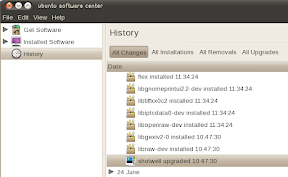
But those are only the UI changes. Ubuntu Software Center got a lot of features and tweaks like information about "upgraded" packages has been added to the history pane and something very useful and much needed: support detecting a broken apt cache and repairing it.

ubuntu software center upgraded history
(Information about "upgraded" packages in the history pane)


The new Ubuntu Software Center version (2.1.4) also feels a lot faster!


A complete changelog for Ubuntu Software Center 2.1.4 can be found here.


Want to try out the latest Ubuntu Software Center 2.1.4 in Lucid? We could have build it in a PPA but that takes too long for something so trivial, so you can simply download a .deb package (you'll also need these dependencies: aptdaemon, python-aptdaemon-gtk and python-aptdaemon) - all debs work for both 32bit and 64bit - and install it.

The package will also probably be available in the guido-iodice PPA later today.

Kamis, 10 Juni 2010

Ubuntu Software Center Gets Visual Improvements, Launchpad Login [Ubuntu 10.10 Maverick Meerkat Development Updates]

ubuntu software center 10.10

An update today brought lots of changes to the Ubuntu Software Center. The most notable are an animated "Featured applications" section, microblogging sharing of applications via Gwibber as well as a Launchpad login (now called Ubuntu login).

The Ubuntu login doesn't seem to work for now (gives an authentification error) but it's still good news as it might mean we'll get ratings for all the applications in the Ubuntu Software Center and probably purchase applications (that's planned for Ubuntu Software Center too).

ubuntu software center 10.10


Another change in the Ubuntu Software Center is a really nice anymation for the breadcrumbs - this change is quite old actually but since there are so many changes to the Ubuntu Software Center in Ubuntu 10.10 Maverick Meerkat (including the History tab) which cannot be expressed by simply posting some screenshots, I decided to make a screencast with all these changes:


You can read all the changes in today's Ubuntu Software Center update, HERE.


Update 1: Ubuntu Software Center also got microblogging sharing via Gwibber:

ubuntu software center microblogging sharing

Update 2: thanks to Guiodic tip in the comments, you can already install this Ubuntu Software Center version in Ubuntu Lucid. Warning: the PPA has many packages backported from Maverick!

Install it with:
sudo add-apt-repository ppa:guido-iodice/guiodiclucid
sudo apt-get update && sudo apt-get upgrade


adium ubuntu theme 10.10

And another change in Ubuntu 10.10 (from yesterday) brings an update to the Ubuntu Adium theme for Empathy (with the help of om26er): both Gwibber and Empathy use the same theme but the font in Empathy was smaller - this update increases the font in Empathy to match Gwibber. If you want this change in Ubuntu 10.04 Lucid Lynx, Brian C. has a PPA for you.


Credits for the Empathy screenshot: Brian C.

Kamis, 20 Mei 2010

Ubuntu Software Center Gets A History Tab (Ubuntu 10.10 Maverick Meerkat Development)

Here we go again: just like we did with Ubuntu 10.04, we'll be providing news regarding important changes in Ubuntu 10.10 Maverick Meerkat as soon as they are released.

An update in Ubuntu 10.10 Maverick Meerkat today (which didn't even hit the first Alpha yet) brings a new "History" tab in the Ubuntu Software Center where the users are able to see all installed and removed packages - this info is grouped by day:

ubuntu software center 10.10 maverick meerkat


A very useful feature, especially if you install a package that breaks things - having a history of recently installed software can be used to identify the faulty package and remove it.


This new version of Ubuntu Software Center also brings animations for pathbar elements and many other changes which you can see HERE.

Senin, 14 Desember 2009

The Future Of Ubuntu Software Center


Ubuntu Software Center (initially Ubuntu Software Store) was released with Ubuntu 9.10 Karmic Koala and it currently has only a few of the features it was designed for, being just stage 1 out of 4.

The Ubuntu Software Center is a graphical utility for package management in Ubuntu. In version 1, it builds on the basic philosophy of Add/Remove Applications with an easier-to-use design. In version 2, the primary goals are to take the place of Synaptic and apturl, and to include ratings and reviews of software.


Let's take a deeper look to what we'll have with Ubuntu Software center version 2 and more.

The features Ubuntu Software Center should bring with Lucid:


- Ratings and reviews:

ubuntu software center ratings

ubuntu software center review login

There is already work in progress for this feature which gives users the possibility to rate applications and post 'comments' (reviews). Also, everyone will be able to offer suggestions to the packages maintainers. The users will need to have a Launchpad account.

Third-party repositories packages can also offer these features (ratings and comments), but the meta data will have to be directly integrated into the packages.


- Extended functionality: Currently, you can only install applications through Ubuntu Software Center. The new version is planned to replace Synaptic (advanced package manager) and gdebi (package installation manager). To replace Synaptic, a new category will be included in the Software Center. This new category should contain packages that are not software and it may also use a more complete search engine.


- Sub-categories integration: currently, there is one a main category which is insufficient given the amount of software and packages available. For better organization, software should be divided into different sub-categories.

- History: Version 2.0 of Ubuntu Software Center could include a history of items installed, removed, updated, and otherwise changed since Ubuntu was installed. However, this wasn't scheduled so it depends on contributions by volunteers.

ubuntu software center history
(Ubuntu Software Center History mockup. More, HERE).

- Finally, The theme will also be improved and an interactive demonstration of how to launch the software you’ve just installed should be available.


Ubuntu Software Center planned changes for Ubuntu 10.10 and 11.04


Ubuntu 10.10 (Stage 3):

- Provide the ability to purchase software from within the Center.
- Establish and convey a trust level for software in PPAs, and let you easily add PPAs within the Center.


Ubuntu 11.04 (Stage 4):

- Improve sharing and tracking of software within the Center. For example:
  • Overviews of installed software by license, cost, or maintenance timetable.
  • Discovering software by what your friends have installed.
  • Downloading a package once for installing on many computers.
  • Incorporating AptOnCD.
  • A visible history of past installations/removals/purchases, including the ability to undo specific changes.
- Investigate and, if appropriate, implement specialized interfaces for browsing and installing particular classes of package (fonts, screensavers, etc).

And this is how Ubuntu Software Center should look like after stage 4 (well, more or less):

Ubuntu Software Center 4.0


However, it seems that Stage 4 is not the last one, as mpt points out in a comment (thanks!).

And a final note: the Ubuntu wiki states that "The version shipped in Ubuntu 10.04 should be at least 2.0." so we may see a newer Ubuntu Software Center version (meaning more features) in Ubuntu Lucid Lynx.

What do you think about the upcoming Ubuntu Software Store features? Would you do things differently? Let us know your opinion in the comments.

Credits / Further reference:

Logithèque Ubuntu et Lucid Lynx (French)
Ubuntu Wiki
Thanks to the additional info from mpt.