Powered By

Powered by Blogger

Tampilkan postingan dengan label f-spot. Tampilkan semua postingan

Jumat, 17 September 2010

Download F-Spot 0.8.0 Ubuntu .deb (With Improved Duplicate Detection, 300 Bugs Fixed, More)

F-Spot 0.8.0

F-Spot was the default photo manager for Ubuntu until 10.10 when it will be replaced with Shotwell.


F-Spot 0.8.0 was released 2 days ago with a complete new import system, improved duplicate detection, photo panning using the mouse as well as other features which you can see by reading the official F-Spot 0.8.0 release announcement. Further more, the new version also fixes almost 300 bugs!

If you're using Ubuntu 10.04 Lucid Lynx, you're probably noticed the F-Spot PPA hasn't been updated yet (and I'm guessing it will take a while until F-Spot 0.8.0 will be in the PPA as it usually takes quite some time). But Roberto @ LFFL created some F-Spot 0.8.0 Ubuntu 10.04 Lucid Lynx .deb files so you can install it already.


Download F-Spot 0.8.0 Ubuntu 10.04 Lucid Lynx .deb:

32bit: f-spot_0.8.0-1_lffl_i386.deb
64bit: f-spot_0.8.0-1_lffl_amd64.deb


Thanks to Roberto for the debs!

Sabtu, 21 Agustus 2010

Shotwell 0.7 (Photo Manager) Released With Migration Support For F-Spot Users

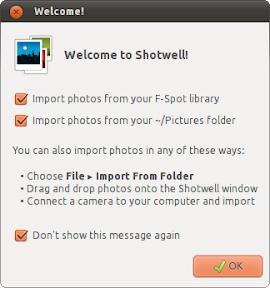
Shotwell import from f-spot

Shotwell, the photo manager which will be default in the upcoming Ubuntu 10.10 Maverick Meerkat was just updated to version 0.7. The new version makes it easy for F-Spot users (previously the default photo manager for Ubuntu) to migrate to Shotwell by importing photos directly from your F-Spot library, preserving tags and ratings.


Other features in Shotwell 0.7:

  • Photos can be rated on a 1-5 star scale or marked as rejected. A filter button supports viewing only photos of a specified rating or better.
  • A new Last Import page in the sidebar gives you instant access to your most recently imported photo roll.
  • Sidebar functionality and appearance have been improved with new icons and inline renaming.
  • Numerous bug fixes and translation updates.

Shotwell 0.7 is not even available in the Ubuntu 10.10 official repositories yet, but you can install it in both Ubuntu 10.10 and Ubuntu 10.04 using the following commands:
sudo add-apt-repository ppa:yorba/ppa
sudo apt-get update
sudo apt-get install shotwell

Jumat, 16 Juli 2010

Install F-Spot 0.7.1 In Ubuntu

f-spot 2.7.1

F-Spot is a full-featured personal photo management application for the GNOME desktop which is the default photo manager in Ubuntu, but it is going to be replaced with Shotwell starting with Ubuntu 10.10 Maverick Meerkat.


Four weeks after F-Spot 0.7.0, yet another version was released: 0.7.1, which brings better metadata through Taglib, the importer now gives you the option to remove files from the camera after a successful import, tons of cleanups and refactorings and lots more. You can read the full announcement, here.

To install F-Spot 0.7.1 (which is a development version which eventually will lead to 0.8) in Ubuntu 10.04 Lucid Lynx, use the following commands:
sudo add-apt-repository ppa:f-spot/f-spot-ppa && sudo apt-get update
sudo apt-get install f-spot

Minggu, 20 Juni 2010

Install F-Spot 0.7.0 In Ubuntu (Photo Manager)

f-spot 0.7.0

Unless you don't like Mono, you'll probably agree that F-Spot is a good Linux photo manager / organizer. At least that's what 16% of those who voted in our best Linux photo manager poll think.

F-Spot 0.7.0 comes with a completely rewritten import feature to make it less crash-prone. Besides this, the latest F-Spot also comes with duplicate detection that actually works, fixed Facebook support, uses a lot less memory and reparenting and detaching of versions - a feature that allows you to combine multiple similar photos (e.g. bursts of photos) and many more. A complete changelog can be found here.

But these are not the only changes between the latest F-Spot 0.7.0 and the version in Ubuntu 10.04 Lucid Lynx (0.6.1.5). Version 0.6.2 which was released back in May introduced lots of bug fixes which are not available in Ubuntu 10.04, so if you use F-Spot, I advise you to upgrade to the latest 0.7.0.


To install F-Spot 0.7.0 (Ubuntu 10.04 only!), simply use the following commands in a terminal:
sudo add-apt-repository ppa:f-spot/f-spot-ppa && sudo apt-get update
sudo apt-get install f-spot