Powered By

Powered by Blogger

Tampilkan postingan dengan label kde. Tampilkan semua postingan

Minggu, 03 April 2011

Make KDE Applications Look Native In GNOME (With Ubuntu Ambiance Style)

KDE Gnome
(Dolphin running in Gnome)


Getting KDE applications to look native in Gnome is rather easy (contrary to what you may think when looking at the lenghty instructions below - it's actually just a few clicks) thanks to an Ambiance KDE style created by WebUpd8 reader Alaukik. This means that while the instructions below work with any GTK theme, you'll need a KDE style similar to the one created by Alaukik for your current GTK theme to get everything looking properly.


Get KDE apps to look native in GNOME (Ambiance style)


1. Install systemsettings:

sudo apt-get install systemsettings

2. You need a KDE style to match your GTK theme. For Ambiance, download it from HERE (you'll need an Ubuntuforums account to download it) and extract it.

3. Go to System > Preferences > System Settings, on the "Application Appearance" and do the following:

- On the "Style" tab, under "Widget style" select "GTK+":

systemsettings


- On the "Colors" tab, select "Import Scheme" and browse for the Ambiance KDE style you've downloaded in step 2:

systemsettings


- On the "Icons" tab, select "Humanity":

systemsettings


- On the "Fonts" tab, select you need to select Ubuntu 11 (or whatever size you use on your desktop) for all except the fixed width font. You can mass-select the Ubuntu font for all by clicking the "Adjust All Fonts" button:

systemsettings


- For a complete matching font, on the same tab select "Enabled" under "use anti-aliasing", then click "Configure and select "Use sub-pixel rendering" and for "Hinting style", select "Slight":

systemsettings


Please note that the font hinting will only be applied to newly opened applications.


Thanks to alaukik for the tip! Via Ubuntuforums

Minggu, 30 Januari 2011

How To Install Oxygen-Transparent Style In Ubuntu [KDE]

KDE 4.6 Oxygen Transparent screenshot

KDE 4.6 was supposed to ship with a transparent Oxygen style but in the end it didn't make it "due to serious issues (notably with embedded widgets, such as videos) which cannot be fixed at the style level". But that doesn't mean you can't install Oxygen-Transparent. Read on!


Do not confuse Oxygen Transparent with the window opacity - the window opacity (which you can tweak by right clicking the titlebar) makes everything transparent but using Oxygen Transparent, the widgets will still be visible while making everything else transparent!

Before proceeding, please note that even though this is an official branch, it is experimental so use it at your own risk! This will replace your current Oxygen with Oxygen Transparent. Further more, it will likely be erased by any future update of Oxygen by your distribution packages.


Install Oxygen Transparent in Ubuntu


The instructions below should work with KDE4.4 and above, however I've only tested it with KDE4.6 (in Ubuntu 10.10 Maverick Meerkat).

Oxygen transparent kde screenshots


1. Install the required dependencies:
sudo apt-get install build-essential cmake kdelibs5-dev kdebase-workspace-dev libxrender-dev libx11-dev subversion

2. Download the setup script from KDE Look and save it a folder called "oxygen-transparent" (save the file as "oxygen-setup.pl") in your home directory.

3. Run the following commands to start building Oxygen Transparent:
cd && cd oxygen-transparent
chmod +x oxygen-setup.pl
./oxygen-setup.pl

4. Once the script finishes downloading and compiling Oxygen Transparent, run the following command to install it:
cd build
sudo make install

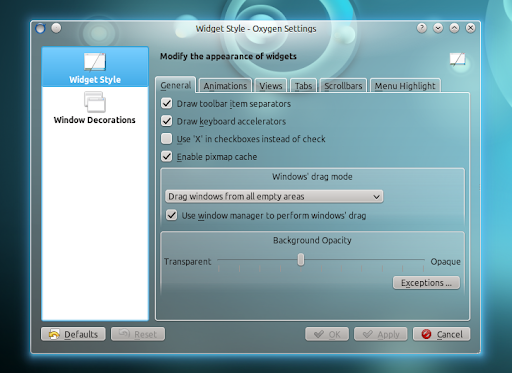
5. Log out and log back it. Now to tweak the transparency, either use Krunner or a terminal and enter: "oxygen-settings" and set the "Background opacity" for both the Widget Style and Widget Decorations to the desired value:

Oxygen transparent


It would be a good idea to check the "Use widget style opacity settings" in the "Widget decorations" so the opacity will always match.

Also in Oxygen Settings, go to Window Decoration > Fine tuning and make sure "Follow hint style" is selected for "Background style".


Revert the changes

Basically you could just set the opacity to 100% and everything should look like before using the script in this post. 

But if you want to completely revert all the changes, open a terminal and copy/paste the following command:
sudo apt-get install --reinstall kdelibs-bin kdelibs5-dev kdelibs5 kdelibs5-data kdelibs5-plugins kdebase-bin kdebase-data kdebase-runtime-data kdebase-workspace kdebase-workspace-bin kdebase-workspace-data kdebase-workspace-dev


Thanks to KoreSource.

Jumat, 28 Januari 2011

Yakuake (Quake-Like Terminal Emulator) 2.9.8 Finally Adds KWin Support

Yakuake 2.9.8 screenshot

Yakuake is a very cool Quake-like drop-down terminal emulator for KDE. If you've never seen Yakuake in action before, check out the following video which I've just recorded with Yakuake 2.9.8 in KDE SC 4.6:


A new Yakuake version was released yesterday (2.9.8) which finally brings support for KWin for handling its window animation (via OpenGL). The new version also comes with keyboard shortcuts to grow terminals in any diretcion and minor bug fixes.

If you're using Ubuntu (Kubuntu) 10.10 and you have installed the latest KDE 4.6, you can install Yakuake 2.9.8 (only works with KDE 4.6+) from a PPA using the following commands:
sudo add-apt-repository ppa:msb/ppa
sudo apt-get update
sudo apt-get install yakuake


If you're not using KDE, you can use Guake instead of Yakuake. If you want split terminals (and other features) too, check out this how-to: How To Get A Quake Like Terminal Under Gnome Using Terminator.

Rabu, 26 Januari 2011

Install KDE 4.6 In Ubuntu 10.10 (With Redesigned Activities System, Faster KWin)

KDE SC 4.6 screenshot

KDE SC 4.6 was released today, brining polish to existing functionality as well as some cool new features and bug fixes.

Probably the biggest change in KDE 4.6 is the redesign of the Activities system which makes it easy to associate applications to activities - once you create some new activities, right clicking an window title you'll have an option to make that application part of a certain activity as you can see in the screenshot below:

KDE 4.6 screenshot

Other improvements include: faster KWin (which now works with more graphics drivers), revamped Power management, rogram start-up notifications are now handled more efficiently revamped notifications system, better integration of GTK applications thanks to a completely rewritten Oxygen GTK theme and of course, updates/new features for most of the KDE applications, like routing capabilities in Marble, advanced filtering and searching using file metadata in the Dolphin and so on.


Nautilus KDE SC 4.6 screenshot
(Oxygen GTK theme)


For more info on KDE SC 4.6, read the release announcements.

Install KDE SC 4.6 In Ubuntu 10.10 Maverick Meerkat

To install KDE 4.6 in Ubuntu 10.10, open a terminal and copy/paste the following commands:
sudo add-apt-repository ppa:kubuntu-ppa/backports
sudo apt-get update
sudo apt-get install kubuntu-desktop

Once installed, log out and select KDE Plasma Workspace from the login window.

Minggu, 23 Januari 2011

Pardus 2011: KDE SC 4.5.5 With A Pinch Of GNOME In One Of The Best KDE-Based Linux Distros

Pardus 2011 screenshots

Pardus is a Linux distribution funded by the Scientific & Technological Research Council of Turkey. Even though it uses KDE, Pardus tries to make every user - including those who come from a GNOME Linux distribution - feel like home and in which the user is in control of how his desktop looks like right from the start.

Pardus 2011 comes with its own original tools: YALI (installer), Kaptan - an first boot configuration tool, PiSi (package manager) as well as many tweaks to some already existing tools. Read on to find out more!


First impressions


Pardus 2011 screenshots
(Pardus login screen)

When you first boot the Pardus 2011 Live CD, YALI installer (which now has LVM/RAID and UUID support) will guide you through the installation process. Everything is intuitive and easy to use for both novice and advanced users (the following screenshot is just one of the YALI installation steps):

Pardus 2011 screenshots


While most major Linux distributions impose their own style (theme, icons and so on), in Pardus you're in complete control of how everything looks from the beginning: when you first boot Pardus you'll meet Kaptan, an original Pardus tool that runs when you boot Pardus for the first time and lets you customize the user interface and other settings (you can choose the theme, menu, wallpaper and so on):

Pardus 2011 screenshots

Pardus 2011 screenshots


If you've never tried Pardus before, I'm sure the first impression will be "wow" for most of you like it was for me!


Default applications


Pardus 2011 screenshots
(Clementine)

Pardus 2011 screenshots
(Firefox 4.0 beta 9)


Pardus 2011 is not your regular KDE Linux distribution - you won't find KOffice (now Calligra Suite) by default but LibreOffice. Further more, Mozilla Firefox 4.0 beta 9 is the default web browser. Other default applications: SMplayer as the default video player, Clementine as the default music player, KsCD is now the default player for Audio CDs and of course most of the popular KDE applications like digiKam, Kdenlive, Kopete, Dolphin, Ktorrent, Kget, Choqok, Konqueror and so on.


Pardus 2011 screenshots
(GIMP)

Even though Pardus is a KDE Linux distribution (Pardus 2011 comes with KDE SC 4.5.5), it features some of the best GNOME applications too such as GIMP or GNOME NetworkManager 0.8.2:

The reason for using GNOME Network Manager as the default network manager application is to make it easy for its users to set up CDMA, HSPA and VPN networks.

But you don't have to worry about integrating GNOME applications with the KDE look - Pardus has this covered and the latest Pardus 2011 uses KDE's Oxygen style for all the GTK apps. This is great for those who use GNOME and want to try a KDE Linux distro as they can keep using some of the applications they've got used to while trying out some of the best KDE applications too.


For a package manager, Pardus comes with its own "PiSi":

Pardus 2011 screenshots


But of course, there's also a graphical package manager too:

Pardus 2011 screenshots


Panda (Pardus alternative driver administration) is a new System Settings module which allows users to change the driver between Open Source and proprietary one for NVIDIA and ATI display adapters.


Pardus 2011 comes with KDE SC 4.5.5, Linux Kernel 2.6.37, Python 2.7.1, xorg-server 1.9.4 RC1 with improvements to the automatic driver configuration mechanism done by the Pardus developers.


Download Pardus 2011


There's much more to Pardus 2011 then I could ever cover in a post so you really need to try it out for yourself to see why Pardus is considered one of the best KDE-based Linux distributions of the moment.

Pardus 2011 is available for both 32bit and 64bit and you can download it from HERE | Pardus 2011 release notes

Selasa, 18 Januari 2011

Qt Applications To Be Evaluated For Inclusion On The Ubuntu CD Starting With Natty+1

Ubuntu Qt

Mark Shuttleworth announced on his blog today that starting with Natty+1 (the Ubuntu release after Natty), Qt applications will be evaluated for inclusion on the Ubuntu CD.

Until now Qt applications, even if they were "best-in-class", were not considered for inclusion in Ubuntu because they didn't fully integrated with the GNOME desktop. But that's about to change!


Mark Shuttleworth writes:

We should evaluate apps on the basis of how well they meet the requirement, not prejudice them on the basis of technical choices made by the developer. [...]

Canonical is driving the development of dconf bindings for Qt, so that it is possible to write a Qt app that uses the same settings framework as everything else in Ubuntu.

But remember: "Qt" is not "KDE" so Mark explains that this doesn't mean Amarok might replace Banshee or anything like that. Unless of course "KDE apps learn to talk dconf in addition to the standard KDE mechanisms" in which case any KDE application "would be a candidate for the Ubuntu default install". But this depends on the KDE community.


So is Ubuntu driving even further away from GNOME? Sure, "To be evaluated for inclusion" doesn't mean we'll see a bunch of new Qt applications by default in Natty+1 but there are a few very good ones which have a pretty good chance! VLC anyone?


Rabu, 17 November 2010

QMLSaver Is A Nice Clock Screensaver For Ubuntu

QMLSaver

If you had trouble installing the Noflipqlo screensaver or simply didn't want to go through so many steps to install a screensaver, you can try QMLSaver. It's not exactly the same thing, but the animation is still pretty nice as you can see in the video below:


To install QMLSaver in Ubuntu 10.10 Maverick Meerkat (works on both Gnome and KDE), use the following commands:
sudo add-apt-repository ppa:prodoomman/qmlsaver
sudo apt-get update
sudo apt-get install libqt4-dev qmlsaver

Then go to System > Prefereces > Screensaver and you should find QMLSaver among the available options.

Rabu, 29 September 2010

Download Faenza Icon Theme For KDE4

Faenza icon theme KDE4

KDE4 users will be glad to know that the gorgeous Faenza icons theme has been ported to KDE4. Unfortunately since this pack is not supported by Thieum (the original Faenza icon theme author), the package is not available in the Equinox PPA - but that shouldn't be such a big issue since the icons are very easy to install.


Download Faenza Icon Theme for KDE 4

Senin, 27 September 2010

Install Qwit 1.1 Pre 2 In Ubuntu, Now With OAuth Support [Identi.ca And Twitter Client]

Qwit Twitter Identi.ca client

Qwit is a cross-platform (works on Windows and Linux - any desktop environment) Twitter / Identi.ca client written in Qt4. The application was recently updated (currently version 1.1 pre 2) to support OAuth and comes with http-proxy support, customizable interface, Twitpic support, a lot of URL shorteners, multiple accounts support and other features.

What's interesting about this Twitter client is that you can customize which tabs refresh automatically and which manually and you can of course also specify the update interval. Also, Qwit integrates well with both Gnome and KDE and can use libnotify, kdialog or Qt notifications.


Thanks to Roberto @ LFFL, you can easily install Qwit in Ubuntu (even tough the package name says "lucid", it also works in Ubuntu 10.10 Maverick Meerkat) using .deb packages:

32bit:
libqoauth1_1.0.1-1~lffl~lucid~ppa_i386.deb
qwit_1.1+pre2-1~lffl~lucid~ppa_i386.deb

64bit:
libqoauth1_1.0.1-1~lffl~lucid~ppa_amd64.deb
qwit_1.1+pre2-1~lffl~lucid~ppa_amd64.deb

Note: after installing Qwit, don't enter your Twitter username and password - that won't work (it doesn't work with any Twitter client anymore unless it uses SuperTweet). Instead, click the "Authorize" button under "OAuth", then follow the instructions.


You can also find Windows packages for the latest Qwit 1.1 pre 2 @ Qwit homepage (not download page!). Or you can compile Qwit yourself.


Thanks to Roberto @ LFFL for the .deb files!

Kamis, 19 Agustus 2010

Install UbuntuOne Alpha 1 For KDE In Kubuntu 10.10 Maverick Meerkat

UbuntuOne Kubuntu 10.10

UbuntuOne for KDE is finally ready. Well, sort of - the first "real" alpha has been released and there's an Kubuntu PPA available which will only work with the latest Kubuntu 10.10 Maverick Meerkat.

To install UbuntuOne Alpha 1 in Kubuntu 10.10 Maverick Meerkat, use the following commands:

sudo add-apt-repository ppa:apachelogger/ubuntuone-kde
sudo apt-get update
sudo apt-get install ubuntuone-kde

Even though it's in alpha, everything in UbuntuOne for KDE should work but still, expect to find bugs!

Known issue: in case the "ubuntuone-client-gnome" package is installed, make sure you remove it before installing "ubuntuone-kde".


Note: I do not use KDE so I didn't test this!


Image credits & info: Apachelog

Kamis, 29 Juli 2010

Kubuntu Netbook (10.10) Application Menu ("Global Menu") Is Finally Ready!

appmenu kubuntu 10.10


Kubuntu Netbook (10.10) finally got its application menu integration ready yesterday (turned off panel auto-hiding by default).

As you can see in the screenshot, it's not exactly the same like on Ubuntu Netbook Edition 10.10 maverick Meerkat, but it's built on the same technologies.

The Kubuntu Nebtook "global menu" also works with GTK/GNOME applications (but for now you'll have to install some additional packages for this):

Kubuntu netbook application menu
The GIMP application menu in Kubuntu Netbook 10.10


Of course, just like it is with the UNE application menu, the Kubuntu Netbook appmenu also has some bugs so if you plan on testing it, don't forget to submit any bugs you may encounter!


And some old news we didn't post on WebUpd8 (but we shared it on Twitter / Facebook / Google Buzz): Kubuntu Netbook Edition 10.10 is dead. There won't be an Kubuntu Netbook Edition 10.10 Maverick Meerkat ISO, and instead the Plasma Netbook has been added to the standard Kubuntu desktop ISO with some detection to select Desktop or Netbook based on the screen size. More on this, here.


Image credits: skitterman.wordpress.com / News via the Ayatana mailing list.

Rabu, 21 Juli 2010

VLC Default In Kubuntu 10.10 Maverick Meerkat?

vlc kubuntu

It seems the Kubuntu developers aren't big fans of Kaffeine 1.0 and want a new default media player for Kubuntu 10.10 Maverick Meerkat.

The first obvious choice would have been Smplayer, but:

smplayer almost certainly not, mplayer has licencing isues which prevent it being on the CD.

And since Smplayer is a Mplayer front-end, that completely rules it out.

The second choice seems to be VLC for which Kubuntu already ships all the libraries. VLC has a few advantages: it can be compiled without MPEG and alike codecs so the license is not an issue and of course there's also the Phonon back-end, however, there's something the Kubuntu developers don't like: its UI (user interface) which they label as "pretty ugly" (although I believe they are referring to the playlist here, and not the entre UI).

Many say VLC is the best Linux media player but will it make it onto the Kubuntu 10.10 CD? We'll see...


Please note: there is nothing official about this yet. We'll keep you updated once we find out more.


Senin, 28 Juni 2010

Download All The KDE SC 4.5 Wallpapers

kde sc 4.5 wallpapers

The wallpaper contest for KDE SC 4.5 ended today resulting in 12 new beautiful wallpapers.

You can download these 12 new wallpapers as well as the old wallpapers (most of them coming in many resolutions so they should fit any screen) from HERE.

Jumat, 11 Juni 2010

GnoMenu 2.7 Released With Zeitgeist Support [GNOME Main Menu Alternative]

gnomenu 2.7

GnoMenu is an eye-candy GNOME menu with themes support which works both for composited and non-composited desktops. It works with the GNOME Panel, Avant Window Navigator, Cairo Dock, KDE Plasma and more.

The applications supports many customizations: from changing the way the button looks to some amazing themes and more advanced features:

gnomenu settings

GnoMenu 2.7 was just released and it adds Zeitgeist support: simply right click an application in the menu and you'll see a list of most used / recently used files related to that application.


Other changes in GnoMenu 2.7:
  • Places now allow 1 level browse in right click menu
  • Recent files now have a open with in right click menu
  • Speed improvements
  • No more loading errors
  • Losts of bugs fixed
  • More Translations


To install GnoMenu 2.7 in Ubuntu 9.10 Karmic Koala and 10.04 Lucid Lynx, use the following commands:
sudo add-apt-repository ppa:gnomenu-team/ppa && sudo apt-get update
sudo apt-get install gnomenu


To take advantage of Zeitgeist functionality, also install Zeitgeist:
sudo add-apt-repository ppa:zeitgeist/ppa && sudo apt-get update
sudo apt-get install zeitgeist


Once you install GnoMenu, right click the GNOME panel, select "Add to panel" and then add the newly installed GnoMenu.


Performance-wise, GnoMenu has improved a lot. However, after selecting the option to load the menu icons into the memory so GnoMenu is more responsive, the memory usage is somewhere around 23.3 mb (as a comparison, MintMenu uses around 20 mb on my system). But that's the story with eyecandy: it requires some extra RAM.

Senin, 24 Mei 2010

Rekonq Web Browser Getting Extension Support

rekonq web browser screenshot

Rekonq is a webkit browser for KDE which will become default in Kubuntu 10.10 Maverick Meerkat.

Soon, Rekonq will get extensions support through Chrome's extension API which means you'll be able to install Chrome extensions in Rekonq.

Ubuntu's 10.04 repositories currently hold version 0.4.0 but you can install daily builds via a PPA (which are a lot more recent).


Rekonq 0.5 first beta will be released on May 25 with the stable 0.5 release following on June 30 and finally, Rekonq 1.0 should be released on September 12 (with a beta on August 20) which makes the release right in time for Kubuntu 10.10 Maverick Meerkat.


Selasa, 11 Mei 2010

KDE Gets Global Menu Plasmoid With GTK / GNOME Support [Kubuntu]

global menu kde 4.x kubuntu

Aurélien presented at Ubuntu Developer Summit (Maverick) a project he's working on and will be available for Kubuntu 10.10: a DBusMenu-based implementation of a global menu with GTK+ / GNOME support.

This feature was available in KDE 3.x but hasn't been ported to KDE 4.x yet.

What's really nice about this implementation of a global menu bar is that it will support GTK applications running in KDE. The same thing goes for KDE applications running in GNOME.


Here is a video with this global menu in action:


There is also an .ogv version available, HERE.


More info as well as a PPA available @ Aurélien’s room


[Video & image credits: Aurélien]

Minggu, 02 Mei 2010

KDropbox 0.2.0 Adds Option To View Recently Changed Files

kdropbox 0.2.0


KDropbox is an application which offers almost the same features as the official Dropbox Linux application, but works on KDE. We already wrote about KDropbox not so long ago and if you didn't like the lack of "recently changed files" option, you should reconsider giving KDropbox another chance because version 0.2.0 (released a few days ago) adds a "Last changed files" option as well as an option to start and stop Dropbox daemon and double click on icon opens Dropbox folder.


A complete how-to on installing KDropbox can be found @ kdropbox.deuteros.es | Download KDropbox 0.2.0 (includes .rpm, .deb and source files).


[Thanks to Ubuntronics for the update]

Senin, 19 April 2010

KDropbox - Use Dropbox In KDE (.rpm And .deb Available)

KDropbox

KDropbox is an application which offers almost the same features as the official Dropbox Linux application, but works on KDE.

KDropbox features:
  • Dropbox status
  • Open Dropbox folder
  • Preferences editor
  • Open help URLs
  • English, Polish (by Mateusz Piekos) and Spanish translations

KDropbox comes with .rpm and .deb packages for Mandriva, Fedora, OpenSuse, Debian and Ubuntu (and derivates).

KDropbox requires the official Dropbox daemon to run. Step by step installation instructions for both the official Dropbox daemon as well as KDropbox (and KDropbox download) can be found @ KDropbox website.


Note: I didn't test this application since I don't use KDE.


[Special thanks to UbuntizandoElPlaneta for the tip; Image credits: KDropbox website]

Sabtu, 03 April 2010

Amarok 2.3.1 To Get Cover Bling

So what's up with all that cover bling-bling? Banshee has a Clutter Flow, Nautilus Elementary comes with Clutter Flow (via Gloobus of course) for image previews and now Amarok.

Except the applet in Amarok 2.3.1 is not called ClutterFlow but CoverBling:

amarok coverbling screenshot


CoverBling lets you browse your collection in an animated 3D view.


Amarok 2.3.1 will also bring an automated Playlist Generator which allows smart creation of playlists that match user-specified constraints. The Playlist Generator combines the features of "Smart Playlists" in Amarok 1.4 with the Bias system of Amarok 2.0.

Other changes in Amarok 2.3.1 include lots of bug fixes, some polishing and also the new file browser will finally support "places". Another new feature will be a Last FM similar artists applet:


If only Amarok 2.x would require less system resources... I'd even start using KDE for it.


Amarok 2.3.1 is currently in beta and there's no date set (that I could find) for the 2.3.1 release.


{Image credits: amarok.kde.org}

Selasa, 30 Maret 2010

Kubuntu 10.04 New Branding [Logo]

Kubuntu 10.04 finally got a new branding (logo) to match the new Ubuntu branding:

kubuntu 10.04 branding

There should be an update on the Kubuntu Plymouth theme really soon.

[via darkwing duck]