Powered By

Powered by Blogger

Senin, 24 Agustus 2009

VLC Allows You To Convert Videos [Quick Tip]

I can't believe I missed this. VLC allows you to easily convert videos. Simply go to Media > Convert / Save, select the video(s) you want to convert, then press the "Convert / Save" button and you'll be able to choose from different codecs, etc:

vlc convert video

Thanks to Ubuntu Life & JSBlog for the info!

Yahoo Messenger 10 Beta Released

Yahoo Messenger 10 alpha has been spotted in the wild for a few months and now, Yahoo! finally decided to release the Beta version for public use.

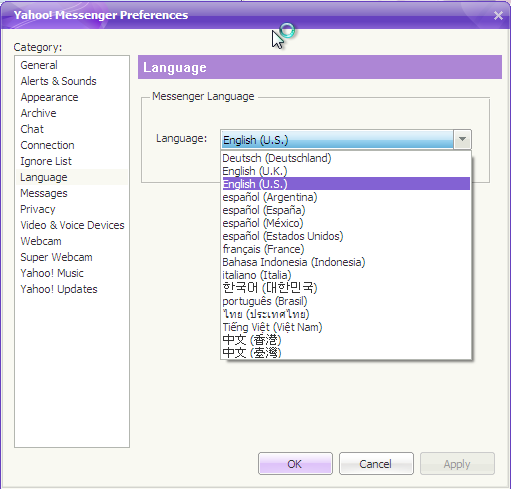
With this new release of Yahoo! Messenger, the biggest news is the debut of truly high quality video calling. Using your Web cam, you can now have full-screen, face-to-face video conversations with crystal clear audio for free from right within your Yahoo! Messenger window. Messenger is also more getting social as we roll out new features to help you stay in closer contact with friends and family. A new “Updates” tab gives you a quick glimpse of what your contacts are up to – including status updates, Flickr uploads, Yahoo! Buzz stories, Tweets and more. Another interesting Yahoo! Messenger 10 feature is that you are now able to change the language to something other than english:

yahoo messenger 10 non-english


Here is a video with what's new in Yahoo Messenger 10 Beta:


Download Yahoo Messenger 10 Beta | You may also want to patch Yahoo Messenger 10 Beta for using multiple instances (multi-messenger).

In other news, Yahoo also increases in Yahoo Mail's attachment size limits from 10 to 25MB. And finally, certain Yahoo searchers will get results that all for both filtering by topic/subject, and contextual follow-ups when you search one term after another. As Yahoo explains it, if you search for "cat" and then "jaguar," its engine should know that, based on the "cat" search, your "jaguar" is much more likely a creature than a luxury vehicle.

Restarter Windows Program Automatically Restarts Crashed Apps

Restarter process monitor windows

Restarter is a free Windows-only application that automatically monitors and restarts crashed or hung programs and applications. It can monitor and restart any console or form based program or application. If your application crashes or if someone accidentally shuts it down, the Restarter will automatically restart the software with all the parameters that you have specified.

It's a great utility that you can use to ensure that your critical programs are always up and running.

Please note: If you are running this application in Windows 7 or Vista, you need to run it in administrator mode.

[via nirmaltv]

Cross-Platform Data Recovery Solution: TestDisk & PhotoRec

TestDisk & PhotoRec


If for any reason, you have lost information of any of your disks: either hard drives, memory cards or flash drives, you should try TestDisk & PhotoRec, a free, open source multi-platform application distributed under GNU Public License which is very efficient on retrieving data from those drives.

PhotoRec supports data recovery for the following filesystems:

* FAT,
* NTFS,
* EXT2/EXT3 filesystem
* HFS+


You can download PhotoRec and TestDisk from HERE (packages available for: Windows (9x/NT/XP/2000/2003/Vista), Mac OSX, and Linux).

Ubuntu users just have to run the following command in a terminal:
sudo apt-get install testdisk

The, to run it (still in a terminal):
sudo photorec

PhotoRec works with HardDisks, Cdrom, memory card (Compact Flash, Memory Stick, SecureDigital/SD, SmartMedia, Microdrive, MMC...), USB Memory Drives, DD raw image, EnCase E01 image, and also various portable media players including iPod and various digital cameras.

Program Which Automatically Compiles and Install The Latest Kernel in Ubuntu / Debian: KernelCheck

Image and video hosting by TinyPic

KernelCheck is a a program that automatically compiles and installs the latest Kernel for Debian based Linux distributions (Debian, Ubuntu, Mint, etc.). The program also allows for automatic installation of proprietary video drivers via EnvyNG.

A kernel is the base of any operating system – in our case, the Linux operating system. KernelCheck will fetch the latest information from http://www.kernel.org, which hosts the source packages for the Linux kernel, and ask the user which one they would like to compile into a .deb package (with the option of installing the kernel after the compilation).


Features

• Fetch latest kernel information (mature kernel, mature kernel patch, stable
development prepatch)
Download and compile any 2.6 kernel into a .deb package
Auto-fix for ALSA sound in new kernels
• Auto-optimize new kernel
• Option to configure kernel options manually
Option to install the nVidia kernel module/driver on reboot
Option to reconfigure the X server
• Custom kernel patching
• Multiple CPU jobs for faster compilation


KernelCheck can be used for several purposes:

1. Fixing hardware issues
2. Speeding up your computer with a shiny new kernel
3. Automatically downloading, compiling, and installing the latest kernel

KernelCheck can install any stable 2.6 kernel, the latest stable patch, the latest stable development prepatch, the latest mm patch, a custom patch, or none at all. Usually the prepatch is less stable than the normal performance patch, but it is still widely used.


After installing KernelCheck (Ubuntu .deb file download link at the end of the post), you will find it under Applications > System Tools > KernelCheck. You can also open KernelCheck using a terminal and typing in:
sudo kernelcheck


Download KernelCheck .deb package for Ubuntu Linux.

Update: KernelCheck stopped working some time ago due to some changes made on kernel.org website, but a patch has been released and you can make KernelCheck work again, running 2 simple commands in a terminal. Read more about patching KernelCheck to make it work again.

jQuery FontEffect: Create Font Effects Without Using Images

jquery fonteffect

FontEffect is a jQuery plugin that adds effects to HTML text, without using any images. In version 1.0 (which has only 7 kb), you can use 4 different text effects: edge (outline), shadow, gradient and reflection (mirror).


To use jQuery FontEffect, use the following code:


- Javascript / jQuery:
<script type="text/javascript" src="http://jqueryjs.googlecode.com/files/jquery-1.3.2.min.js"></script> <script type="text/javascript" src="http://path.to/jquery-FontEffect-1.0.0.min.js"></script>
Place the above code before the </head> tag in your template.

Obviously, replace http://path.to/jquery-FontEffect-1.0.0.min.js with the exact path to the jquery-FontEffect-1.0.0.min.js file. Also, if you already use jQuery, don't include the jQuery code twice.

-CSS:
#example{ font-family: Georgia,'Times New Roman', serif; font-size:3.0em; color:#ff0080; font-weight:bold; margin-bottom:10px;}
This can be placed in your .css file or if you use Blogger, before the ]]> tag in your template.

-HTML:

<div id="example">Web Upd8</div>

<script type="text/javascript">
$("#example").FontEffect({shadow:true});
</script>
The above html code will present the "Web Upd8" text using shadow effect. You can replace it for any of the other effects supported by this jQuery plugin.

It is an interesting jQuery plugin, ideal for dynamically generated headers (such as the title of the post). The best thing is that it works with most known browsers, including everyone's favorite: IE6. :)

More info, live demo & download

Nokia Booklet 3G, The First Nokia Laptop

Nokia_Booklet_3g
Many of you already know that Nokia is the leading manufacturer in the mobile industry for many, many years now. What you probably don't know is that Nokia decided to extend its business in mobile industry to create laptops and the new Nokia Booklet 3G is the first release of its kind.

The mini-laptop is powered by an Intel Atom processor, it has a 10" display and an outstanding battery life (12h). Also, it will run Windows 7 as pre-installed operating system. In terms of connectivity, Nokia Booklet 3G features 3G/ HSPA and Wi-Fi support for Internet connectivity and Bluetooth for data transfer.
The laptop also comes with HDMI port for HD video output pre-installed, a camera for video calling , integrated Bluetooth and SD card reader slot.

Newly enough for a laptop, Nokia integrated in its new product a GPS receiver with A-GPS (Assisted - GPS) which, combined with Nokia Maps can retrieve your location in a few seconds with pinpoint accuracy.

The body is not left behind either and, in my opinion, it doesn't look cheap at all. The case measures about 2 cm thickness and it's made by aluminium. The price has not been revealed yet but some little bird told me that we'll find out some more details on Nokia's World Congress in early September.

Nokia_Booklet_3g